Does a transparent PNG stay transparent at YouTube thumbnail size?
YouTube Help’s “Image size & resolution” section lists JPG or PNG as image formats, but does not explain how transparent pixels are displayed after upload. Feed Thumbnail’s thumbnail resizer has a narrower, verifiable behavior: it paints the canvas background first and exports a JPG, so that tool’s output does not retain transparent pixels.
Official wording: “Be uploaded in image formats such as JPG or PNG.” Add custom thumbnails on YouTube - Computer - YouTube Help, “Image size & resolution”; reviewed 2026-10-01.
PNG is named; transparency is not
The current YouTube Help page names JPG and PNG as image formats for custom thumbnails. In that same “Image size & resolution” section, it gives separate image-size, aspect-ratio, and upload-size guidance. The section does not describe alpha-channel preservation, a transparency preview, or a background color used by YouTube after upload. That behavior is not specified there, so this guide does not promise that a transparent PNG will look transparent in YouTube’s surfaces.
| Question | What the cited page establishes |
|---|---|
| Is PNG named as a supported image format? | Yes. YouTube Help says image formats such as JPG or PNG. |
| Does that page say how transparent pixels appear after upload? | No transparency-rendering behavior is stated there. |
| Does Feed Thumbnail’s resizer export an alpha-preserving PNG? | No. Its current export path creates a JPG. |
Source for the YouTube statement: YouTube Help, Image size & resolution; reviewed 2026-10-01.
What happens to transparency in this site’s resizer?
When you use the Feed Thumbnail resizer, transparent parts of the source are composited over its canvas background before the file is saved. The exported file is a JPG, not a transparent PNG. This statement describes Feed Thumbnail’s own browser-side code; it is not a claim about how YouTube processes a PNG upload.
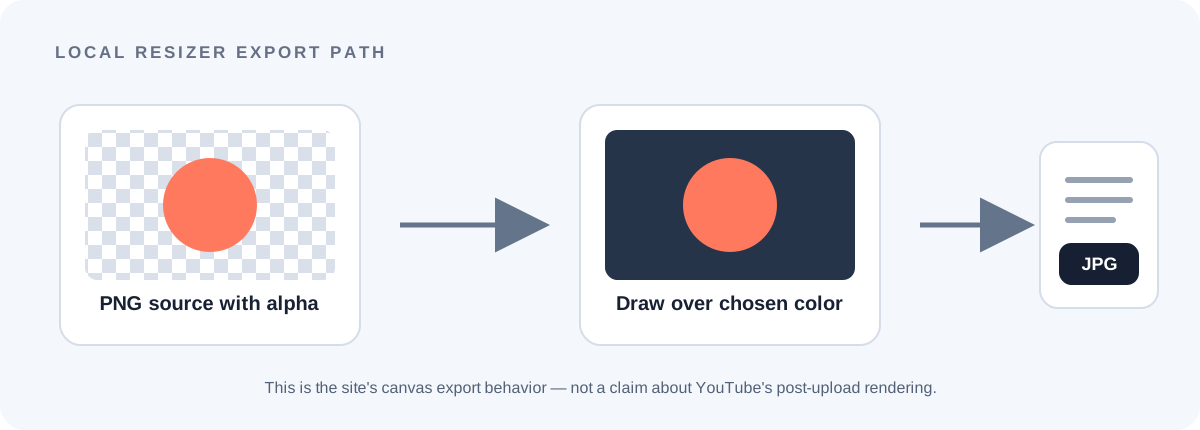
- The canvas is made opaque. The resizer creates its canvas context with
alpha: false, then fills the whole canvas with the selected background color before drawing the source. - The source is drawn over that fill. Any transparent pixels reveal the already-painted canvas color in the local preview. The background control is visible beside the frame options.
- The export encoding is JPG. The public resizer script calls the canvas export with the
image/jpegtype. The input being PNG does not change that output path. - The boundary is important. This is a source-code check of Feed Thumbnail’s resizer, not a test upload to YouTube. YouTube Help does not state whether its player preserves, composites, or otherwise renders PNG transparency.
Practical takeaway: if you need the saved file itself to keep transparency, this resizer’s JPG export is not the right export path. If you use it, choose the background color you want behind transparent areas and inspect the preview before saving.
First-party source: Feed Thumbnail resizer.js, the public thumbnail resizer, and its visible background-color control; inspected 2026-10-01.
PNG and thumbnail transparency questions
Can I upload a PNG as a YouTube thumbnail?
YouTube Help lists image formats such as JPG or PNG. Check that same official page for the current image and upload requirements.
Will YouTube keep a PNG’s transparent background?
The cited “Image size & resolution” section does not specify how transparent pixels are rendered after upload. This guide cannot confirm that behavior.
Why does this thumbnail resizer save JPG when I choose PNG?
PNG is an accepted source-image type in the tool, but its current export code writes JPG. The output format is set by the resizer, not inherited from the selected source file.
Can I use this resizer when I need alpha in the saved file?
No. Its current canvas export produces JPG and does not preserve an alpha channel. Use an export workflow that can save PNG if keeping transparency in the file is required.
Separate format guidance from tool behavior
YouTube Help: Add custom thumbnails on YouTube is the source for the JPG/PNG wording and the separate image and upload guidance cited here. The “Image size & resolution” section was reviewed 2026-10-01.
The Feed Thumbnail resizer source is the source for this site’s opaque canvas, background fill, and JPG export description. It is browser-side behavior and does not send an image to YouTube.
For official thumbnail canvas and upload-size notes, see YouTube thumbnail size and the upload-device file-size guide. For the local tool, open the YouTube thumbnail resizer.