Which YouTube thumbnail file size limit applies to your upload?
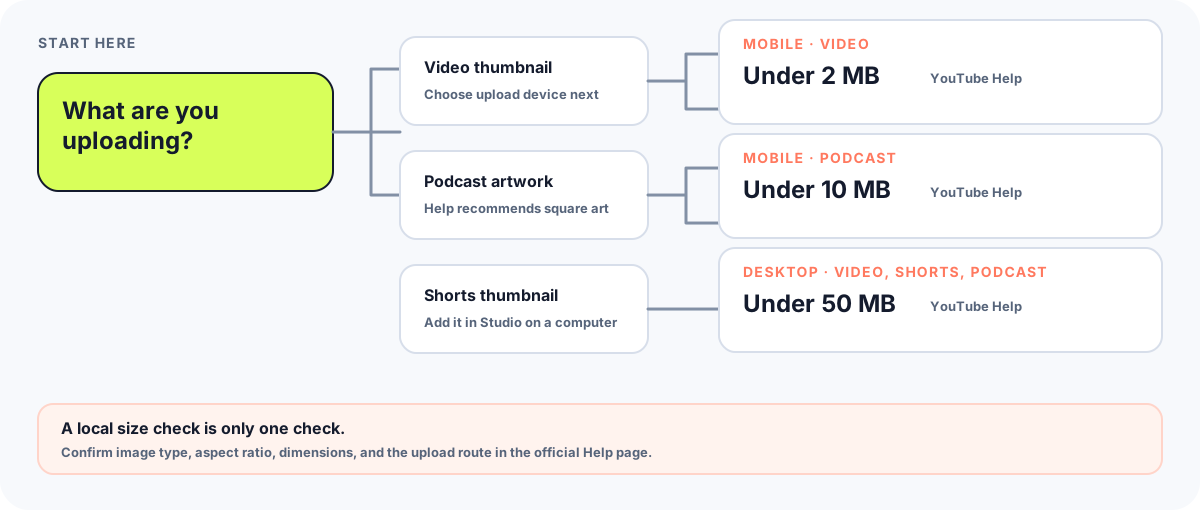
Use the upload device and content type together. YouTube Help lists a 2 MB limit for video thumbnails uploaded on mobile, 10 MB for podcast thumbnails uploaded on mobile, and 50 MB for video, Shorts, and podcast thumbnails uploaded on desktop. Its current help page says custom Shorts thumbnails can only be added in YouTube Studio on a computer.
Official source: Add custom thumbnails on YouTube - Computer - YouTube Help, “Image size & resolution”; reviewed 2026-09-30.
Match the limit to the upload route
The official guidance says file-size limits depend on the device used for upload. Read each row as one combination of upload device and thumbnail type; do not treat the mobile video value as a universal cap for every YouTube thumbnail.
| Upload context | YouTube Help file-size guidance | What the page specifies |
|---|---|---|
| Mobile · video thumbnail | Under 2 MB | Mobile video-thumbnail upload. |
| Mobile · podcast thumbnail | Under 10 MB | Mobile podcast-thumbnail upload. |
| Desktop · video, Shorts, or podcast thumbnail | Under 50 MB | The desktop row names all three thumbnail types. |
Source for every row: YouTube Help, “Image size & resolution”; reviewed 2026-09-30. The help page also recommends square artwork for podcast playlists and a 9:16 ratio for Shorts.
Choose the upload path before exporting
Start with where the file will be uploaded, not just with the file you already have. A file below one listed limit is not automatically suitable for every thumbnail type: YouTube Help separately describes image dimensions, formats, aspect ratios, and device-specific size limits.
- For a regular video thumbnail uploaded from a phone, check the mobile video row. Our local resizer is designed around that under-2-MB check and exports a JPG from its 16:9 canvas.
- For a regular video thumbnail uploaded from a computer, use the desktop row. The official file-size ceiling is different from the mobile video value; a small file is allowed by that size rule, but the ceiling itself is not a quality target.
- For podcast artwork, use the podcast row for the device you will upload from. YouTube Help recommends a 1:1 image for podcast playlists; the Feed Thumbnail resizer is a 16:9 video-thumbnail tool, so it is not a podcast-artwork preset.
- For a Shorts thumbnail, the current YouTube Help page says adding a custom one is available in YouTube Studio on a computer, and its desktop size row includes Shorts. The same page separately recommends a 9:16 ratio.
- Read the local check narrowly: the Feed Thumbnail resizer retries its browser-generated JPG at lower quality settings when the first result is above its mobile-video target, then reports whether its final attempt remains above that target. It does not upload the image or test YouTube’s uploader.
What a green size check means: the exported file passed this tool’s local size check. It is not a YouTube upload receipt and does not confirm the file’s eligibility, framing, account status, or any other requirement.
Which file-size question should you ask?
Is 2 MB the limit for every YouTube thumbnail?
No. YouTube Help separates mobile from desktop uploads and also lists a different mobile limit for podcast thumbnails. Pick the row that matches both the upload device and the content type.
Can I add a custom Shorts thumbnail from my phone?
The current YouTube Help page says custom Shorts thumbnails are currently only available to add in YouTube Studio on a computer. Its desktop file-size row includes Shorts.
Does “under the limit” guarantee that YouTube will accept my image?
No. A local file-size check only checks file size. Review YouTube Help’s separate image-size, format, aspect-ratio, account, and upload instructions for your situation.
What is official, and what is this site checking?
YouTube Help: Add custom thumbnails on YouTube is the source for the upload-size, Shorts workflow, image-format, and aspect-ratio statements on this page. The cited “Image size & resolution” section was reviewed 2026-09-30.
The local behavior described here was checked against the resizer page and its current browser-side export logic. Images are handled in the browser; the page does not call YouTube’s upload endpoint.
For the canvas recommendation and other thumbnail facts, see the YouTube thumbnail size notes. This guide does not estimate a file’s final quality or claim that one upload route improves image quality.