What does YouTube’s daily custom thumbnail limit mean?
If YouTube Studio says “Daily custom thumbnail limit reached,” YouTube Help says to try again in 24 hours. Its help section does not give one universal daily count: it says limits may vary by country or region and channel history, and that strikes can affect thumbnail eligibility or how many a channel can upload.
Official source: Add custom thumbnails on YouTube - Computer - YouTube Help, “Custom thumbnail limits”; reviewed 2026-10-02.
A daily upload limit is not an image-size reading
The exact message matters. YouTube Help describes a per-day limit on how many custom thumbnails a channel can upload. That is different from checking an image’s dimensions, format, or file size. A resize or compression step can change the image file, but it cannot reveal a channel’s remaining YouTube upload allowance.
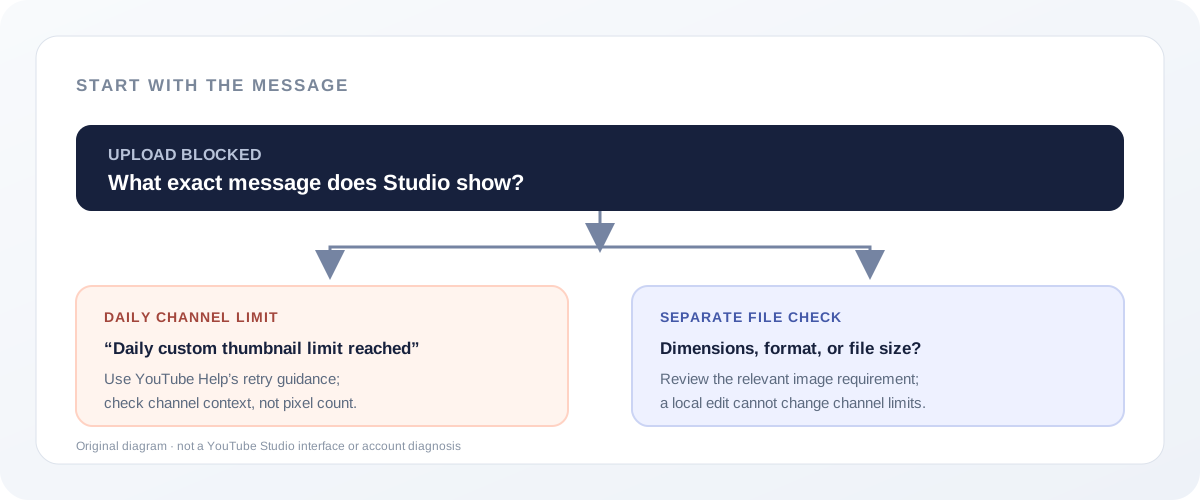
The Help page does not publish one fixed cap
YouTube’s “Custom thumbnail limits” section says each channel has a daily upload limit. For the exact error “Daily custom thumbnail limit reached,” it advises trying again in 24 hours. It does not state a single daily number that applies to every channel in the section we reviewed.
The same section says limits may vary by country or region and channel history. It also distinguishes two strike effects: copyright strikes may affect channel-history eligibility, while Community Guidelines strikes affect how many custom thumbnails a channel can upload. The source does not disclose your channel’s current allowance or say that every channel will see the same limit.
Read the Help wording without turning it into a quota chart
The official section gives a condition and a next step, not a number to calculate against. It identifies a daily channel allowance, names the message shown when that allowance is reached, and tells the creator to try again in 24 hours. It does not publish a universal count, a range of counts, or an account-specific counter in that section. A precise-looking number copied from an unrelated tool page would therefore not answer what this source establishes.
- What triggers this explanation: the Help text is about the channel’s daily number of custom-thumbnail uploads, not the dimensions or byte size of one selected image.
- What to do next: the stated instruction is to try again in 24 hours. The wording is advice to retry; the checked section does not promise a reset at an exact clock time.
- Why another channel may differ: YouTube names country or region and channel history as factors that can change the limit. The source does not provide a formula for converting those factors into a count.
- How strikes are described: the section says copyright strikes may affect channel-history eligibility; it says Community Guidelines strikes affect how many custom thumbnails a channel can upload. Those are distinct statements, not a published personal quota.
That distinction sets a useful boundary for a browser-based image tool. Feed Thumbnail can inspect and export the chosen file locally, but the public resizer script has no YouTube Studio session or channel counter to read. It can help with a separate image-file problem; it cannot confirm how many uploads remain, explain an account-specific limit, or change YouTube’s allowance.
Practical reading, not an account diagnosis: if the exact daily-limit message appears, changing the image’s pixels or compressing it does not address the stated per-day channel allowance. The file may still need to satisfy separate image rules, but those are a different check.
These statements are based on YouTube Help’s “Custom thumbnail limits” section, reviewed 2026-10-02. The section’s retry wording is “try again in 24 hours”; this guide does not interpret it as a guaranteed reset time.
What to check before exporting the image again
- Keep the full error wording. A daily-limit message points to the channel’s upload allowance. Do not treat it as proof that the image dimensions or file bytes are wrong.
- Follow the published retry advice. YouTube Help says to try again in 24 hours. It does not promise an exact hour-by-hour reset time.
- Keep the account context in view. The official section says the limit can vary by country or region and channel history, and that strikes can affect eligibility or the permitted count. It does not expose an account-specific quota in the article.
- Only revisit the file for a separate file issue. For official image requirements, see YouTube thumbnail size. For device-based file-size rows and the boundary of the local checker, see the upload file-size guide.
Tool boundary: Feed Thumbnail’s resizer reads and exports an image in your browser. Its script does not sign in to YouTube Studio or read a channel’s daily upload count, so it cannot clear or diagnose a channel limit.
First-party scope checked in the public resizer script; inspected 2026-10-02. It handles the selected file and local export, not a YouTube account or upload session.
Daily thumbnail limit questions
How many custom thumbnails can I upload each day?
The cited Help section does not state one universal number. It says the limit may vary by country or region and channel history.
Does “try again in 24 hours” guarantee the limit resets then?
YouTube Help advises trying again in 24 hours. It does not describe that wording as a guaranteed reset timestamp.
Can resizing or compressing remove the daily-limit message?
The message concerns a channel’s daily upload allowance. A local image edit does not change that allowance, though a separate file requirement may still need checking.
Can strikes affect the limit?
YouTube Help says copyright strikes may affect channel-history eligibility and Community Guidelines strikes affect how many custom thumbnails a channel can upload.
Separate channel limits from file requirements
YouTube Help: Add custom thumbnails on YouTube is the source for the daily-limit error, retry advice, regional/channel-history variation, and strike wording. “Custom thumbnail limits” was reviewed 2026-10-02.
Feed Thumbnail’s resizer script is the source for the boundary of the local file check. It does not inspect a channel’s upload history or send the selected image to YouTube.
For the size requirements themselves, read YouTube thumbnail size and the upload file-size guide. This page is about the separate daily channel limit.