YouTube thumbnail size not showing? Separate upload, display, and analytics timing
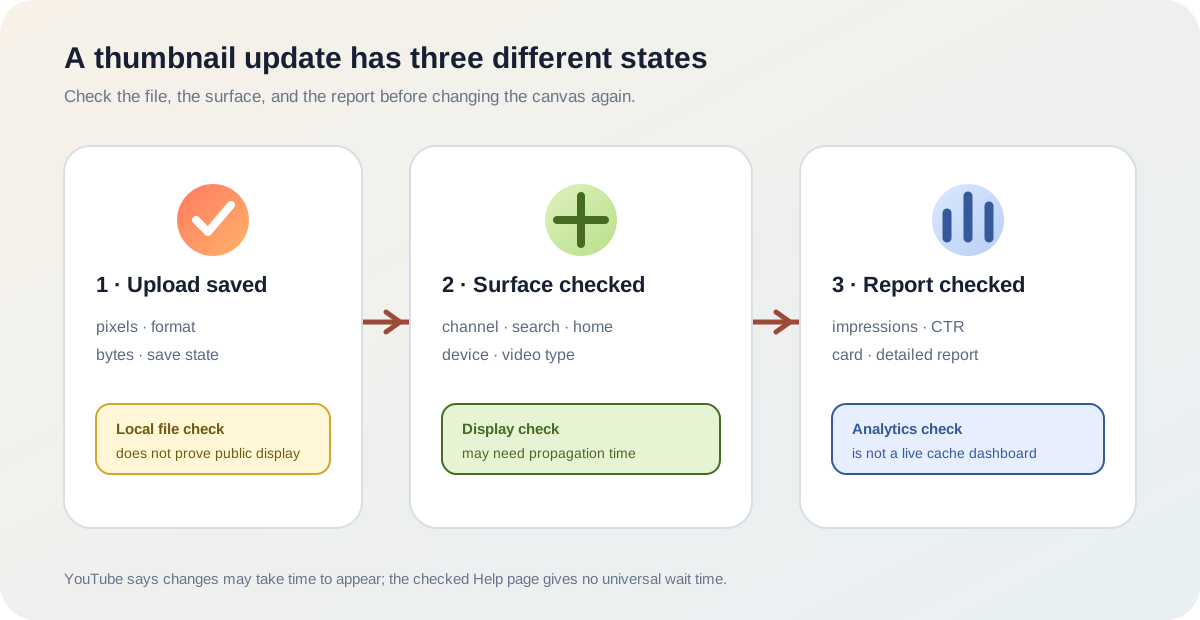
If a new YouTube thumbnail size file saved but the old image still appears, do not assume the dimensions are wrong. YouTube's current Help page says thumbnail changes may take time to appear on YouTube. That sentence gives a timing caveat, not a universal wait period. Check the saved file, the surface where you are looking, and the analytics report separately before changing the asset again.
Official sources: Add customised thumbnails on YouTube and Check your YouTube thumbnail impressions and watch time, reviewed 2026-10-18.
What does YouTube actually say about a thumbnail change?
The current YouTube Help page places a short note after the custom Shorts-thumbnail save steps: it may take time for thumbnail changes to appear on YouTube. The note is deliberately broad. It does not give a fixed number of minutes, hours, or days, and it does not say that resizing the file again will make the update appear sooner.
“It may take time for your thumbnail changes to appear on YouTube.”
— YouTube Help, Add customised thumbnails on YouTube
That wording is enough to separate a propagation problem from a dimension problem, but not enough to diagnose an account. A saved image can be valid while one viewer still sees an older preview. A different surface can also use a different display treatment, especially for vertical videos. The checked source does not promise that every page refreshes at the same moment.
Official answer: changes may take time to appear No universal wait time is published hereWhy can a correct YouTube thumbnail size still look wrong?
These gates describe different evidence. A local file check can confirm pixels, file type, and byte size. It cannot prove that YouTube saved the file to a channel or that a particular viewer received the newest preview. A Studio screenshot can show that the creator sees a saved asset, but it does not prove that every search or feed surface has refreshed.
The analytics gate is separate again. YouTube's impressions Help page says the key metrics card is updated more often than the “Impressions and how they led to watch time” report, and says key metrics data can be available within a few hours of publishing. That is an analytics reporting note, not a guarantee for thumbnail preview propagation.
Can changing the YouTube thumbnail size fix a stale preview?
Not necessarily. YouTube's current size guidance recommends 3840 × 2160 pixels for video thumbnails and 2160 × 3840 for Shorts, with JPG or PNG formats and device-specific file-size limits. Those rules help create an eligible source file. They do not state that a second export, a larger canvas, or a 1280 × 720 resize will force every public preview to refresh.
The local Feed Thumbnail resizer has a reproducible 1280 × 720 canvas and JPEG export. That is useful for the standard 16:9 file path, but it is not a YouTube cache inspector. If the file already meets the relevant source requirements, repeatedly changing its size can make the investigation harder because each new upload creates another timestamp and another asset state.
There is also a display exception for vertical videos: YouTube says a 16:9 custom thumbnail can be replaced by an auto-generated 4:5 thumbnail on the home, explore, and subscription pages, while the custom image remains on the watch feed, watch history, and non-mobile platforms. Read the vertical-video thumbnail guide before treating a portrait preview as proof that the uploaded size was rejected.
What should you record before changing the file again?
- Record the source file. Note the pixel dimensions, extension, byte size, and export time. Keep the exact file that was selected in Studio so a later comparison has a stable input.
- Confirm the save path. Check the video or Short in the official Studio workflow and record whether the new preview appears there. Do not infer a public result from a local editor alone.
- Name the surface. Record whether you are checking the channel page, search, home, subscriptions, watch feed, history, or a non-mobile platform. For vertical videos, compare the named replacement surfaces separately.
- Keep the timestamp honest. The official Help page says changes may take time, but does not provide a universal deadline. Write down when you saved the change instead of promising that it must appear after a specific interval.
- Separate analytics from appearance. If you are checking impressions or click-through rate, read the relevant Studio report and its update context. A missing or delayed metric is not proof that the thumbnail file failed.
- Escalate only with evidence. If the issue persists, keep the video URL, file facts, surface/device, screenshots, and timestamps together for the channel owner or official support route. Do not submit credentials or bypass a verification prompt.
This checklist documents what can be compared without inventing a wait-time promise, a hidden cache rule, or a channel-specific diagnosis.
Does a thumbnail preview equal a registered impression?
No. YouTube's impressions Help page defines an impression as a thumbnail shown for more than one second with at least 50% of the thumbnail visible. It lists YouTube computers, TVs, game consoles, Android, iPhone, iPad, Search, the homepage, feeds, Up Next, and playlists as counted locations, while excluding external websites and apps, the YouTube mobile website, YouTube Kids, YouTube Music, email, notifications, and other cases.
This means a creator can see a thumbnail in a public page and still have no matching impression for that exact view, or see a metrics delay while the public preview has already changed. The report is a measurement system with its own inclusion rules, not a live image cache dashboard. Do not use an early impression number to prove that a new file was or was not displayed everywhere.
The same page says that the key metrics card and the detailed impressions report can differ because the key metrics card updates more often. It also says key metrics data can be available within a few hours of publishing. These are the source's reporting notes; Feed Thumbnail does not have access to the channel's Studio analytics and does not infer values.
What do LightX, Snappa, and Reddit add?
The opened LightX YouTube thumbnail resizer page documents a 1280 × 720 preset, custom dimensions, image editing, and JPG/PNG download. The opened Snappa YouTube thumbnail size page explains the ordinary video-thumbnail canvas and creation workflow. Both are useful when checking the source file, but neither establishes YouTube's public preview propagation timing or analytics refresh rules.
Reddit supplies the real user problem rather than a reliable timer. The opened discussions describe custom thumbnails appearing on a channel or browse surface but not in search, or changing after a delay. Those reports show why creators look for a “thumbnail not showing” answer, but they are personal outcomes and can mix caching, surface rules, account state, and vertical-video behavior.
The gap is therefore a troubleshooting map, not another generic resizer. The official sources explain the timing caveat and the measurement boundaries; the fixed tools explain the local file path; the community explains the symptoms. No source in this comparison supplies a universal number of minutes before every thumbnail surface must update.
YouTube thumbnail size and change-visibility questions
Why is my new YouTube thumbnail not showing?
YouTube says thumbnail changes may take time to appear. Check the saved file, the exact surface and device, and the analytics report separately before deciding that the size is wrong.
How long does a YouTube thumbnail change take?
The checked official Help page does not publish one universal wait time. Record the save time and compare the relevant surfaces without inventing a deadline.
Should I upload the thumbnail again?
First confirm the file facts and the Studio save state. Repeated uploads change the evidence trail; a larger or different canvas is not documented as a universal refresh trigger.
Does the thumbnail preview equal an impression?
No. YouTube counts impressions using its own visibility and duration rules and excludes several surfaces, including external apps and the YouTube mobile website.
Why can a vertical video show a different image?
YouTube says a 16:9 custom thumbnail for a vertical video can be replaced by an auto-generated 4:5 thumbnail on the home, explore, and subscription pages. Check the vertical-video guide.
Can Feed Thumbnail check my YouTube thumbnail update?
No. It can inspect local dimensions, format, and its own 1280 × 720 JPEG output, but it cannot sign in to Studio or observe a channel-specific public preview or analytics report.
Keep timing, rendering, and measurement separate
YouTube Help: Add customised thumbnails on YouTube is the source for the statement that thumbnail changes may take time to appear, current size/format guidance, and the vertical-video display note. Reviewed 2026-10-18.
YouTube Help: Check your YouTube thumbnail impressions and watch time is the source for impression inclusion rules, the key-metrics update note, and the distinction between public visibility and analytics reporting. Reviewed 2026-10-18.
YouTube Help: YouTube performance FAQ & Troubleshooting is the source for the caution that changing a title or thumbnail affects viewer interactions rather than acting as a guaranteed ranking switch.
Feed Thumbnail's public resizer source is the source for the local 1280 × 720 JPEG behavior. For the broader table, read YouTube thumbnail size. For all guides, open Feed Thumbnail Guides.
LightX's YouTube thumbnail resizer, Snappa's YouTube thumbnail size notes, and the opened Reddit custom-thumbnail discussion were used as fixed comparison and question-signal sources, not as authority for a wait time or analytics value.