YouTube thumbnail size for vertical videos: why 16:9 may become 4:5
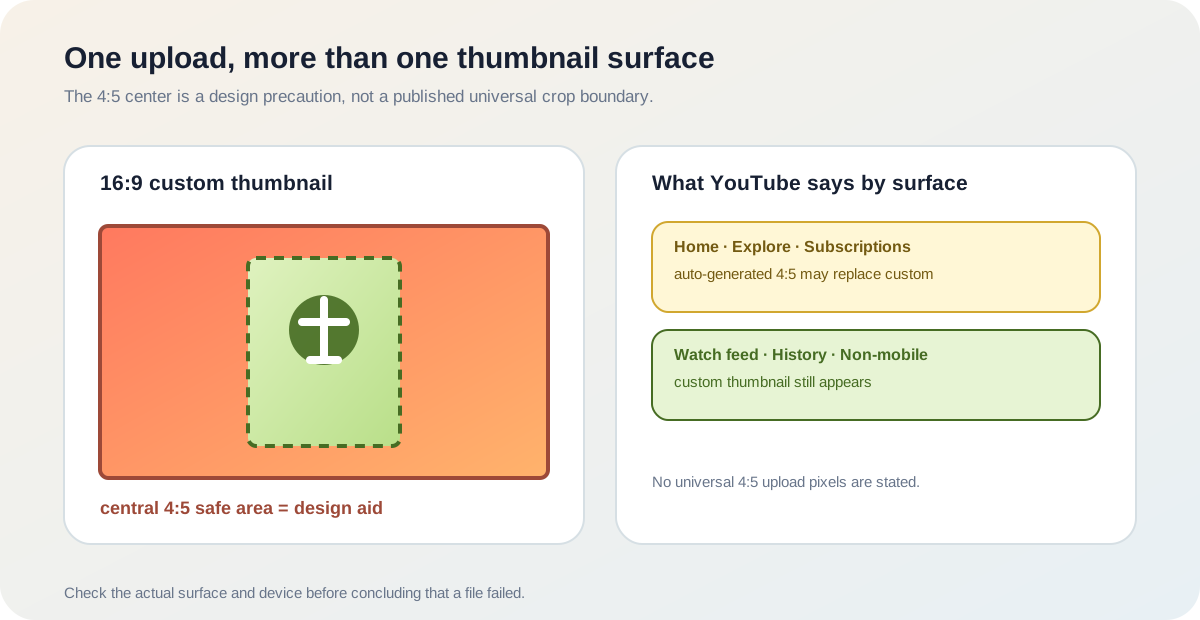
A 16:9 custom thumbnail is not guaranteed to remain the visible thumbnail for a vertical video on every YouTube surface. YouTube's current Help page says vertical videos with 16:9 custom thumbnails can be replaced by an auto-generated 4:5 thumbnail on the home, explore, and subscription pages. The same page says the custom thumbnail still appears on the watch feed, watch history, and non-mobile platforms.
Official source: Add customised thumbnails on YouTube - YouTube Help, reviewed 2026-10-17.
What happens to a 16:9 thumbnail on a vertical video?
The current YouTube Help page makes a display distinction that is easy to miss in a generic YouTube thumbnail size table. It says a vertical video with a 16:9 custom thumbnail can be replaced by an auto-generated 4:5 thumbnail on the home, explore, and subscription pages. It then names other surfaces where the custom thumbnail still appears: the watch feed, watch history, and non-mobile platforms.
“Vertical videos with 16:9 custom thumbnails will be replaced by an auto-generated 4:5 thumbnail” on selected pages.
— YouTube Help, Add customised thumbnails
That is a surface rule, not a new upload instruction. The page does not tell creators to upload a 4:5 file for every vertical video, does not publish one 4:5 pixel canvas, and does not promise that every vertical-video viewer sees the same asset. A careful answer should preserve the difference between the file you prepare and the thumbnail YouTube may generate for a particular route.
Named replacement surfaces: home · explore · subscriptions 4:5 is not a published universal upload canvasWhich thumbnail should you expect to see?
The word “surface” matters more than a simple 16:9-versus-9:16 argument. A creator can upload a file successfully and still see a different thumbnail treatment in one feed. That does not prove the upload failed, and it does not prove that YouTube cropped the uploaded file into 4:5. The official note says the replacement is auto-generated; it does not document the exact frame-selection or crop algorithm.
This also explains why a screenshot from a mobile subscription page cannot be used by itself to infer the saved thumbnail file. It is evidence about one display route. For a reproducible report, record the video orientation, the uploaded file's dimensions, the surface where the image appeared, and whether the viewer was on a mobile or non-mobile platform.
Does a vertical video need a 4:5 thumbnail file?
Not from the checked official wording. YouTube's current thumbnail Help page recommends 3840 × 2160 pixels for videos and 2160 × 3840 for Shorts, with a minimum width of 640 pixels for videos and a minimum height of 640 pixels for Shorts. It separately recommends 16:9 for videos and 9:16 for Shorts. The vertical-video replacement note does not add a 4:5 upload dimension for long-form vertical videos.
The safest content decision is therefore target-specific. Prepare the file required by the video or Shorts upload workflow, then design the important text and subject so the composition remains understandable if a vertical-video feed shows an auto-generated portrait treatment. Do not label a 4:5 safe area as an official YouTube crop specification unless YouTube publishes one.
How should you design a vertical-video thumbnail?
- Identify the video type. Decide whether the upload is a standard video, a Short, or a vertical long-form video. The official size table does not use those labels interchangeably.
- Prepare the official file path. Use the current 16:9 video guidance or 9:16 Shorts guidance where it applies. Do not turn the auto-generated 4:5 display note into a mandatory upload preset.
- Protect the center. Keep the headline, face, and logo inside a conservative central portrait area as a design precaution. This is a layout recommendation from the guide, not a measured YouTube crop boundary.
- Test more than one surface. Check the watch feed and history as well as the home, explore, or subscription route that matters to your audience. Record the surface and device with the result.
- Separate evidence from inference. A replacement thumbnail proves what YouTube displayed on that surface. It does not by itself reveal the generated frame, the exact crop, or the saved source file.
This workflow combines the official surface note with a deliberately labelled design precaution. It does not estimate click-through rate, reach, or ranking impact.
Can the Feed Thumbnail resizer preview YouTube's 4:5 replacement?
No. The public resizer source sets a 1280 × 720 canvas, calculates crop and fit operations against that 16:9 target, and exports a JPEG. That is a reproducible local file-preparation fact for the standard video path. It is not a simulation of YouTube's auto-generated 4:5 thumbnail or a report about a particular feed.
The site can help inspect a prepared image and show how a central safe area fits inside a wide canvas, but it cannot sign in to YouTube Studio, upload a vertical video, observe an account-specific feed, or retrieve the frame that YouTube generated. Open the thumbnail resizer for the current 16:9 local workflow and use the official Help page for the display caveat.
If an uploaded custom image appears on the watch feed but not on a mobile home or subscription surface, that difference is consistent with the current Help note. It is not a local export failure until the file itself fails a format, dimension, or size check.
What do LightX, Snappa, and Reddit add?
The opened LightX YouTube thumbnail resizer page documents a 1280 × 720 preset, custom dimensions, editing controls, and JPG/PNG download. The opened Snappa YouTube thumbnail pages focus on ordinary video-thumbnail presets, templates, and download workflows. Those pages are useful for the standard 16:9 creation comparison, but neither establishes YouTube's vertical-video surface replacement rule.
The Reddit discussions show why creators ask the question. One vertical long-form thread asks how to use a vertical thumbnail and reports that the custom image was more visible on desktop than on mobile. Another discussion describes creators seeing a frame or different thumbnail treatment for vertical videos. These are real user reports and question signals; they cannot establish the current product rule or its exact crop behavior.
The gap is specifically a handoff problem: generic tools describe the source file, the community describes inconsistent surfaces, and YouTube Help names the surfaces where an auto-generated 4:5 thumbnail may replace a 16:9 custom one. A useful guide has to keep those evidence types separate instead of promising that one canvas will look identical everywhere.
YouTube thumbnail size and vertical-video questions
What is the YouTube thumbnail size for a vertical video?
YouTube's checked Help page recommends 3840 × 2160 for videos and 16:9, but says a vertical video's 16:9 custom thumbnail may be replaced by an auto-generated 4:5 thumbnail on home, explore, and subscription pages. It does not publish one universal 4:5 upload canvas.
Should I upload a 4:5 thumbnail for a vertical video?
Do not infer that from the checked note. It describes a possible display replacement, not a separate 4:5 upload requirement.
Will my custom thumbnail appear on every surface?
Not necessarily. YouTube says the custom thumbnail still appears on the watch feed, watch history, and non-mobile platforms, while naming home, explore, and subscription pages as replacement surfaces for the vertical-video case.
Is a vertical video the same as a Short?
Not automatically. The Help page gives separate guidance for videos and Shorts. Confirm the product type and upload route before choosing a thumbnail canvas.
Can I design a center 4:5 safe area?
Yes, as a design precaution. Keep important content toward the center, but do not call that area YouTube's official crop boundary; the checked page does not publish the generated crop algorithm.
Can Feed Thumbnail verify the replacement image?
No. Its current resizer prepares a local 1280 × 720 JPEG and does not sign in to YouTube Studio or inspect account-specific feed rendering.
Keep the upload canvas and display route separate
YouTube Help: Add customised thumbnails on YouTube is the source for the 3840 × 2160 video recommendation, the 2160 × 3840 Shorts recommendation, the 16:9 and 9:16 guidance, and the vertical-video 4:5 replacement note. Reviewed 2026-10-17.
Feed Thumbnail's public resizer source is the source for the local 1280 × 720 JPEG behavior. For the broader official table, read YouTube thumbnail size. For all guides, open Feed Thumbnail Guides.
LightX's YouTube thumbnail resizer and Snappa's YouTube thumbnail size notes were opened for standard 16:9 comparison, not as sources for YouTube display behavior.
The opened Reddit vertical long-form thumbnail discussion and a second vertical-video question were treated as real user reports and question signals, not product documentation.