YouTube thumbnail size for Shorts: use 9:16 and the right upload route
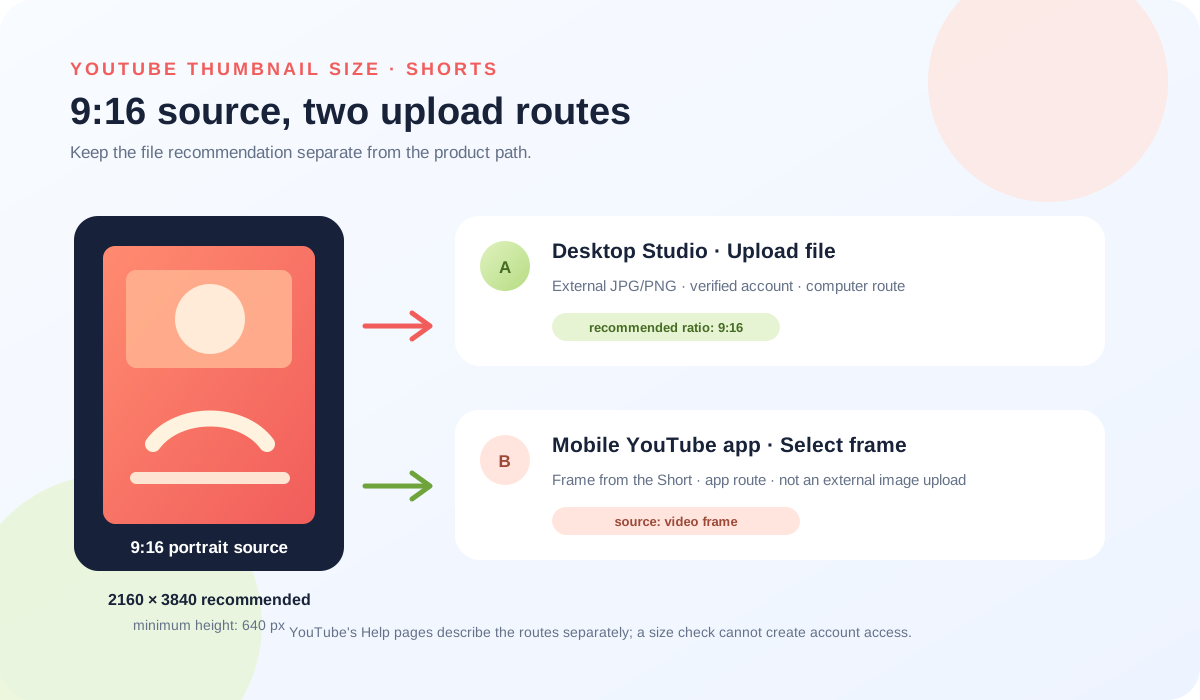
For a YouTube Shorts thumbnail, the current Help page recommends a 9:16 aspect ratio and 2160 × 3840 pixels. The route matters too: YouTube currently describes an external custom-image upload in Studio on a computer for verified accounts, while its mobile Shorts instructions describe selecting a frame from the video in the YouTube app. Do not treat a prepared JPG and a selected video frame as the same thumbnail input.
Official sources: Add customised thumbnails on YouTube and Create YouTube Shorts, reviewed 2026-10-19.
What YouTube thumbnail size should a Short use?
YouTube's current custom-thumbnail Help page recommends a resolution of 2160 × 3840 pixels for Shorts, with a minimum height of 640 pixels. It says to upload image formats such as JPG or PNG and to try a 9:16 aspect ratio for Shorts. The wording is a recommendation: it is not a statement that every other portrait size will be rejected.
| Question | Current source wording | What it does not prove |
|---|---|---|
| Recommended canvas | 2160 × 3840 for Shorts; minimum height 640 pixels | It is not a guarantee that a smaller file will be rejected. |
| Recommended shape | Try a 9:16 aspect ratio for Shorts | It does not turn 9:16 into a hidden minimum or a separate upload permission. |
| File type | Image formats such as JPG or PNG | It does not make the local resizer's 16:9 JPEG a Shorts-specific export. |
Can you upload an image or choose a frame for a Short?
Desktop Studio route
Current YouTube Help path: sign in to YouTube Studio on a computer, open Content, choose Shorts, select the Short, open its details, and under Thumbnail choose Upload file. YouTube says custom Shorts thumbnails are currently available to add in Studio on a computer and that the account must be verified. For an uploaded file, the recommended aspect ratio is 9:16.
Mobile YouTube app route
Current mobile Help path: in the YouTube app, choose a frame during the Short's final upload screen, or open a Short from Your videos and select a frame while editing. The page says thumbnail editing for this route is in the YouTube app, not Studio. This route starts with a frame from the video rather than an external JPG or PNG.
These instructions describe two different sources for the visible image. A custom file is a separate image asset that must pass the account and desktop Studio route. A selected frame is taken from the Short itself in the mobile app. If the Upload file control is missing on a phone, changing the canvas size will not create that control; the current source directs the custom-file path to Studio on a computer.
Does the usual YouTube thumbnail size tool make a Shorts file?
Feed Thumbnail's current public resizer source uses a fixed 1280 × 720 canvas and exports JPEG. That is a reproducible 16:9 video-thumbnail path, not a 9:16 Shorts source-file generator. The local tool can help inspect the ordinary workflow, but it cannot grant verified-account access, open YouTube Studio, or select a frame from a Short.
If the goal is the custom-image route, prepare a portrait asset that follows YouTube's published 9:16 recommendation, keep the JPG or PNG source stable, and then use the computer Studio path. If the goal is the frame route, place the important visual information in the Short itself and select the frame in the YouTube app. These are separate production decisions, so label the source in your notes before troubleshooting a missing preview.
For the fixed 16:9 tool behavior, read the public resizer source and Thumbnail resizer. For the broader dimension table, read YouTube thumbnail size.
Why can a correct Shorts thumbnail size still look different?
The same YouTube Help page separately says that vertical videos with 16:9 custom thumbnails can be replaced by an auto-generated 4:5 thumbnail on the home, explore, and subscription pages. It says the custom thumbnail still appears on the watch feed, watch history, and non-mobile platforms. This is a surface rule for a 16:9 vertical-video case; it is not a published instruction to upload a 4:5 Shorts file.
A recent Reddit discussion reports that a creator's custom Shorts image appeared on the channel but a different frame appeared in search or on the front page. That is a useful symptom signal for testing more than one surface, but it is a personal report rather than proof of a universal YouTube rule. The official page supplies the 9:16 recommendation and upload route; it does not promise that every surface will display the same crop or frame.
When a preview differs, record the source type, the surface, the device, and the time. Do not turn a community report into a wait-time promise, and do not turn the vertical-video 4:5 replacement note into a new upload specification. The distinction keeps a size check from being used as a substitute for a product-surface check.
The earlier vertical-video thumbnail guide maps the 16:9-to-4:5 display note; this guide focuses on Shorts source and upload routes.
What do LightX, Snappa, and Reddit add to the Shorts question?
The opened LightX YouTube Thumbnail Resizer page documents a 1280 × 720 preset, custom dimensions, image editing, and JPG/PNG download. That is useful for ordinary file preparation, but the page does not document YouTube's current desktop-only custom Shorts route or mobile frame-selection route.
The opened Snappa YouTube thumbnail-size page describes the familiar 1280 × 720, 16:9 video-thumbnail workflow. It does not supply the current Shorts upload-path distinction. Its role here is a comparison boundary, not authority for a Shorts requirement.
The opened Reddit feature discussion describes custom Shorts thumbnails rolling out to some creators, with a desktop upload path and a mobile frame-selection option. A second discussion reports a selected image being replaced by a random-looking frame on search or the front page. Both are community reports. They explain why the route and surface need to be named, but they cannot replace the current YouTube Help instructions.
The practical gap is therefore clear: generic tools answer “what canvas can I design?” while the first-party Help pages answer “which route can set the image?” Feed Thumbnail keeps those questions separate.
What should you check before changing a Shorts thumbnail?
- Name the input. Write “custom image file” if you are uploading a separate JPG/PNG, or “video frame” if you are selecting an image from the Short.
- Check the route. Use computer Studio for the current custom-file path; use the YouTube app for the frame-selection path. Do not infer one route from the other.
- Check the source shape. For an external Shorts image, compare the file to YouTube's 9:16 recommendation and 2160 × 3840 recommendation. Keep the original file and export facts together.
- Check account access. YouTube's current Help page says the custom Shorts upload route requires a verified account. Feed Thumbnail cannot inspect that state.
- Check the surface. Compare the channel page, search, home, subscriptions, and the relevant device. A different surface is new evidence, not proof that the source dimensions failed.
- Record the change. Save the route, timestamp, device, source type, and visible result before making another export. This keeps a display symptom separate from a file-format problem.
This checklist is a documentation method, not a promise that a particular account or surface will update on a fixed schedule.
YouTube thumbnail size for Shorts questions
What is the recommended YouTube thumbnail size for Shorts?
YouTube currently recommends 2160 × 3840 pixels, a 9:16 aspect ratio, and a minimum height of 640 pixels for Shorts. It also recommends image formats such as JPG or PNG.
Can I upload a custom Shorts thumbnail from my phone?
YouTube's current custom-thumbnail page says external custom Shorts uploads are currently available in Studio on a computer for verified accounts. The mobile Help page describes selecting a frame from the Short in the YouTube app.
Is selecting a frame the same as uploading a JPG?
No. A selected frame comes from the Short in the YouTube app. An uploaded file is a separate image asset handled through the desktop Studio route.
Can I use 1280 × 720 for a Short?
YouTube's current Shorts recommendation is 9:16 and 2160 × 3840. The Feed Thumbnail resizer's fixed 1280 × 720 JPEG path is for the standard 16:9 workflow, not a Shorts-specific export.
Why does my Shorts thumbnail look like another frame?
First record whether you used an uploaded file or a selected frame, then compare the exact surface and device. Community reports describe surface differences, but they are not a universal product rule.
Keep Shorts size and route evidence separate
YouTube Help: Add customised thumbnails on YouTube is the source for the verified-account requirement, computer Studio route, 9:16 recommendation, 2160 × 3840 recommendation, image formats, and the vertical-video surface note. Reviewed 2026-10-19.
YouTube Help: Create YouTube Shorts is the source for selecting a frame before or after upload in the YouTube app and the statement that this route is not edited from Studio. Reviewed 2026-10-19.
Feed Thumbnail's public resizer source is the source for the local fixed 1280 × 720 JPEG behavior. It cannot sign in to Studio, verify an account, or observe a channel-specific thumbnail.
LightX's YouTube thumbnail resizer and Snappa's YouTube thumbnail size notes were used as fixed comparison pages for ordinary 16:9 preparation, not as authority for Shorts routing.
The opened Reddit Shorts feature discussion and the opened search/front-page symptom report were used as community question signals only.