YouTube thumbnail size vs video previews: 3 seconds is not a new thumbnail
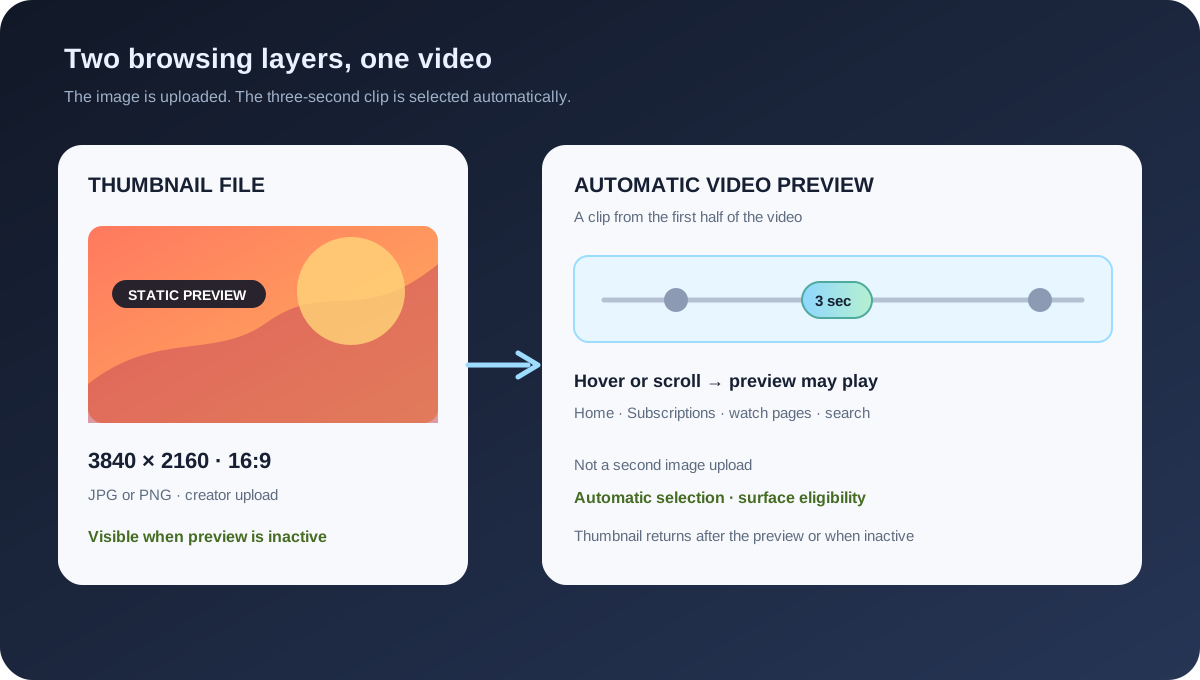
A custom thumbnail is an image file; a video preview is an automatically selected clip from the video. YouTube's current custom-thumbnail guidance recommends 3840 × 2160 for regular videos, 16:9, JPG or PNG, and a 640 px minimum width for videos. Its video-preview page describes a 3-second preview, a clip from the first half of the video, surface-specific eligibility, and the fact that the thumbnail appears when the preview is not active.
Official sources: Video previews, Add custom thumbnails on YouTube, and Use the inline player, reviewed 2026-11-02.
What is the YouTube thumbnail size when a video preview plays?
YouTube's custom-thumbnail page treats a thumbnail as a quick snapshot of the content and recommends 3840 × 2160 pixels for regular videos, a minimum width of 640 pixels for videos, JPG or PNG image formats, and a 16:9 aspect ratio. That is the source-file rule for the uploaded preview image.
YouTube's video-preview page defines a preview as a 3-second preview before watching. When a viewer hovers over a video's thumbnail on a computer or scrolls past a video on mobile search, the viewer may see the preview; after the preview plays, YouTube says the video's thumbnail appears.
The two layers can look like they are competing because the preview temporarily covers the thumbnail. The preview does not create a new thumbnail-size requirement, does not replace the uploaded image file, and does not give the creator a second pixel canvas to export.
Thumbnail = image source · Preview = automatic video clipCan you choose the 3-second preview frame?
The reviewed Help page says that a clip from the first half of the video is automatically selected to be displayed as the video preview. This is different from the thumbnail workflow, where the creator can upload a custom image or use a generated suggestion through the Thumbnail control.
The first-half rule describes the source region from which the system selects a preview clip. It does not describe a 3-second image file, a 3-second thumbnail canvas, or a fixed crop that a creator can export locally. A frame that looks unhelpful is a preview-selection question, not evidence that the thumbnail has the wrong YouTube thumbnail size.
The same page says that even when a video has a preview, creators should still customize their video thumbnails because thumbnails appear when the preview is not active. That first-party instruction is the clearest reason to keep investing in the static thumbnail source instead of treating an automatically chosen clip as a replacement.
Where can a video preview appear?
YouTube's video-preview page says viewers can watch previews on Home, Subscriptions, watch pages, and search results. It also says previews are available only on select computer browsers, naming Chrome version 32 and up and Opera version 19 and up on the reviewed page. Treat the page and browser as part of the evidence, not as a property of the thumbnail file.
The page says video previews are available for most videos longer than 30 seconds, but they may not be added to every video longer than 30 seconds. YouTube uses several criteria, including the video topic and content, to determine eligibility. If a preview is not present within two days, the page says the video is not currently eligible.
That eligibility language explains why two videos with identical 3840 × 2160 thumbnails can behave differently. A missing preview may result from duration, topic, content, browser, surface, or YouTube's selection criteria. It does not prove that one image needs a different dimension.
| Layer | Official signal | What to record | Do not infer |
|---|---|---|---|
| Thumbnail file | 3840 × 2160 recommended for videos; 16:9; JPG or PNG; 640 px minimum width. | Width, height, format, bytes, crop, upload device, Save result. | Do not infer preview eligibility from image dimensions alone. |
| Preview clip | 3 seconds; clip automatically selected from the first half of the video. | Video duration, selected scene, timestamp, preview state, and surface. | Do not treat the clip as an alternate thumbnail file. |
| Browser surface | Help page describes Home, Subscriptions, watch pages, search results, and selected computer browsers. | Browser version, device, URL, account state, and playback setting. | Do not promise identical preview behavior everywhere. |
| Inline player | On Android, Playback in feeds can be Always on, Wi-Fi only, or Off; some devices and formats turn autoplay previews off. | Playback setting, network, device, and whether the player is inline or watch-page. | Do not diagnose a setting as a thumbnail-size rejection. |
| Preview eligibility | Most videos longer than 30 seconds may qualify, but YouTube may not add previews to all of them. | Publish time, duration, eligibility wait, and the two-day check. | Do not estimate eligibility or traffic from the thumbnail alone. |
Why can a thumbnail disappear when a viewer scrolls?
The video-preview Help page says the thumbnail appears after the preview plays and when the preview is not active. A viewer who watches a preview is therefore looking at a temporary video layer. The thumbnail can be valid even though the viewer does not see it during the active preview.
YouTube's inline-player Help page for Android describes Playback in feeds settings: Always on, Wi-Fi only, or Off. It also notes that autoplay previews are turned off on some devices and formats to save battery and ensure smooth scrolling. These controls change whether the video plays inline; they do not resize the uploaded thumbnail.
A useful reproduction needs the account, device, browser or app, network, playback setting, page surface, and time spent hovering or scrolling. If the thumbnail returns when previews are disabled, that is evidence about the playback layer. If the image is wrong when no preview is active, then inspect the thumbnail source or propagation state.
The official page also warns that watching a video for a certain amount of time while browsing may enter the watch history when the inline player is used. That is a viewer-behavior side effect, not a file-property claim. Keep the playback setting and watch-history observation out of the thumbnail-size calculation.
How do you fix the right layer?
For the thumbnail, use YouTube Studio, Content, the selected video, Thumbnail, Upload file or Get suggestions, and Save. Check the file's dimensions, format, byte size, crop, policy compliance, and the device-specific limit before calling the image valid.
For a preview, there is no matching upload field on the reviewed Help page. Check whether the video is longer than 30 seconds, whether the surface and browser support previews, whether the preview has had up to two days to appear, and whether Playback in feeds or inline playback is affecting what the viewer sees.
If the preview clip shows a spoiler, an unflattering scene, or a poor crop, do not promise that a new thumbnail dimension will change the automatically selected first-half clip. The first-party page describes selection as automatic; the safe action is to diagnose the preview behavior and keep the static thumbnail clear for the moments when it is visible.
- Check the file. Verify dimensions, aspect ratio, format, bytes, crop, and Studio Save result.
- Check the video. Record duration and whether the video has been published long enough for the two-day eligibility check.
- Check the surface. Note Home, Subscriptions, watch page, search, browser, app, device, and account state.
- Check playback. Record hover or scroll behavior, inline player state, Playback in feeds setting, network, and whether the preview is active.
- State the narrow result. Label the issue file, propagation, eligibility, playback setting, or preview selection instead of calling every mismatch a size problem.
What can Feed Thumbnail check?
Feed Thumbnail's public thumbnail resizer is a browser-local video-thumbnail tool. It reads PNG, JPG, or WEBP input, targets a fixed 1280 × 720 canvas, offers crop, fit, padding, or stretch treatments, and exports a JPG. Its page says the file stays on the device and that there is no account, server upload, batch queue, or image API.
The public downloader is a separate browser-side image workflow. It accepts watch, Shorts, live, embed, and bare video-ID inputs, checks direct YouTube image files, keeps files that load, and reports their natural dimensions. It cannot inspect whether a preview clip is eligible, which first-half scene YouTube selected, or which viewer setting is active.
The local record can preserve the source thumbnail, width, height, aspect ratio, file type, byte size, crop choice, and export time. A preview record needs video duration, publish time, surface, browser or app, playback setting, selected clip, and the time since publication. Keep these records linked but separate.
Use the resizer for the image job and YouTube for the preview job. If a viewer says the thumbnail disappeared, first ask whether a 3-second preview is active. If the preview is off and the image is still wrong, return to the file and propagation checks.
What do LightX, Snappa, and Reddit add?
The opened LightX YouTube Thumbnail Resizer is an upload-and-edit workflow centered on a practical 1280 × 720 preset. It exposes custom dimensions, pan and scale controls, and JPG or PNG export. It is useful for the static image layer, but it does not document YouTube's automatic preview selection, eligibility, or Playback in feeds settings.
The opened Snappa article recommends 1280 × 720 and 16:9 for common YouTube thumbnails, then discusses templates and a Studio upload workflow. It reinforces the source-file handoff. It is not first-party evidence for the 3-second clip or the browser and surface conditions in YouTube's preview page.
The opened Reddit question signals describe viewers wanting to disable previews on Home or Subscriptions, sound playing when hovering, a creator asking how to change the automatically chosen preview video, and the thumbnail returning when the preview is not active. These reports are useful reproduction prompts, not official dimensions, eligibility rules, or performance guarantees.
No search volume, ranking position, click-through rate, traffic, conversion, preview completion, or competitor-performance number is inferred from LightX, Snappa, or Reddit. YouTube Help remains the evidence for the product rules.
How to test a thumbnail that seems to vanish
- Record the source. Save dimensions, format, bytes, crop, upload device, and Studio Save time.
- Record the video. Note duration, publish time, and the first-half scenes that could be selected automatically.
- Record the viewer path. Compare Home, Subscriptions, search, watch page, computer, mobile browser, and app separately.
- Record playback state. Note hover or scroll, inline player, Playback in feeds, network, browser, account, and whether sound is enabled.
- Wait before concluding. If the preview is absent, use the two-day note as a timing checkpoint rather than inventing a new image dimension.
- Keep the conclusion narrow. Say “thumbnail source,” “preview eligibility,” “automatic clip,” “playback setting,” or “surface propagation” only when the evidence supports it.
The checklist keeps the static image, the automatic clip, and the viewer settings in separate columns. That makes it possible to improve the thumbnail for non-preview moments without claiming that creators can control a clip the official page says is automatically selected.
YouTube thumbnail size and video previews
Does a YouTube video preview need a different thumbnail size?
No separate preview image size is published on the reviewed page. Use the regular video thumbnail guidance: 3840 × 2160 recommended, 16:9, JPG or PNG, and at least 640 pixels wide for videos.
How long is a YouTube video preview?
YouTube describes a 3-second preview. It is a clip from the first half of the video that the system automatically selects.
Can I choose the preview clip?
The reviewed Help page says a clip from the first half is automatically selected. It does not describe a creator upload field for a custom preview clip.
Why does my thumbnail return after the preview?
That is expected in the documented behavior: after the video preview plays, YouTube says the video's thumbnail appears, and thumbnails appear whenever the preview is not active.
Does Feed Thumbnail test YouTube video previews?
No. Feed Thumbnail can prepare and inspect local image files. It cannot read preview eligibility, select a clip, control Playback in feeds, or verify every viewer surface.
Keep the thumbnail file and preview clip separate
YouTube Help: Video previews is the source for the 3-second preview, hover and scroll contexts, Home, Subscriptions, watch-page and search surfaces, selected browser support, longer-than-30-seconds guidance, two-day eligibility note, automatic first-half clip selection, and thumbnails returning when the preview is inactive. Reviewed 2026-11-02.
YouTube Help: Add custom thumbnails on YouTube is the source for the separate 3840 × 2160 regular-video recommendation, 640 px minimum width, 16:9 guidance, JPG or PNG formats, device-dependent byte limits, and the Studio upload route. Reviewed 2026-11-02.
YouTube Help: Use the inline player is the source for Playback in feeds options on Android, autoplay preview behavior on some devices and formats, and the distinction between inline browsing and the watch page. Reviewed 2026-11-02.
Feed Thumbnail's local thumbnail resizer is the source for the 1280 × 720 browser-local workflow, while the thumbnail downloader is the separate image-variant inspection workflow. Neither can inspect YouTube preview eligibility or playback settings.
LightX's YouTube thumbnail resizer, Snappa's YouTube thumbnail notes, and the opened mobile preview setting discussion, hover-sound discussion, and automatic preview selection question were used as fixed comparison and question-signal sources only.