YouTube thumbnail size for chapters: chapter previews are not custom uploads
A YouTube chapter preview is part of the video timeline, not a second image file. YouTube's current custom-thumbnail guidance recommends 3840 × 2160 for regular videos, 16:9, JPG or PNG, and a 640 px minimum width for videos. Its Video Chapters page describes sections with individual previews, timestamps, automatic chapters, and an option to opt out, but it does not publish a separate chapter-thumbnail canvas or upload size.
Official sources: Video Chapters, Edit video settings, and Add custom thumbnails on YouTube, reviewed 2026-11-16.
What is the YouTube thumbnail size for a chapter preview?
YouTube's Video Chapters Help page says that chapters break a video into sections, each with an individual preview. That wording describes the viewing experience around the video timeline. It does not give the creator a second file slot beside the video's main thumbnail, and it does not publish a chapter-specific pixel dimension.
The regular thumbnail rule still applies to the image viewers see before choosing the video: YouTube recommends 3840 × 2160 for videos, a 16:9 aspect ratio, JPG or PNG, and at least 640 pixels of width for videos. This is the uploadable source that Feed Thumbnail can prepare or inspect. It is not a specification for every frame that appears while a viewer navigates chapters.
So the practical answer to “what is the YouTube thumbnail size for chapters?” is: there is no separate chapter-thumbnail size in the reviewed first-party instructions. Validate the main thumbnail as an image, then validate chapters as timeline metadata and video content. A chapter frame that looks unhelpful is not automatically evidence of a wrong image dimension.
Main thumbnail = image file · Chapter preview = timeline viewThe chapter rules are timestamps, not pixels
For manually added chapters, YouTube instructs creators to sign in to YouTube Studio, open Content, choose a video, and add a list of timestamps and titles in the description. The first timestamp must start at 00:00, the video should have at least three timestamps in ascending order, and each chapter must be at least 10 seconds long. The creator then selects Save.
Those requirements describe a time map over the existing video. They do not ask for a JPG, PNG, canvas width, canvas height, byte limit, or chapter-image crop. If a creator is debugging a chapter, the first local checks should therefore be timestamp order, timestamp start, title text, chapter length, and the saved description—not a second export preset.
YouTube also says that manually entered chapters override automatic video chapters. For automatic chapters, the reviewed page points to the Show more area in the video's settings and the “Allow automatic chapters (when available and eligible)” checkbox. Not all videos are eligible, and not all eligible videos receive automatic chapters. That eligibility statement is about a platform feature, not about the 3840 × 2160 thumbnail file.
The Edit video settings page lists Thumbnail as the image viewers see before choosing the video, while Automatic chapters is a separate advanced setting. The separation is useful: the main thumbnail belongs to the image handoff, while chapter creation belongs to description timestamps or an automatic-chapter control. Do not merge those two controls just because both can be visible around the same video.
Why the same video can show a custom thumbnail and chapter frames
A regular video has an uploaded thumbnail that acts as its primary preview image. When a viewer opens the timeline and navigates a chapter, YouTube can show an individual preview for that section. The chapter preview is still connected to the video's moving-image content; it is not an alternate version of the uploaded thumbnail with a different export size.
The official page does not promise an exact frame-selection formula for every chapter preview. It does not say that the frame must be the exact timestamp, the middle of the chapter, the first frame, or a fixed 16:9 image. That is why an article about chapter previews should describe documented controls and observed behavior separately instead of inventing a universal crop or timing rule.
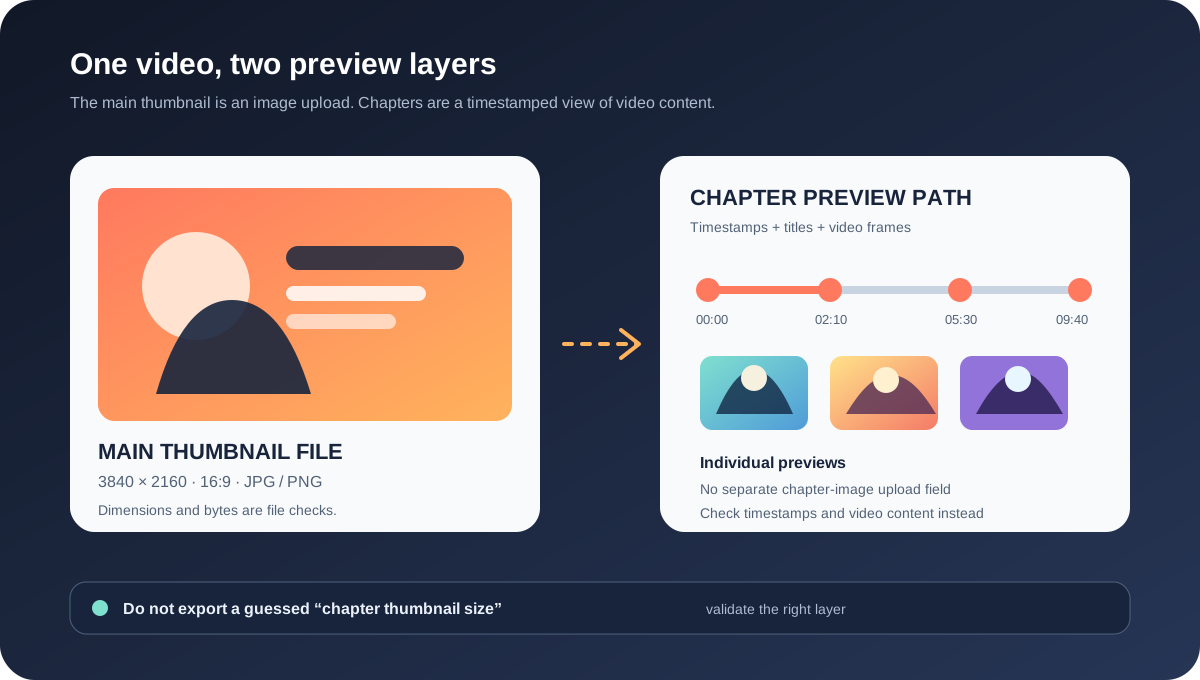
The diagram's left panel is the file path: dimensions, format, byte size, crop, and upload result can be recorded. The right panel is the chapter path: 00:00, titles, ascending order, minimum chapter length, automatic-versus-manual setting, and video processing state can be recorded. Keeping those columns separate prevents a chapter-rendering question from becoming a false YouTube thumbnail size diagnosis.
Which chapter route are you testing?
Manual chapters give the creator a concrete text record: timestamp, title, order, and saved description. The first-party page says the first timestamp starts at 00:00, at least three timestamps are used, and each chapter is at least 10 seconds long. If the chapters do not appear, those are reproducible inputs to check before changing the thumbnail.
Automatic chapters use YouTube's own generation system when the video is available and eligible. The page says the checkbox is on by default for new uploads, that creators can allow automatic chapters in bulk, and that creators can opt out for one video or through upload defaults. An automatic chapter result can therefore differ from a manual timestamp map without implying that the main thumbnail is invalid.
| Layer or route | Creator supplies | What to verify | What not to infer |
|---|---|---|---|
| Main thumbnail | Image file for the video. | 3840 × 2160 recommendation, 16:9, JPG or PNG, width, bytes, crop, and Studio Save result. | Do not infer chapter-frame behavior from the file alone. |
| Manual chapters | Description timestamps and titles. | 00:00 start, three or more timestamps, ascending order, 10-second minimum, and saved description. | Do not invent a chapter image dimension. |
| Automatic chapters | Allow or opt out setting, when available. | Eligibility, active strikes or content restrictions, setting state, and processing time. | Do not promise that every eligible video receives chapters. |
| Chapter preview | Video content at and around the timeline section. | Chapter title, position, visible frame, device, app or browser, and whether the video has finished processing. | Do not treat a preview frame as a custom-upload asset. |
How to make chapter previews easier to read
There is no official promise that YouTube will select the exact frame a creator wants. A useful production practice is therefore to make the video content near a chapter boundary legible, then verify the public result after processing. This is editorial advice, not a new YouTube thumbnail size rule.
Start by choosing a timestamp that represents the section rather than placing a chapter marker in the middle of an unrelated transition. Add the chapter title, keep the timestamp sequence ascending, and make the first entry 00:00. If you use manual chapters, keep each section at least 10 seconds long as the Help page instructs.
Next, create a visually stable opening beat for the chapter: a readable subject, sufficient contrast, and no critical label hidden at the edge of the frame. This is a content-design recommendation. YouTube's official page does not promise that a face, title card, or exact frame will be selected, so treat the result as a quality improvement attempt rather than a guaranteed selector.
If the chapter preview stays identical to the main thumbnail, record whether the video uses automatic chapters, whether the manual timestamps were saved, whether the video is public, and how long the change has had to process. If the feature itself is unavailable, check the official eligibility note and any active strike or inappropriate-content condition before changing the image dimensions.
- Audit the image. Check the main thumbnail's dimensions, aspect ratio, format, bytes, crop, and upload result.
- Audit the timestamps. Confirm 00:00, three or more ascending entries, descriptive titles, and the 10-second minimum.
- Identify the route. Record whether manual timestamps override automatic chapters or whether automatic chapters are allowed.
- Inspect the video. Note the frame around each chapter boundary, public state, processing state, device, browser or app, and account context.
- State the result narrowly. Call the issue an image-file, timestamp, eligibility, processing, surface, or frame-selection issue only when the evidence supports it.
Why do creators ask whether chapter thumbnails can be changed?
The opened Reddit discussion in r/PartneredYoutube describes a creator seeing the same main thumbnail on some chapters and screen-grab-like previews on others, then asking how to ensure unique chapter thumbnails. The replies describe observed delays and inconsistent-looking frame choices. These are useful questions to reproduce, but they are not official timing guarantees or a published image specification.
A second Reddit discussion asks how to make one custom video thumbnail appear for all chapters after different timestamp frames were shown. A third asks whether chapter thumbnails are customizable and reports attempts involving automatic-chapter settings and timestamp formatting. Together, the threads show why the words “chapter thumbnail” can refer to a timeline preview, the main video thumbnail, or a creator's wish for a custom per-chapter asset.
The safe interpretation is narrower: YouTube's official page documents chapter previews and the controls around chapter generation, while Reddit provides anecdotal debugging prompts. Do not attribute a specific update delay, face-selection rule, or timestamp-to-frame algorithm to YouTube unless a first-party source documents it.
What can Feed Thumbnail check?
Feed Thumbnail's public thumbnail resizer is a browser-local image workflow. It reads PNG, JPG, or WEBP input, targets a fixed 1280 × 720 canvas, offers crop, fit, padding, or stretch treatments, and exports a JPG. Its boundary is the static image file: dimensions, crop, format, byte size, and export time can be recorded without sending the image to a server.
The public thumbnail downloader is a separate browser-side image workflow. It accepts watch, Shorts, live, embed, and bare video-ID inputs, checks direct YouTube image files, keeps files that load, and reports their natural dimensions. It can help compare the main thumbnail's image variants, but it cannot read a chapter's timestamp map or choose the frame shown in a timeline preview.
The local workflow cannot sign in to YouTube Studio, add a description timestamp, change the automatic-chapter setting, determine feature eligibility, wait for account-specific processing, or verify every app and device surface. Those actions belong to the creator's YouTube account and the public-video reproduction step.
Use the resizer for the image job. Use YouTube Studio and a public watch-page check for the chapter job. If the static thumbnail is valid but chapter previews remain unexpected, preserve both records rather than exporting a new file at a guessed “chapter size.”
What do LightX, Snappa, and Reddit add?
The opened LightX YouTube Thumbnail Resizer is an upload-and-edit workflow centered on a practical 1280 × 720 preset. It exposes custom dimensions, pan and scale controls, and JPG or PNG export. That is useful for preparing the main image, but it does not document YouTube's chapter timestamps, automatic-chapter eligibility, or per-chapter preview selection.
The opened Snappa YouTube thumbnail article presents 1280 × 720 and 16:9 as common thumbnail guidance, with templates and a Studio upload discussion. It supports the static source-file handoff. It is not first-party evidence for a chapter preview canvas, an automatic frame algorithm, or a custom chapter-image upload route.
The three opened Reddit question signals focus on inconsistent chapter frames, wanting the same custom thumbnail across chapters, and whether automatic-chapter settings or timestamp formatting affect the preview. They are valuable reproduction prompts. They are not evidence for an official dimension, processing deadline, or performance guarantee.
No search volume, ranking position, click-through rate, traffic, conversion, chapter completion, or competitor-performance number is inferred from LightX, Snappa, or Reddit. YouTube Help remains the source for the documented chapter and thumbnail rules.
YouTube thumbnail size and chapter previews
Do YouTube chapters need a different thumbnail size?
The reviewed YouTube chapters page does not publish a separate chapter-thumbnail upload size. Use the regular video-thumbnail guidance for the main image: 3840 × 2160 recommended, 16:9, JPG or PNG, and at least 640 pixels wide for videos.
Are chapter previews custom image files?
The official page describes sections with individual previews and documents timestamp and automatic-chapter controls. It does not describe a second creator-upload image field for those previews.
What are the manual chapter requirements?
Start the first timestamp at 00:00, use at least three timestamps in ascending order, make each chapter at least 10 seconds, add titles, and save the description.
Can I choose the exact frame shown for a chapter?
The reviewed first-party page does not promise an exact frame-selection algorithm. You can control timestamps and video content, but you should not claim that a particular frame, face, or title card is guaranteed to become the preview.
Does Feed Thumbnail test chapter previews?
No. Feed Thumbnail can prepare and inspect local image files and direct thumbnail variants. It cannot sign in, edit timestamps, change chapter settings, determine eligibility, or verify every public viewer surface.
Keep the image source and chapter timeline separate
YouTube Help: Video Chapters is the source for sections with individual previews, manual timestamp rules, the 00:00 start, three-timestamp minimum, 10-second minimum, automatic-chapter controls, override behavior, eligibility note, and opt-out routes. Reviewed 2026-11-16.
YouTube Help: Edit video settings is the source for Thumbnail as a separate video setting and Automatic chapters as an advanced setting. Reviewed 2026-11-16.
YouTube Help: Add custom thumbnails on YouTube is the source for the regular-video recommendation of 3840 × 2160, 640 px minimum width, 16:9, JPG or PNG, device-dependent byte limits, and the Studio thumbnail route. Reviewed 2026-11-16.
Feed Thumbnail's local thumbnail resizer is the source for the 1280 × 720 browser-local workflow, while the thumbnail downloader is the separate image-variant inspection workflow. Neither can inspect chapter metadata or timeline frame selection.
LightX's YouTube thumbnail resizer, Snappa's YouTube thumbnail notes, and the opened chapter preview discussion, same-thumbnail discussion, and customization discussion were used as fixed comparison and question-signal sources only.