YouTube thumbnail size for vertical live streams: source, crop, and surfaces
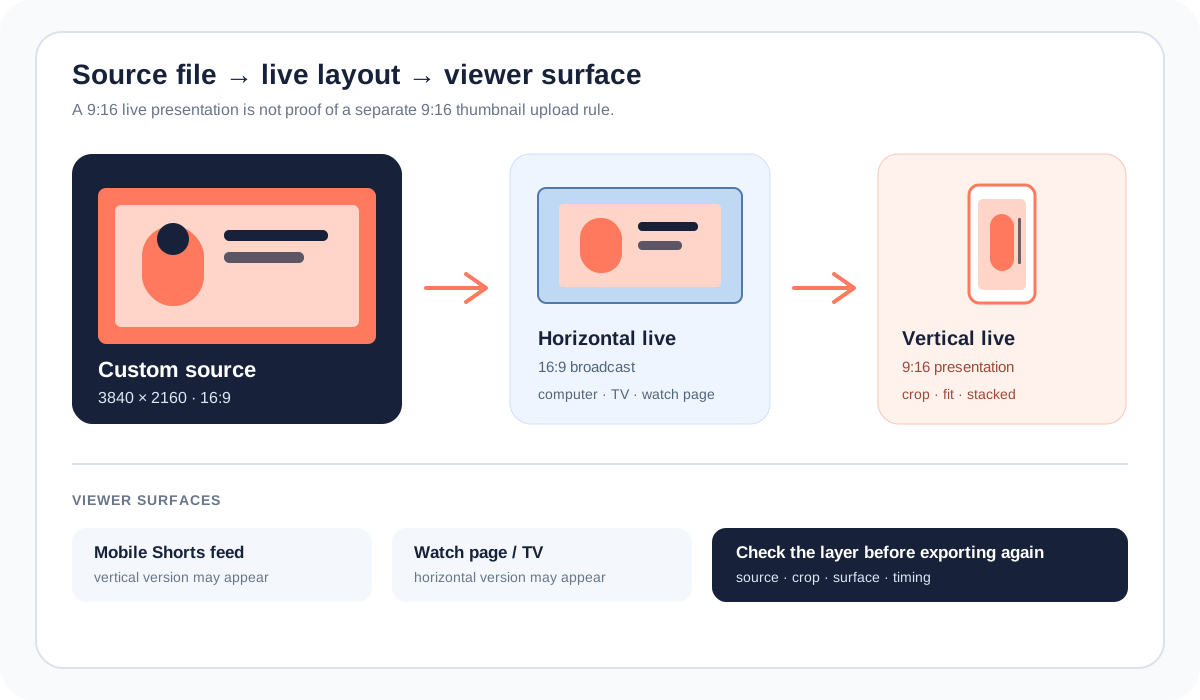
A vertical live-stream layout is not the same thing as a vertical thumbnail upload. YouTube’s current thumbnail Help page recommends a 3840 × 2160 video thumbnail with a 16:9 aspect ratio. Its live-streaming Help page describes a separate dual-format experience: a horizontal 16:9 stream and a vertical 9:16 presentation, with a center crop or other layout options. Start with the source thumbnail, then check the live layout and the surface where viewers see it.
Official sources: Add custom thumbnails on YouTube, Get started with live streaming, and Create a live stream via webcam, reviewed 2026-10-21.
Which YouTube thumbnail size should a live stream use?
YouTube’s custom-thumbnail Help page says the image is used as the preview image for a video and recommends a resolution of 3840 × 2160 pixels for videos, a minimum width of 640 pixels, JPG or PNG formats, and a 16:9 aspect ratio for videos. The page does not publish a separate live-stream thumbnail canvas in that size list, so the safest documented source rule is the video rule.
The live-streaming Help page talks about the broadcast layout instead. It says Live Control Room can send horizontal and vertical formats at the same time, with a horizontal 16:9 format and a vertical 9:16 format. It also says the vertical stream is a center crop of the horizontal stream by default. That is why a vertical live preview can look different from the custom thumbnail source without proving that the source image has the wrong YouTube thumbnail size.
Source thumbnail ≠ live layout ≠ viewer surfaceWhat does YouTube crop when a live stream is vertical?
For the built-in dual-format experience, YouTube says the vertical stream is a center crop of the horizontal stream. It also documents three vertical layout choices in the editing canvas: Center crop, Fit to phone width, and Stacked. The creator can adjust zoom and position in the vertical preview, which changes how the live video is framed for the vertical surface.
The same official page says the vertical format cannot be added after the stream has started. If the vertical composition matters, choose or configure it before going live. A late change to the thumbnail file cannot recover a subject that was already cut out of the vertical video layout.
Where will viewers see the horizontal or vertical live version?
YouTube says viewers watching on mobile in the Shorts feed will see the vertical version, while all other viewers will see the horizontal stream. Subscribers receive one go-live notification with a shared stream URL, and the same live chat is shown to viewers of both formats. The custom thumbnail, the video layout, and the navigation surface are related, but they are not one pixel measurement.
| Layer | Official signal | What to test |
|---|---|---|
| Thumbnail source | 3840 × 2160 and 16:9 video recommendation | File dimensions, format, clarity, and the time it was saved. |
| Live broadcast | 16:9 horizontal plus 9:16 vertical when dual format is enabled | Whether the stream was configured before going live and which layout is selected. |
| Vertical layout | Center crop, fit to phone width, or stacked | Subject position, safe area, zoom, and whether important text survives the crop. |
| Viewer surface | Shorts feed on mobile versus other viewers | Device, app surface, URL, and whether the image is a preview or live video frame. |
| Analytics timing | Combined metrics; vertical metrics after 24 hours | Do not treat an early analytics gap as proof of a thumbnail-size error. |
The live-streaming Help page says combined metrics for both streams are available in Live Control Room during and after the stream, while metrics for only the vertical stream become available 24 hours after the stream. That timing belongs to live-stream analytics, not to the file’s pixel dimensions.
How do you prepare the thumbnail before going live?
YouTube’s webcam Help page says that after a creator enters the title, description, and privacy settings, the camera takes a thumbnail before the creator clicks Go Live. It also says scheduled streams can be accessed in Live Control Room through Manage. The page documents a workflow step, not a new live-specific thumbnail dimension.
- Prepare a source file. Start with the documented video thumbnail guidance: 16:9, as large as practical, and 3840 × 2160 when the upload path accepts it.
- Design for the center. Keep faces, logos, and the short title away from the outer edges if the vertical live layout may use a center crop.
- Schedule or open the live stream. In YouTube Studio, use the stream’s Manage or Live Control Room route and confirm the thumbnail and metadata before broadcasting.
- Inspect the vertical preview. Choose Center crop, Fit to phone width, or Stacked when available, then adjust zoom and position for the video itself.
- Test the right surface. Check a computer or TV view separately from the mobile Shorts feed. Record whether the mismatch is the source image, the live video crop, or the surface preview.
The exact buttons can change with the Studio interface. The durable distinction is the evidence path: source file, Live Control Room layout, then viewer surface.
Could a live-stream feature limit look like a thumbnail problem?
Yes. YouTube’s current members-only live-stream Help page says that switching a public stream to members-only is currently unavailable on vertical live streams. A missing option or a different control-room route is therefore not evidence that the thumbnail source has the wrong YouTube thumbnail size.
The live-streaming Help page also separates the horizontal and vertical viewer experiences: the vertical version can appear in the Shorts feed, while the horizontal version is shown to other viewers. A creator who checks only one surface can conclude that a thumbnail or live layout failed when the two surfaces are intentionally different.
Feature availability is not a dimension checkCan the local tools create a vertical live thumbnail?
The public Feed Thumbnail resizer source sets a fixed 1280 × 720 canvas and exports JPEG. That is a reproducible local 16:9 preparation path for the source-file side of this workflow. It does not create a live broadcast, choose a Live Control Room layout, or generate a vertical stream feed.
The public downloader accepts watch, Shorts, live, embed, and bare video-ID inputs in the browser. It requests direct YouTube image files and reports the dimensions of files that actually load. That can help record an exposed thumbnail variant, but it cannot tell whether the live video was center-cropped, fit to phone width, or supplied by a separate encoder.
Use the thumbnail resizer for the local 16:9 canvas, the thumbnail downloader for loaded image variants, and YouTube thumbnail size for the general source guidance.
What do LightX, Snappa, and Reddit add to the live-stream question?
The opened LightX YouTube Thumbnail Resizer page offers a 1280 × 720 preset, custom dimensions, editing, and JPG/PNG download. That is useful for preparing a horizontal source file, but it does not document YouTube’s dual-format live layout or the vertical crop options.
The opened Snappa YouTube thumbnail-size page focuses on the ordinary 1280 × 720, 16:9 workflow and template creation. Its advice supports a standard source-file handoff, not a claim that a 9:16 live presentation needs a separate 9:16 thumbnail upload.
The opened Reddit livestream-thumbnail question describes the practical tension of making a new thumbnail for every stream, especially when the stream’s final scene does not exist yet. A newer Reddit discussion asks how a horizontal stream connects to an automatically generated vertical version and how that crop is controlled; another community thread observes the new dual-layout experience appearing in the Shorts feed while the channel view remains horizontal. These are useful question signals, not official dimensions or guaranteed distribution results.
The gap is the handoff between a thumbnail editor and a live-layout control room. A 16:9 source answer can be correct while a creator still needs to test center crop, phone-width fit, stacked layout, and the surface-specific preview.
What should you record when a vertical live thumbnail looks wrong?
- Record the source. Save the actual file dimensions, format, and the moment the custom thumbnail was selected.
- Record the live mode. Note whether YouTube created both formats automatically or whether a third-party encoder supplied a separate vertical feed.
- Record the crop. Write down Center crop, Fit to phone width, Stacked, or an encoder layout, plus zoom and position.
- Record the surface. Compare Studio, the watch page, a computer or TV, and the mobile Shorts feed as separate observations.
- Record the timing. Keep thumbnail propagation and the 24-hour vertical-metrics note separate from the source file’s dimensions.
- Keep the conclusion narrow. Say “source file,” “live crop,” “surface preview,” “feature availability,” or “analytics timing” only when the evidence supports that layer.
This checklist separates what can be measured locally from what only the YouTube account and live surface can confirm.
YouTube thumbnail size for vertical live streams
What is the YouTube thumbnail size for a live stream?
YouTube’s documented video thumbnail guidance recommends 3840 × 2160, a minimum width of 640, JPG or PNG, and 16:9. The live-stream Help page describes stream layouts separately and does not publish a universal live-only thumbnail canvas.
Should a vertical live stream use a 9:16 thumbnail?
Do not infer that from the live stream’s 9:16 viewing format. YouTube documents the vertical broadcast layout and crop behavior, while its custom-thumbnail size guidance remains the video source guidance.
Why is my subject cut off in the vertical live view?
The default vertical live presentation can be a center crop of the horizontal stream. Check the vertical preview and the available Center crop, Fit to phone width, or Stacked layout options before changing the thumbnail source.
Can I add the vertical live format after the stream starts?
YouTube’s live-stream Help page says you cannot add the vertical format once the stream has started. Configure the mode and composition before going live.
Can Feed Thumbnail verify my live-stream surface?
No. It can prepare and measure local images and inspect direct files that load in the browser. It cannot read your Studio state, control the Live Control Room, or guarantee what a mobile Shorts feed will show.
Keep the thumbnail source and live layout separate
YouTube Help: Add custom thumbnails on YouTube is the source for the 3840 × 2160 video recommendation, minimum width, JPG/PNG formats, and 16:9 video guidance. Reviewed 2026-10-21.
YouTube Help: Get started with live streaming is the source for dual horizontal and vertical formats, the 16:9 and 9:16 aspect ratios, center-crop default, alternate layout choices, the pre-live setup boundary, viewer surfaces, and metric timing. Reviewed 2026-10-21.
YouTube Help: Create a live stream via webcam is the source for the webcam thumbnail step and the Live Control Room Manage route for scheduled streams. Reviewed 2026-10-21.
YouTube Help: Live stream to members-only is the source for the current vertical-live feature boundary used in the access section. Reviewed 2026-10-21.
Feed Thumbnail’s resizer source and downloader source are the first-party sources for the local 1280 × 720 JPEG path and browser-side live/embed-link and image-variant behavior.
LightX’s YouTube thumbnail resizer, Snappa’s YouTube thumbnail notes, the opened Reddit livestream-thumbnail question, the opened Reddit dual-format question, and the opened Reddit dual-layout discussion were used as fixed comparison and question-signal sources only.