YouTube thumbnail size vs profile picture size: 98 × 98 is a render, not a canvas
A channel profile picture is a small identity image, not the preview image attached to a video. YouTube's branding guidance says the profile picture can be JPG, GIF, BMP, or PNG, cannot exceed 15 MB, and renders at 98 × 98 pixels. The separate custom-thumbnail guidance recommends 3840 × 2160 for a regular video. The profile picture needs square or round composition and crop checks, not a thumbnail preset.
Official sources: Manage your channel branding, Channel banner and profile picture tips, Add custom thumbnails on YouTube, and Channel customization, reviewed 2026-10-29.
What is the YouTube thumbnail size compared with a profile picture?
YouTube's custom-thumbnail page recommends a 3840 × 2160 resolution for regular videos, a minimum width of 640 pixels for videos, JPG or PNG formats, and a 16:9 aspect ratio. It calls the custom image a quick snapshot of the video and says it is used as the preview image in the embedded player.
YouTube's branding page gives a different profile-picture rule. It accepts JPG, GIF, BMP, or PNG files, excludes animated GIFs, sets a maximum image size of 15 MB, and says the image renders at 98 × 98 pixels. The wording describes the rendered display size; it does not instruct creators to upload a 98 × 98 source canvas.
The profile-picture tips page recommends a square or round image and calls the profile picture a signature image or logo that represents the channel. That is a branding description, not a video-preview specification. A large source can still be sensible for a crisp logo, but the official page reviewed here does not publish a single required upload width or height.
Thumbnail = video preview · Profile picture = channel identityWhere do you change each image?
For a regular video thumbnail, YouTube's computer Help page sends the creator to YouTube Studio, then Content, then the selected video, and finally the Thumbnail control. The creator can upload a file or choose a generated suggestion and save it. This changes the preview image for that one video.
For a profile picture, the branding page sends the creator to YouTube Studio, Customization, and Profile. The creator chooses an illustration or image, changes the crop or image size in the profile control, clicks Done, and publishes. The page notes that it may take a few minutes for a profile picture to update across YouTube.
The channel-customization page separates Home from Profile. Home organizes a channel trailer, featured video, and channel sections. Profile updates the profile picture, banner image, and video watermark, along with the channel name, handle, description, and site links. A request that says “YouTube thumbnail size” but asks for a channel logo belongs to Profile, not the video's Content editor.
A thumbnail is evaluated as a small preview of one piece of content. A profile picture is reused as a channel signature in several contexts, including comments and playback surfaces. The same logo may be cropped into a circle or rendered at different physical sizes by the interface, so a square source with a clear center is a production choice that follows from the surface, not a replacement for the official 98 × 98 render statement.
Why can a profile picture look blurry or wrong?
The profile-picture control includes crop and resize behavior. YouTube's branding page tells the creator to change the crop of the illustration or the size of the uploaded image before clicking Done. A source that looks correct in a rectangular editor can therefore lose edges or detail after it is fitted into a square or round identity slot.
The profile tips page says the image appears on the channel page, when the creator comments, and on the bottom right of videos in most playback modes. Those contexts can be much smaller than the original upload. Fine text, narrow strokes, and edge-hugging marks should be treated as risky design choices because the platform's documented output is a small identity rendering.
The official page does not promise one identical pixel display on every surface. It only says the image renders at 98 × 98 and identifies several places where viewers may see it. A browser, app, comment row, or video player can scale that render differently. Record the surface and device when investigating a blurry or stale image rather than inferring a new thumbnail dimension.
Opened Reddit discussions provide question signals around this distinction. One r/youtubers thread reports a profile picture and banner resetting to default until the creator changed browsers. A NewTubers discussion describes blurry profile pictures after trying 800 × 800 files and multiple formats. Another thread reports a profile image not updating in search results and shows how a placeholder can be mistaken for the current asset. These reports are useful for a reproduction log, not official specifications.
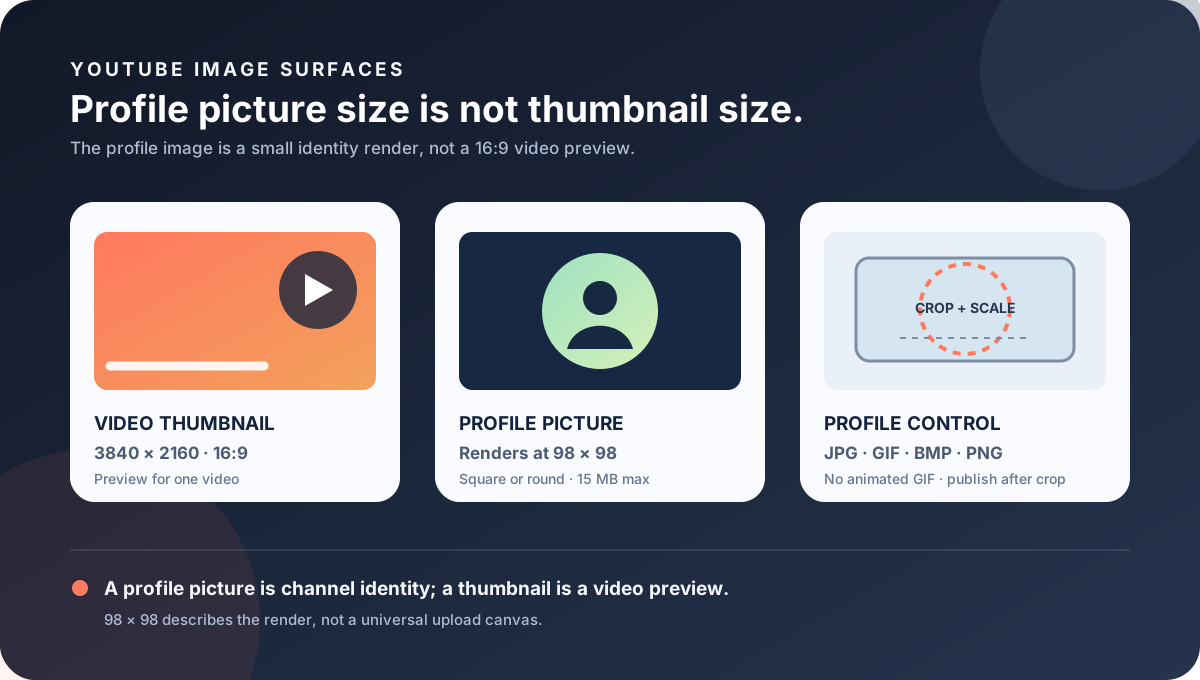
Which YouTube image size belongs to which asset?
| Asset | First-party size and shape | Where it appears or is configured | Do not infer |
|---|---|---|---|
| Regular video thumbnail | 3840 × 2160 recommended; 16:9; minimum width 640 px for videos. | Studio, Content, selected video, Thumbnail, Upload file, Save; used as a preview. | Do not use the thumbnail canvas as a profile-picture source rule. |
| Channel profile picture | Square or round image; renders at 98 × 98 px; JPG, GIF, BMP, or PNG; no animated GIF. | Studio, Customization, Profile; channel page, comments, and most playback modes. | Do not claim that 98 × 98 is the only valid upload canvas. |
| Channel banner | Minimum 2048 × 1152 at 16:9; 2560 × 1440 recommended; safe area applies. | Studio, Customization, Profile; top-of-channel background with device crops. | Do not compress a banner into a profile icon or thumbnail preset. |
| Video watermark | Minimum 150 × 150 px; square; less than 1 MB. | Studio, Customization, Profile; end, custom-start, or entire-video timing. | Do not use the watermark minimum as a profile picture or thumbnail size. |
| Shorts thumbnail | 2160 × 3840 recommended; 9:16 guidance. | Studio on a computer for custom Shorts thumbnails; account verification is required. | Do not rotate the Shorts source into a channel identity rule. |
The official branding page lists profile picture, banner, and video watermark as separate Profile assets. The profile picture is an identity image that renders at 98 × 98, the banner is a large background with device crops, and the watermark is a square image below 1 MB with timing controls. The shared navigation does not make their export rules interchangeable.
The custom-thumbnail page lists regular video, Shorts, and podcast thumbnail guidance separately. A regular video uses 16:9 and 3840 × 2160 as a recommended source, a Short uses 9:16 and 2160 × 3840, and a podcast playlist uses 1:1. None of those thumbnail recommendations replaces the profile picture's format, byte, crop, or rendered-size guidance.
The file-size wording is also different. The profile picture must not exceed 15 MB, while the video-thumbnail page describes device-dependent limits of 2 MB for video thumbnails on mobile and 50 MB for video, Shorts, and podcast thumbnails on desktop. Passing one upload gate does not prove that a file belongs in another asset's control.
What can Feed Thumbnail check?
Feed Thumbnail's public resizer is a browser-local video-thumbnail tool. It reads one PNG, JPG, or WEBP file, targets a fixed 1280 × 720 canvas, offers crop, fit, padding, or stretch treatments, and exports an upload-ready JPG. The page says the file stays on the device and that there is no account, server upload, batch queue, or image API.
The public downloader is also a video-image workflow. It accepts watch, Shorts, live, embed, and bare video-ID inputs, checks direct YouTube image files, keeps files that load, and reports their natural dimensions. It does not open the channel Profile editor, apply a square or round crop, or verify that a profile picture has propagated to comments or search.
The local 1280 × 720 preset is useful for the thumbnail side of this comparison, not the profile-picture side. A profile asset needs a square or round composition, a byte check below 15 MB, an intentional crop, and a small-size readability test. The local browser tool does not claim to be a YouTube channel-branding uploader.
Use the local tools to inspect assets you own and document their actual dimensions. For a private channel operation, record the signed-in account, Profile route, crop choice, file format, byte size, device, and surface where the update is expected. Do not turn a public local measurement into evidence that a profile picture was published.
What do LightX, Snappa, and Reddit add?
The opened LightX YouTube Thumbnail Resizer is an upload-and-edit workflow centered on a practical 1280 × 720 thumbnail preset. That is useful for the video-preview side of this article, but the page does not publish YouTube's 98 × 98 profile render, 15 MB profile limit, or Profile crop route.
The opened Snappa article recommends 1280 × 720 and 16:9 for common YouTube thumbnails. It helps explain the familiar thumbnail preset that creators may bring to a channel-branding question, but it is not first-party evidence for a profile picture. The official branding and profile-tips pages remain the source for square or round identity treatment and the 98 × 98 render.
The opened Reddit discussions were used as question signals. A youtubers thread reports a profile picture resetting to default until a browser changed; a NewTubers thread discusses blur after trying 800 × 800 images and several formats; a YouTube thread discusses stale or placeholder profile images in search. These reports support a browser, crop, cache, and surface test matrix, not a new official pixel formula.
No search volume, ranking position, click-through rate, traffic, conversion, subscription lift, or competitor-performance number is inferred from LightX, Snappa, Reddit, or YouTube's Help pages. The comparison is about asset boundaries and evidence quality only.
How should you prepare and verify a profile picture?
- Name the surface. Write video thumbnail, profile picture, banner, watermark, or Shorts thumbnail before opening an editor.
- Choose the correct source rule. Use the regular-video recommendation for a video preview; use a square or round profile asset that fits the JPG, GIF, BMP, PNG, and 15 MB rules.
- Keep the center legible. Test the logo at a small rendered size and avoid tiny text, thin strokes, and important edge details that can disappear inside a circular crop.
- Record the crop. Note whether YouTube's Profile control cropped or resized the image before you clicked Done.
- Check propagation. Allow time for the profile picture to update, then compare the channel page, a comment, and a playback surface on the relevant device.
- Check the actual file. Record width, height, format, byte size, and whether the file is an animated GIF, which the official guidance excludes.
- Publish only with authority. A signed-in Studio change requires channel ownership or explicit authorization; a local file check is not a completed channel update.
This checklist separates first-party format, byte, render, crop, and route guidance from local design choices and surface observations. It does not promise identical appearance in every YouTube interface.
YouTube thumbnail size and profile picture questions
What is the YouTube thumbnail size for a profile picture?
A profile picture is not a thumbnail. YouTube's branding guidance accepts JPG, GIF, BMP, or PNG, excludes animated GIFs, limits the image to 15 MB, and says it renders at 98 × 98 pixels. A regular video thumbnail has a separate 3840 × 2160 recommendation and 16:9 guidance.
Is 98 × 98 the required profile-picture upload size?
The reviewed page says the image renders at 98 × 98; it does not say that 98 × 98 is the only valid uploaded source canvas. Use a square or round composition, stay within the format and 15 MB rules, and test the crop.
Can I use a 3840 × 2160 thumbnail as a profile picture?
It is not the documented profile-picture workflow. A 16:9 thumbnail source needs to be re-composed into a square or round identity image and checked in the Profile crop control. Do not treat a video preview canvas as a channel logo.
Why is my YouTube profile picture blurry?
Check the source quality, crop, file size, browser or app, and the surface where you see it. YouTube says the profile picture renders at 98 × 98 and can appear in several small contexts; a crisp large file can still be difficult to read when reduced.
Does YouTube accept an animated GIF profile picture?
No. The branding page lists JPG, GIF, BMP, or PNG but explicitly excludes animated GIFs.
Does Feed Thumbnail make a profile picture?
No. Its public resizer targets a local 1280 × 720 video-thumbnail JPG, and its downloader inspects video image files. Neither tool signs in to YouTube Studio or configures a channel profile picture.
Keep the thumbnail and profile evidence separate
YouTube Help: Manage your channel branding is the source for the profile-picture formats, animated-GIF exclusion, 15 MB maximum, 98 × 98 rendered size, crop and resize control, Profile route, and propagation note. Reviewed 2026-10-29.
YouTube Help: Channel banner and profile picture tips is the source for the profile picture as a signature image or logo, square or round upload advice, and appearances on the channel page, comments, and most playback modes. Reviewed 2026-10-29.
YouTube Help: Add custom thumbnails on YouTube is the source for the separate 3840 × 2160 regular-video recommendation, 640 px minimum width, 16:9 guidance, device-dependent thumbnail byte limits, and Shorts and podcast thumbnail rules. Reviewed 2026-10-29.
YouTube Help: Channel customization is the source for the Home and Profile separation and for Profile controls that update the profile picture, banner, and video watermark. Reviewed 2026-10-29.
Feed Thumbnail's local thumbnail resizer and thumbnail downloader are the first-party sources for the 1280 × 720 browser-local video workflow and direct YouTube image-dimension checks. No signed-in profile-picture update was run.
LightX's YouTube thumbnail resizer, Snappa's YouTube thumbnail notes, and the opened profile update discussion, blurry profile picture discussion, and profile placeholder discussion were used as fixed comparison and question-signal sources only.