YouTube thumbnail size for Premieres: the landing page uses the video thumbnail
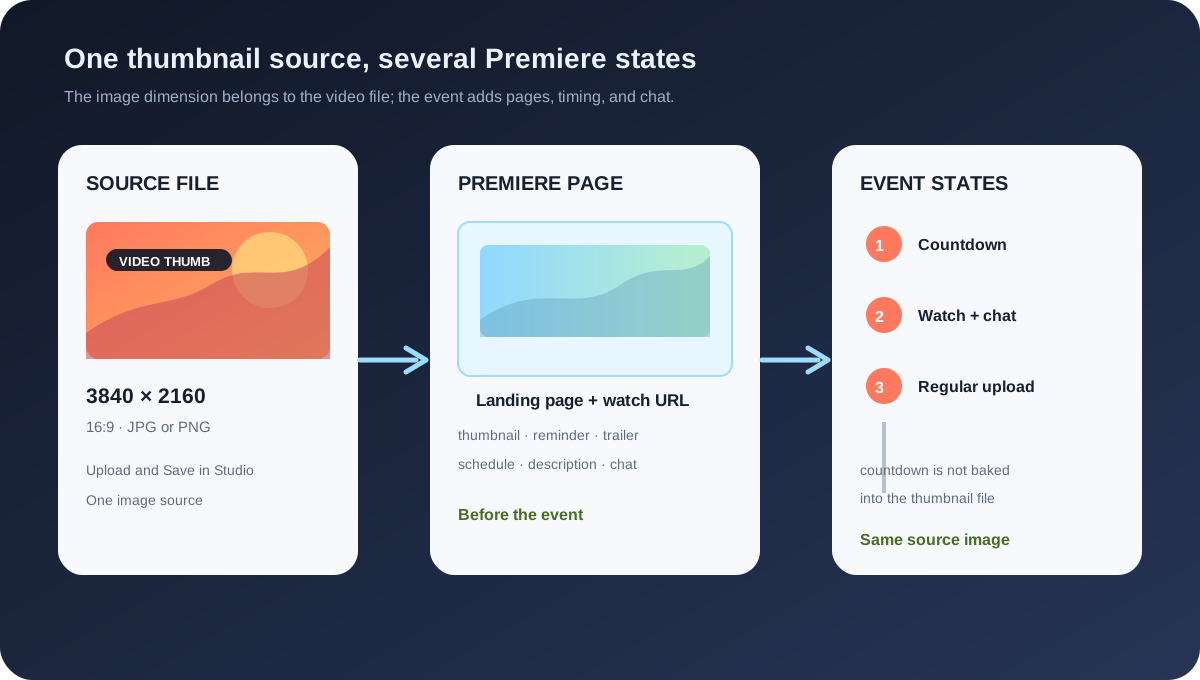
A YouTube Premiere does not need a separate “Premiere thumbnail” canvas. The current custom-thumbnail guidance recommends 3840 × 2160 for regular videos, a 16:9 aspect ratio, JPG or PNG, and a 640 px minimum width for videos. The Premiere guidance says that the custom thumbnail appears on the Premiere landing page and can reach the subscriptions feed before the event. The other Premiere controls are the public watch page, reminder, countdown, trailer, chat, and schedule.
Official sources: Add custom thumbnails on YouTube, YouTube Premiere tips, and Premiere a new video, reviewed 2026-11-01.
What is the YouTube thumbnail size for a Premiere?
YouTube's custom-thumbnail page describes a custom video thumbnail as the preview image for a video. Its current recommendation is 3840 × 2160 pixels for videos, with a minimum width of 640 pixels, JPG or PNG image formats, and a 16:9 aspect ratio. The page does not publish a different resolution for a Premiere.
YouTube's Premiere tips page says that scheduling a Premiere at least 24 hours in advance gives audiences around the world an opportunity to see the thumbnail in their subscriptions feed. It also says to choose the custom thumbnail carefully because the image will be on the Premiere landing page.
The Premiere page is therefore a display context for the same video packaging asset, not a reason to create a new image dimension. A creator may choose a different design for a Premiere campaign, but the official size evidence remains the custom video thumbnail guidance.
Same thumbnail file · New Premiere lifecycleWhere can viewers encounter the thumbnail before the video starts?
When a creator schedules a Premiere, YouTube creates a public watch page for the video to eventually premiere on. The Premiere page says that the watch page can be shared before the event and that Premieres can appear across YouTube like regular uploads, including search, the homepage, and video recommendations.
The Premiere tips page adds a subscriptions-feed timing detail: scheduling at least 24 hours in advance gives audiences around the world an opportunity to see the thumbnail in that feed. This is an exposure and scheduling statement, not a new thumbnail-size requirement.
Viewers can open the public watch page before the event, set a reminder, leave a comment, and chat. The reminder control is part of the Premiere page. It is not baked into the thumbnail file and should not be drawn into the 3840 × 2160 source as if it were guaranteed to sit at a fixed pixel position.
YouTube's Premiere tips also describe a shareable landing page, a URL, a reminder notification about 30 minutes before the Premiere begins, and optional promotion through posts, social media, and pinned comments. These are distribution and page behaviors around the thumbnail, not image dimensions inside it.
How do you configure a Premiere without mixing up the image and the event?
The current Premiere setup page starts in YouTube Studio with Create and Upload videos. After selecting the video and entering its details, the creator can choose an instant Premiere or schedule a date and time, then select Set as Premiere. Shorts are not supported for Premieres, and the page excludes 360 or VR180 videos and output greater than 1080p from this feature.
The custom-thumbnail route is separate inside the video details. YouTube's thumbnail Help page sends the creator to Content, the selected video, Thumbnail, Upload file or Get suggestions, and Save. The image is prepared and saved as a video thumbnail before the Premiere schedule is treated as an event state.
After the Premiere is scheduled, the public watch page and its countdown become the event layer. The thumbnail is still the preview image, while the reminder, chat, countdown, and any trailer are controls or content associated with the watch page. If a creator sees a layout difference, first identify whether the problem is the source file, page propagation, or the event configuration.
- Prepare the image. Verify the regular video thumbnail dimensions, format, bytes, crop, and readable small-size composition.
- Save the thumbnail. Use the selected video's Thumbnail control and record the save time; do not treat the Premiere schedule as proof that the file was accepted.
- Create the event. Choose instant or scheduled Premiere, set the date and time, choose the countdown, and save the event.
- Share the page. Use the public watch page URL, reminder, posts, social, or pinned comments as separate distribution actions.
- Check the surfaces. Compare the watch page, subscriptions feed, homepage, search, and the post-Premiere video page without assuming all update at the same moment.
What is a Premiere landing page allowed to show?
Before the Premiere starts, YouTube says the public watch page can be shared and viewers can set a reminder, leave a comment, or chat. If the creator has uploaded a trailer, it can play on the watch page. The thumbnail is the visual preview, while the page supplies the event controls around it.
The Premiere tips page suggests adding text in the video description to tease the content and using the landing page URL in promotion. That suggestion is separate from text placed inside the thumbnail. A creator can test whether the title, description, thumbnail, and reminder work together without claiming that the description changes the thumbnail canvas.
A Premiere can appear on the homepage, in search, and in video recommendations before its scheduled start. The same asset may therefore be rendered in several responsive surfaces. The official pages do not promise one exact displayed pixel size for each surface; they define the source image and the event behaviors.
What changes when the Premiere starts and ends?
YouTube's Premiere page says a countdown theme begins at the scheduled time for the chosen duration. When the countdown is over, viewers watch the video together in real time. Viewers can rewind what has already been shown, but cannot forward past what has been shown live.
During the Premiere, the creator and viewers can continue to interact in comments and live chat. Those interactions are watch-page and event behaviors. They are not embedded in the thumbnail file and should not be used to infer that a custom image was cropped incorrectly.
After the Premiere ends, YouTube says the video stays on the channel as a regular upload. The countdown theme is not included in the video, while chat replay remains available for viewers who want to experience the Premiere chat later. The post-event transition is another reason to keep the thumbnail source separate from the temporary Premiere UI.
A useful report should record the same thumbnail asset at three stages: the pre-release landing page, the countdown or live watch page, and the regular upload after the event. If the image differs, record the URL, surface, device, and time before concluding that the source dimensions were wrong.
Which rule belongs to the thumbnail, and which belongs to the Premiere?
| Layer | Official signal | Where it is configured | Do not infer |
|---|---|---|---|
| Video thumbnail | 3840 × 2160 recommended for videos; 16:9; JPG or PNG; 640 px minimum width for videos. | Studio, Content, selected video, Thumbnail, Upload file, Save. | Do not invent a separate Premiere-only pixel canvas. |
| Premiere landing page | Custom thumbnail appears on the landing page; shareable watch page exists before the event. | Premiere creation and the public watch page. | Do not treat the page frame or reminder control as part of the source image. |
| Subscriptions feed | Scheduling at least 24 hours ahead gives audiences an opportunity to see the thumbnail there. | Premiere schedule and audience distribution. | Do not promise a fixed display size or update time for every viewer. |
| Countdown and chat | Countdown theme and length; comments and live chat during the Premiere. | Premiere setup and watch-page event state. | Do not draw countdown or chat UI into the thumbnail as a required overlay. |
| Post-Premiere upload | Video stays on the channel as a regular upload; countdown is not included. | Automatic lifecycle transition after the event. | Do not assume a new thumbnail dimension appears when the event ends. |
The table separates the image rule, the landing page, the subscriptions-feed opportunity, the countdown and chat, and the post-Premiere upload. This prevents a common category error: using a page or event control as evidence about the image file.
The custom-thumbnail page has device-dependent byte limits for video thumbnails and podcasts. The Premiere pages do not add a separate byte limit or image extension. If an upload fails, record the device, file type, byte size, verification state, and Studio message before attributing the failure to the Premiere feature.
The Premiere page also says Shorts are not supported for Premieres and excludes 360 or VR180 videos and output greater than 1080p. Those are event eligibility rules. They do not change the regular video thumbnail recommendation for an eligible long-form video.
What can Feed Thumbnail check before a Premiere?
Feed Thumbnail's public thumbnail resizer is a browser-local video-thumbnail tool. It reads PNG, JPG, or WEBP input, targets a fixed 1280 × 720 canvas, offers crop, fit, padding, or stretch treatments, and exports a JPG. The page says the file stays on the device and that there is no account, server upload, batch queue, or image API.
The public downloader is a separate browser-side image workflow. It accepts watch, Shorts, live, embed, and bare video-ID inputs, checks direct YouTube image files, keeps files that load, and reports their natural dimensions. It can help record an exposed preview file, but it cannot open Studio, schedule a Premiere, set a reminder, or confirm the landing-page state.
A local preparation record can include the source file, width, height, aspect ratio, format, byte size, crop choice, and the date of export. A Premiere record needs the Studio save result, schedule, public watch page URL, countdown choice, trailer status, reminder test, and viewer surface. The two records should remain linked but separate.
Use the local tools for the image handoff and YouTube Studio for the event. If the preview looks wrong, keep the source file unchanged while checking whether the issue belongs to file validation, page propagation, schedule state, or the viewer's surface.
What do LightX, Snappa, and Reddit add?
The opened LightX YouTube Thumbnail Resizer is an upload-and-edit workflow centered on a practical 1280 × 720 preset. It exposes custom dimensions, pan and scale controls, and JPG or PNG export. It is useful for preparing the image file, but it does not publish Premiere landing-page behavior, scheduling rules, countdowns, or reminder controls.
The opened Snappa article recommends 1280 × 720 and 16:9 for common YouTube thumbnails, then discusses templates and Studio upload. It supports the ordinary source-file comparison. It is not first-party evidence for how a Premiere watch page, subscriptions feed, or countdown displays the image.
The opened Reddit question about a blank grey Premiere thumbnail reports a mismatch between a creator's uploaded image and what appeared on the homepage, while the image looked correct elsewhere. Another discussion asks why a Premiere thumbnail appears oversized on the Premiere screen, and a third reports different thumbnail behavior when a video is uploaded as a Premiere. These are reproduction prompts, not official dimensions or performance guarantees.
No search volume, ranking position, click-through rate, traffic, conversion, reminder rate, or Premiere lift is inferred from LightX, Snappa, or Reddit. The fixed benchmark line describes workflow differences and failure questions; YouTube Help remains the source for the product rules.
How to diagnose a Premiere thumbnail without guessing
- File check: record 3840 × 2160 or the chosen source dimensions, 16:9, JPG or PNG, byte size, crop, and the upload device.
- Studio check: record the selected video, Thumbnail control, Save result, verification state, and any displayed error.
- Event check: record instant or scheduled Premiere, date and time, countdown theme, countdown length, trailer status, and public watch page URL.
- Surface check: compare landing page, subscriptions feed, homepage, search, watch page, and post-Premiere video page.
- Time check: record when the file was saved, when the Premiere was scheduled, when the page was checked, and whether the event has started or ended.
- Conclusion: label the result as file, propagation, page, schedule, countdown, or viewer-surface evidence instead of calling every mismatch a size problem.
This checklist makes the key claim testable: the size belongs to the video thumbnail source, while the Premiere adds a lifecycle and a collection of page controls. A page mismatch should be reproduced across the relevant surfaces before changing the source file.
YouTube thumbnail size for Premieres
What thumbnail size does a YouTube Premiere need?
Use the current regular video thumbnail guidance: 3840 × 2160 recommended, 16:9, JPG or PNG, and at least 640 pixels wide for videos. YouTube's Premiere pages do not publish a separate Premiere-only size.
Does a Premiere have a different thumbnail canvas?
No. The official Premiere tips say the custom thumbnail appears on the Premiere landing page. The page, reminder, countdown, and chat are event layers around the image.
Why can the thumbnail look different before the Premiere?
The image can be rendered on the public watch page, subscriptions feed, homepage, search, or another surface at different display sizes and times. Record the surface and timestamp before changing the source file.
Can Shorts be Premieres?
The current Premiere setup page says Shorts are not supported for Premieres. This is an event eligibility rule, not a change to the regular video thumbnail dimensions.
Does Feed Thumbnail schedule Premieres?
No. Feed Thumbnail can prepare and inspect local image files. It does not sign in, upload a video, schedule a Premiere, set a reminder, or verify the public watch page.
Keep the thumbnail source and Premiere state separate
YouTube Help: Add custom thumbnails on YouTube is the source for the 3840 × 2160 regular-video recommendation, 640 px minimum width, 16:9 guidance, JPG or PNG formats, device-dependent byte limits, and the Studio thumbnail route. Reviewed 2026-11-01.
YouTube Help: YouTube Premiere tips is the source for the thumbnail in the Premiere landing page, the 24-hour scheduling opportunity in the subscriptions feed, the public landing page, shareable URL, reminder, countdown, description, trailer, and promotion context. Reviewed 2026-11-01.
YouTube Help: Premiere a new video is the source for the Create and Upload videos route, instant or scheduled Premiere, unsupported Shorts, 360/VR180 and greater-than-1080p limitation, public watch page, reminder, chat, countdown, and post-Premiere regular-upload behavior. Reviewed 2026-11-01.
Feed Thumbnail's local thumbnail resizer is the source for the 1280 × 720 browser-local workflow, while the thumbnail downloader is the separate image-variant inspection workflow. Neither opens YouTube Studio or verifies a Premiere.
LightX's YouTube thumbnail resizer, Snappa's YouTube thumbnail notes, and the opened grey Premiere thumbnail report, Premiere sizing question, and Premiere and thumbnail behavior discussion were used as fixed comparison and question-signal sources only.