YouTube thumbnail size for playlist covers: cover vs video thumbnail
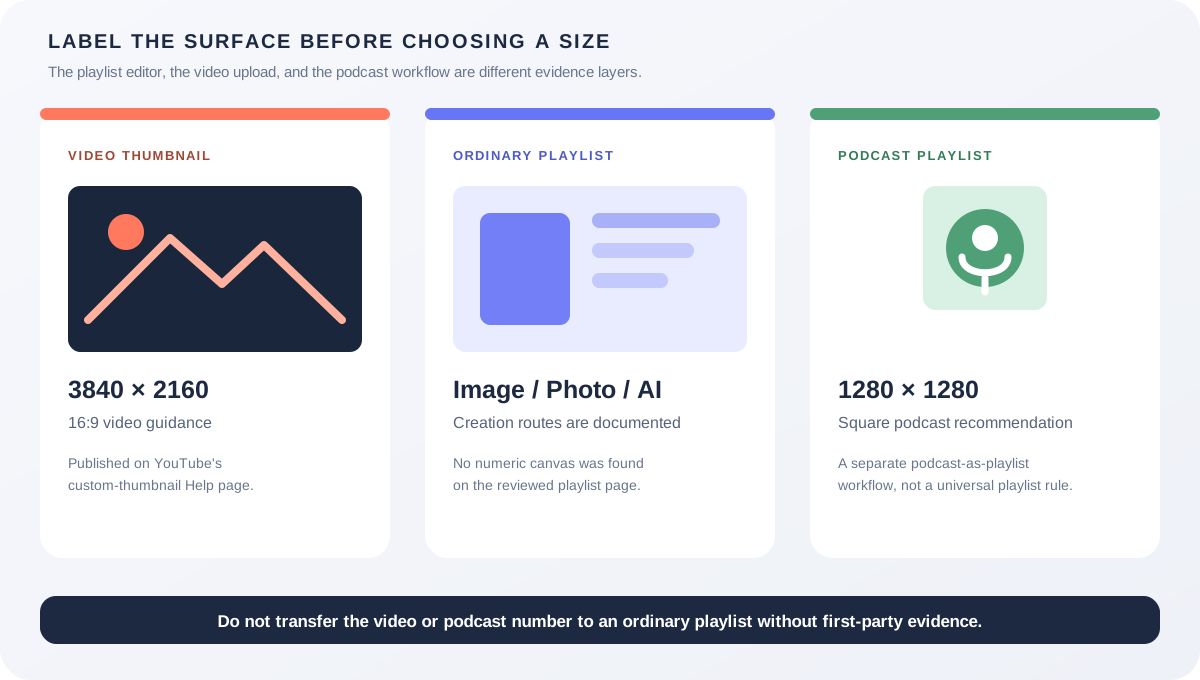
An ordinary playlist cover is not the same object as a video custom thumbnail. YouTube’s current playlist Help page says you can choose an image, take a photo, or create a playlist cover with AI, but the page reviewed here does not publish a numeric pixel canvas or aspect-ratio rule. Keep the official 3840 × 2160 / 16:9 video guidance for video thumbnails, the 1280 × 1280 recommendation for podcast playlist covers, and the ordinary playlist-cover workflow as three separate evidence layers.
Official sources: Add a playlist thumbnail, Add custom thumbnails on YouTube, and Create a podcast in YouTube Studio, reviewed 2026-10-24.
What is the YouTube thumbnail size for a normal playlist cover?
The ordinary playlist Help page says to open a playlist, select Edit, choose an image from the library, and use that image as the playlist thumbnail on computer. The Android page adds a camera route, optional text, filters, stickers, and a Create with AI route that offers themes and more options after a description change. These instructions describe creation and editing controls; they do not publish a resolution or ratio.
The video-thumbnail Help page is a different document and explicitly lists 3840 × 2160 for videos, 2160 × 3840 for Shorts, minimum widths or heights, JPG or PNG, device-specific MB limits, and ratios for video, Shorts, and podcast playlists. Its numbers should not be silently relabeled as an ordinary playlist-cover specification.
No numeric playlist-cover canvas was found in the reviewed pageWhy does the same word thumbnail cause confusion?
YouTube uses thumbnail language for several surfaces. A video custom thumbnail is attached to an individual video and is used as a preview image in the embedded player. A playlist thumbnail is attached to a collection. A podcast thumbnail is attached to a podcast show, which YouTube describes as a playlist with full-length episode videos. The surrounding product surfaces overlap, but the public size evidence does not.
| Object | What the official source publishes | What to record |
|---|---|---|
| Video thumbnail | 3840 × 2160, minimum width 640, JPG or PNG, 16:9 are the current video guidance. | Final pixel size, ratio, format, bytes, video route, and display surface. |
| Ordinary playlist cover | Choose an image, take a photo, or create with AI; the reviewed page states no numeric canvas. | Playlist type, source image, editing route, crop behavior, and visible result. |
| Podcast cover | Square is required for the podcast workflow, and YouTube recommends 1280 × 1280. | Podcast status, square source, 1280 × 1280 recommendation, and playlist details. |
The podcast Help page says a podcast show is a playlist and that podcast episodes are videos in that playlist. When editing podcast details, it requires a square podcast thumbnail and recommends 1280x1280 pixels. That is a useful contrast: YouTube gives a number for the podcast surface but not in the ordinary playlist-cover page reviewed for this guide.
The conclusion is deliberately narrow. “No numeric playlist-cover canvas was found” means the reviewed first-party page does not state one in its accessible instructions. It does not prove that every internal renderer accepts every file, that every account sees the same editor, or that a future page cannot add a dimension.
What can you do in the current playlist-cover workflow?
On computer, YouTube’s playlist page documents an Edit action followed by Choose from library. The page describes the selected image as the playlist thumbnail and does not ask the reader to enter a width, height, or ratio. If your account’s editor shows a crop or preview, record that account-level behavior instead of turning it into a universal pixel rule.
On Android, the playlist page documents three source routes: choose an existing image, take a new photo, or select Create with AI. The AI route asks you to pick a theme, optionally change a few words in the description, and select Create. The page does not state that the AI result is a 16:9 video thumbnail or a 1:1 podcast cover.
The platform tabs on the same Help page expose computer, Android phone and tablet, and iPhone and iPad variants. A difference in the visible editor can therefore be a device or rollout difference. A missing button should be logged as a route or account-surface observation, not converted into an unsupported size claim.
- Identify the collection. Confirm that it is an ordinary playlist, not a podcast show, a video, a Short, or a live-stream surface.
- Choose the route. Record computer, Android, or iPhone/iPad and the exact YouTube surface where Edit appears.
- Choose the source. Note whether the cover came from the library, a camera photo, a local editor, or Create with AI.
- Inspect the preview. Look for cropping, padding, text loss, and whether the cover is presented differently in YouTube or YouTube Music.
- Keep the dimension claim bounded. If the Help page does not state a number, say “the page does not publish a numeric canvas” and preserve your measured account observation separately.
- Save and re-check. Record whether the cover persisted, where it appeared, and whether a later playlist edit replaced it.
Practical rule: an ordinary playlist cover can be prepared as a local image, but Feed Thumbnail’s 1280 × 720 video canvas is a convenience for video-thumbnail preparation, not proof of a playlist-cover specification.
When should you use the square podcast rule instead?
Use the square podcast rule when the playlist is being used as a YouTube podcast show. YouTube says a podcast show is a playlist, but it adds podcast-specific details, full-length episode expectations, podcast features, and a square podcast thumbnail. The podcast workflow recommends 1280x1280 for that cover.
Do not infer that every playlist is a podcast because both surfaces have a cover. The podcast Help page says some playlists are not eligible for podcast features, including content the creator does not own, and it distinguishes podcast episodes from Shorts created to support the podcast. These are content and product classifications, not ordinary playlist-cover dimensions.
If a creator wants a normal thematic collection, keep the ordinary playlist page and its image/AI workflow as the source of truth. If the creator wants a podcast show, record the podcast designation, square cover, 1280 × 1280 recommendation, episode order, and the podcast-specific Studio route.
Square is documented for podcast covers, not automatically for every playlistCan a local tool determine a playlist-cover size?
The Feed Thumbnail resizer source uses a fixed 1280 × 720 canvas, a browser canvas, crop, fit, padding, and stretch modes, and a JPEG export. That is a reproducible 16:9 video-thumbnail preparation path. It does not claim to be a playlist-cover editor and it cannot inspect an account’s playlist preview or YouTube’s crop behavior.
The downloader source accepts watch, Shorts, live, embed, and bare video-ID inputs and measures public image variants after they load. A playlist URL is not the same as a video ID, and a loaded video thumbnail cannot prove the dimensions or crop of a playlist cover. Treat the downloader’s image evidence as a public video-surface check only.
A local checklist can still help: save the source file, record its pixel dimensions and bytes, export a few aspect-ratio variants if the playlist editor visibly crops them, and compare screenshots from the same account and route. Label those as reproducible observations, not first-party numeric requirements.
Use the thumbnail resizer for a local video-thumbnail canvas, the thumbnail downloader for public video image variants, and YouTube thumbnail size for the official video source guidance.
What do LightX, Snappa, and Reddit add?
The opened LightX YouTube Thumbnail Resizer page presents a 1280 × 720 preset and custom dimensions. That is useful for a video-thumbnail source file, but it does not establish a YouTube playlist-cover canvas, playlist editor crop, or podcast-cover requirement.
The opened Snappa YouTube thumbnail-size page focuses on the 1280 × 720, 16:9 video workflow, templates, and upload guidance for a video. It is not first-party evidence for ordinary playlist covers and does not document the playlist image, camera, or AI routes.
The opened Reddit feature-change discussion says a creator noticed the set-playlist-thumbnail option return after a period when it seemed unavailable. This is a rollout and product-surface signal, not evidence for a numeric size. The opened YouTube Music discussion reports custom playlist thumbnails, regional or device differences, phone prompts, and an editor that some users saw on desktop or mobile. These are community observations only.
The opened Reddit bug discussion asks about a missing set-video-as-playlist-thumbnail option and includes replies about custom playlist thumbnails and reverting to an automatically selected video. It shows why “which image is used” and “what size is it” are separate questions. No claim about current universal behavior is inferred from the archived thread.
No search volume, traffic, ranking, click-through rate, conversion, or competitor-performance number is inferred from these benchmark pages or discussions.
What should you record before publishing a playlist cover?
- Classify the surface. Write ordinary playlist, podcast playlist, video, Short, live stream, or YouTube Music playlist before selecting a dimension.
- Capture the official rule. For a video, cite 3840 × 2160 / 16:9. For a podcast cover, cite square and 1280 × 1280. For an ordinary playlist cover, record that the reviewed page states the creation routes but no numeric canvas.
- Record the route. Note computer, Android, or iPhone/iPad, plus the exact Edit, Choose from library, Take photo, or Create with AI controls visible.
- Measure your asset. Save width, height, format, and bytes even when YouTube does not publish a playlist-cover number. This is a measurement of your file, not a platform guarantee.
- Check the crop. Keep text and faces away from edges until the account-level editor and target surface show how the cover is presented.
- Keep the log honest. Separate first-party documentation, local tests, public screenshots, Reddit questions, and creator judgment. Do not turn a community workaround into a universal rule.
This checklist helps preserve the boundary between an official specification and an observed playlist-cover editor. It does not replace a signed-in YouTube test.
YouTube thumbnail size and playlist cover questions
What is the official YouTube thumbnail size for an ordinary playlist?
The ordinary playlist Help page reviewed here explains how to choose an image, take a photo, or create a cover with AI, but it does not state a numeric resolution or aspect ratio. Do not present the video 3840 × 2160 rule as an ordinary playlist-cover specification.
Can I use 1280 × 720 for a playlist cover?
It is a practical 16:9 working canvas used by Feed Thumbnail, LightX, and Snappa for video thumbnails. It may be a useful experiment for a playlist editor, but the official ordinary-playlist page reviewed here does not guarantee that canvas.
Is a YouTube playlist cover always square?
No universal square rule was found for ordinary playlists. YouTube’s podcast workflow is explicitly square and recommends 1280x1280, but that is a podcast-cover rule. Keep the two playlist types separate.
Can YouTube create a playlist cover with AI?
The Android playlist Help page says to open Edit, choose Create with AI, pick a theme, optionally change a few words in the description, and select Create. Treat the generated result as a playlist-cover creation route, not as a published pixel preset.
Can Feed Thumbnail test my playlist cover?
No. It can measure a local file and prepare a 1280 × 720 video-thumbnail canvas, but it cannot sign in to a playlist, reproduce private account UI, or guarantee how YouTube crops a playlist cover on every surface.
Keep playlist covers separate from video thumbnails
YouTube Help: Add a playlist thumbnail — Computer is the source for the ordinary playlist image and Choose from library route. Reviewed 2026-10-24.
YouTube Help: Add a playlist thumbnail — Android is the source for the image, camera, text/filter/sticker, and Create with AI routes. Reviewed 2026-10-24.
YouTube Help: Add custom thumbnails on YouTube is the source for the separate video and Shorts dimensions, formats, MB limits, and ratios. Reviewed 2026-10-24.
YouTube Help: Create a podcast in YouTube Studio is the source for the podcast-as-playlist distinction, square podcast cover, and 1280x1280 recommendation. Reviewed 2026-10-24.
Feed Thumbnail’s resizer source and downloader source are the first-party sources for the local 1280 × 720 video path and public video image-variant behavior. No private playlist test was run.
LightX’s YouTube thumbnail resizer, Snappa’s YouTube thumbnail notes, and the opened Reddit feature-change discussion, YouTube Music playlist-cover discussion, and playlist-thumbnail bug discussion were used as fixed comparison and question-signal sources only. No benchmark performance was estimated.