YouTube thumbnail size vs info cards: cards have no upload canvas
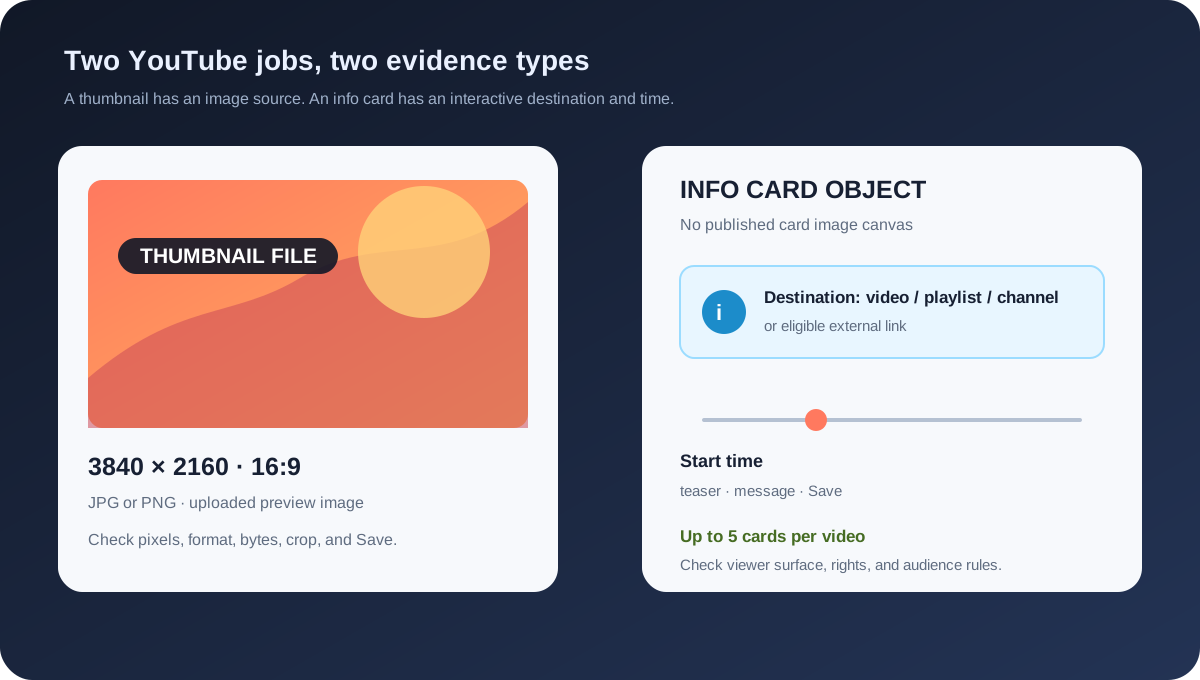
A custom video thumbnail is an image file; an info card is a timed YouTube Studio object that points to a video, playlist, channel, or eligible external link. YouTube's current custom-thumbnail guidance recommends 3840 × 2160 for regular videos and 16:9. The info-card page instead describes a five-card limit, a start time, optional message and teaser text, and a player interaction. It does not publish a required JPG, PNG, width, height, or standalone card canvas.
Official sources: Add info cards to videos and Add custom thumbnails on YouTube, reviewed 2026-10-31.
What is the YouTube thumbnail size compared with an info card?
YouTube's custom-thumbnail page treats the thumbnail as a quick snapshot of the content and recommends 3840 × 2160 for regular videos, a minimum width of 640 pixels for videos, JPG or PNG image formats, and a 16:9 aspect ratio. The file can become the preview image in the embedded player. Those are image-source instructions.
YouTube's info-card page treats the card as an interactive feature added in the Editor. The documented card types are video, playlist, channel, and, for creators in the YouTube Partner Program, an external link. The creator chooses what the card points to and when its teaser begins.
The reviewed info-card page does not say to upload a card image, export a card PNG, or create a card at a named pixel dimension. A thumbnail preset such as 3840 × 2160 or 1280 × 720 can prepare a video preview, but it cannot prove that an info card has been configured or that its teaser will appear.
Thumbnail = image file · Info card = timed destinationWhere do you add each surface?
For a custom video thumbnail, YouTube's computer Help page sends the creator to YouTube Studio, Content, the selected video, and the Thumbnail control. The creator chooses Upload file or Get suggestions and saves the change. This route stores a preview image for the video.
For an info card, the official route is Studio, Content, the selected video, Editor, Info cards, and a card type. The creator then chooses a destination, changes the start time below the video, adds optional message and teaser text, and selects Save. This route edits a timeline-linked interaction, not a static image slot.
The two routes can be used on the same video, but they produce different records. A thumbnail check can confirm dimensions, file type, crop, and local export. An info-card check needs the destination, start time, teaser copy, audience setting, viewer surface, and whether YouTube actually exposes the card.
The phrase “YouTube thumbnail size” therefore answers only part of a creator's preparation question. If the next action is Upload file under Thumbnail, prepare an image file. If the next action is Info cards under Editor, do not look for a missing card-size field; look for the card type, destination, time, copy, and Save state.
What does an info card contain?
A video card links to a public YouTube video. A playlist card links to a public YouTube playlist. A channel card points viewers to a YouTube channel, including a channel that helped with the video or that the creator wants to recommend. These destinations are content objects; none is a thumbnail-image upload.
A link card can point to an external website when the creator is in the YouTube Partner Program. YouTube's page also warns that the linked website must comply with its policies, Community Guidelines, and Terms of Service. That eligibility and policy boundary is different from a thumbnail file-size limit.
The creator can add an optional message and teaser text about the video. The official page says message and teaser text are required for channel cards. Copy therefore belongs in the card configuration and should be checked as copy, not placed inside a thumbnail canvas because the card has no published image dimension.
A practical evidence record for a card should preserve the selected type, destination URL or channel, chosen start time, message, teaser, Save result, and a viewer-side check. A local thumbnail tool can preserve the source image and its dimensions, but it cannot observe a signed-in Studio object or confirm that YouTube delivered the teaser.
Why might a card be missing when the thumbnail is fine?
YouTube says a creator can add up to five cards to one video. That is a count limit on interactive objects, not a maximum number of thumbnail exports. If the sixth item is not available, changing the thumbnail from 1280 × 720 to 3840 × 2160 will not create another card slot.
The creator chooses a start time for each card. Viewers see a teaser at the designated time, and when the teaser is not showing they can hover over the player and select the card icon. On mobile, the official page describes the card icon as visible when player controls are showing. A hidden teaser can therefore be a timing or viewer-surface question rather than an image-resolution error.
The official page says cards are shown below the video description and that viewers can scroll through multiple cards while the video plays. It also says videos displaying cards will not show a Call-to-Action overlay. A creator should not treat a changed overlay as proof that the thumbnail was resized or rejected.
Cards will not show if the video has a Content ID claim and the content owner has set up a campaign. Cards are also unavailable on videos set as made for kids, and the page says the feature is available to viewers on computers. These are content, rights, audience, and surface conditions, not a card pixel requirement.
YouTube says the system may improve which teasers and cards are most relevant based on performance, viewer behavior, and device. A saved card in Studio is therefore not the same evidence as a guaranteed teaser at an identical position for every viewer. Record the device, signed-in state, video timestamp, audience setting, and card destination during a reproduction check.
- Confirm the image separately. Check the thumbnail file's width, height, format, byte size, crop, and the Studio save result.
- Confirm the card separately. Check card type, destination, start time, message, teaser copy, and the five-card count.
- Reproduce the viewer surface. Note computer or mobile context, player controls, made-for-kids setting, Content ID state, and whether the card icon or teaser appears.
Which YouTube rule belongs to which surface?
| Surface | First-party size or rule | Where it is configured | Do not infer |
|---|---|---|---|
| Regular video thumbnail | 3840 × 2160 recommended; 16:9; minimum width 640 px for videos; JPG or PNG guidance. | Studio, Content, selected video, Thumbnail, Upload file, Save. | Do not turn the image dimensions into an info-card canvas or timing rule. |
| Info card | Up to five cards; video, playlist, channel, or eligible link; start time; message and teaser text. | Studio, Content, selected video, Editor, Info cards, destination, Save. | Do not claim that YouTube publishes a card PNG, JPG, width, or height requirement. |
| End screen | Last 5–20 seconds; up to four elements for a standard 16:9 video; video at least 25 seconds. | Studio, Content, selected video, Editor, End screen. | Do not treat end-screen timing or element count as thumbnail dimensions. |
| Feed Thumbnail resizer | Local 1280 × 720 target with crop, fit, padding, or stretch choices and JPG export. | Browser-local tool; no YouTube Studio connection. | Do not use a local export as proof that a card is saved or visible. |
| Feed Thumbnail downloader | Loads direct YouTube image variants and reports their natural dimensions. | Browser-only video-image inspection. | Do not use a downloaded image dimension to infer an info-card state. |
The table keeps an uploaded preview, an Editor card, an end screen, and two local image tools in separate rows. The evidence type changes by row: resolution and format for the thumbnail, destination and timing for the card, timeline and elements for the end screen, and local file behavior for Feed Thumbnail.
The custom-thumbnail page includes device-dependent byte limits: 2 MB for video thumbnails on mobile, 10 MB for podcast thumbnails on mobile, and 50 MB for video, Shorts, and podcast thumbnails on desktop. The info-card page does not provide a parallel file-byte limit because it does not describe a card image upload.
A card may recommend a different video or playlist even when the current thumbnail is valid. Conversely, a thumbnail may appear while a card is unavailable because of the video setting, Content ID campaign, viewer surface, start time, or card-count limit. Diagnose the object that failed instead of changing an unrelated image dimension.
What can Feed Thumbnail check?
Feed Thumbnail's public thumbnail resizer is a browser-local video-thumbnail tool. It reads a PNG, JPG, or WEBP file, targets a fixed 1280 × 720 canvas, offers crop, fit, padding, or stretch treatments, and exports a JPG. Its page says the file stays on the device and that there is no account, server upload, batch queue, or image API.
The public downloader is also a video-image workflow. It accepts watch, Shorts, live, embed, and bare video-ID inputs, checks direct YouTube image files, keeps files that load, and reports their natural dimensions. It does not open YouTube Studio Editor or inspect a card destination, time, or teaser.
The local tools can create an honest handoff: save the source thumbnail, note the dimensions, record the format and byte size, and keep the card plan as a separate text checklist. They cannot sign in, add a card, verify a Content ID state, or establish what every viewer sees.
Use the resizer for the image job and YouTube Studio for the card job. If a card is missing, preserve the thumbnail file unchanged while checking the Editor state, audience setting, rights state, time, count, and viewer surface. This keeps a local file assertion separate from a first-party interaction assertion.
What do LightX, Snappa, and Reddit add?
The opened LightX YouTube Thumbnail Resizer is an upload-and-edit workflow centered on a practical 1280 × 720 preset. It describes upload, resizing, download, custom dimensions, panning, and JPG or PNG export. That is useful for the thumbnail side of this article, but it does not publish YouTube's card types, five-card limit, teaser timing, or viewer restrictions.
The opened Snappa article recommends 1280 × 720 and 16:9 for common YouTube thumbnails, then walks through a thumbnail template and Studio upload workflow. It helps explain why a creator may arrive with an image preset in mind. It is not first-party evidence for an info-card image canvas, card count, or card availability.
The opened Reddit discussions were used as question signals rather than dimension sources. One r/youtube report describes cards disappearing for a logged-in viewer; a second report describes cards not appearing on Shorts; a third report describes cards missing on desktop until a viewer setting was changed. These reports support a device, account, and surface reproduction checklist, not a universal rule.
No search volume, ranking position, click-through rate, traffic, conversion, card lift, thumbnail performance, or competitor-performance number is inferred from LightX, Snappa, or Reddit. The fixed benchmark line is a workflow comparison and a source of failure modes; official YouTube Help remains the evidence for the product rules.
How to check a thumbnail and an info card without mixing them
Start with the file. Record whether the asset is for a regular video, a Short, or a podcast playlist, then check the corresponding current recommendation, aspect ratio, format, byte limit, and upload device. For a regular video, the reviewed official page recommends 3840 × 2160, 16:9, and JPG or PNG with a 640 px minimum width.
Then move to Studio and inspect the thumbnail route. Content, selected video, Thumbnail, Upload file, and Save answer whether the preview image changed. Do not use a successful thumbnail save as evidence that a card was added; the card has its own Editor route.
For the card route, select Editor and Info cards. Count the existing cards, identify the destination, inspect the start time and message or teaser, and save. If the destination is external, confirm the Partner Program and policy boundary before treating the card as eligible.
Finally, test the viewer surface. Record the timestamp, device, browser or app, signed-in state, audience setting, Content ID state if known, and whether the teaser, card icon, or cards below the description appear. A viewer report that says “the card is not there” is incomplete until those variables are recorded.
- File evidence: dimensions, aspect ratio, format, byte size, crop, source path, and thumbnail save time.
- Studio evidence: card type, destination, number of cards, start time, message, teaser, and Save result.
- Viewer evidence: timestamp, device, player controls, audience setting, rights context, teaser, card icon, and below-description cards.
YouTube thumbnail size and info-card questions
What size should an info-card image be?
The reviewed YouTube Help page does not specify an info-card image because it describes a card as a Studio interaction with a destination, start time, message, and teaser. Use the official thumbnail dimensions only for the thumbnail file.
Can I upload a 3840 × 2160 image to an info card?
No. The 3840 × 2160 recommendation belongs to a regular video thumbnail. An info card is configured in the Editor and does not have the same upload field.
How many info cards can one video have?
YouTube says up to five cards can be added to one video. That is an interactive-object limit, not a thumbnail image count.
Why can a thumbnail show while an info card is missing?
The thumbnail and card have separate routes and conditions. Check card timing, card count, destination, Content ID campaign, made-for-kids setting, viewer surface, and player controls before changing the thumbnail file.
Does Feed Thumbnail add YouTube info cards?
No. Feed Thumbnail's resizer and downloader are browser-local image tools. They do not sign in, open Studio Editor, save a card, or verify what viewers see.
Keep the thumbnail and card evidence separate
YouTube Help: Add info cards to videos is the source for the four card types, five-card limit, Studio Editor route, start time, message and teaser text, viewer interaction, below-description placement, Content ID campaign behavior, Call-to-Action overlay behavior, computer availability, and made-for-kids restriction. Reviewed 2026-10-31.
YouTube Help: Add custom thumbnails on YouTube is the source for the separate 3840 × 2160 regular-video recommendation, 640 px minimum width, 16:9 guidance, JPG or PNG formats, device-dependent byte limits, and the distinct Shorts and podcast rules. Reviewed 2026-10-31.
Feed Thumbnail's local thumbnail resizer is the source for the 1280 × 720 browser-local target, crop and fit options, and local export boundary. The thumbnail downloader is a separate image inspection tool and does not inspect Studio cards.
LightX's YouTube thumbnail resizer, Snappa's YouTube thumbnail notes, and the opened logged-in card report, Shorts card report, and desktop card report were used as fixed comparison and question-signal sources only.