YouTube thumbnail size and feature access: verify before upload
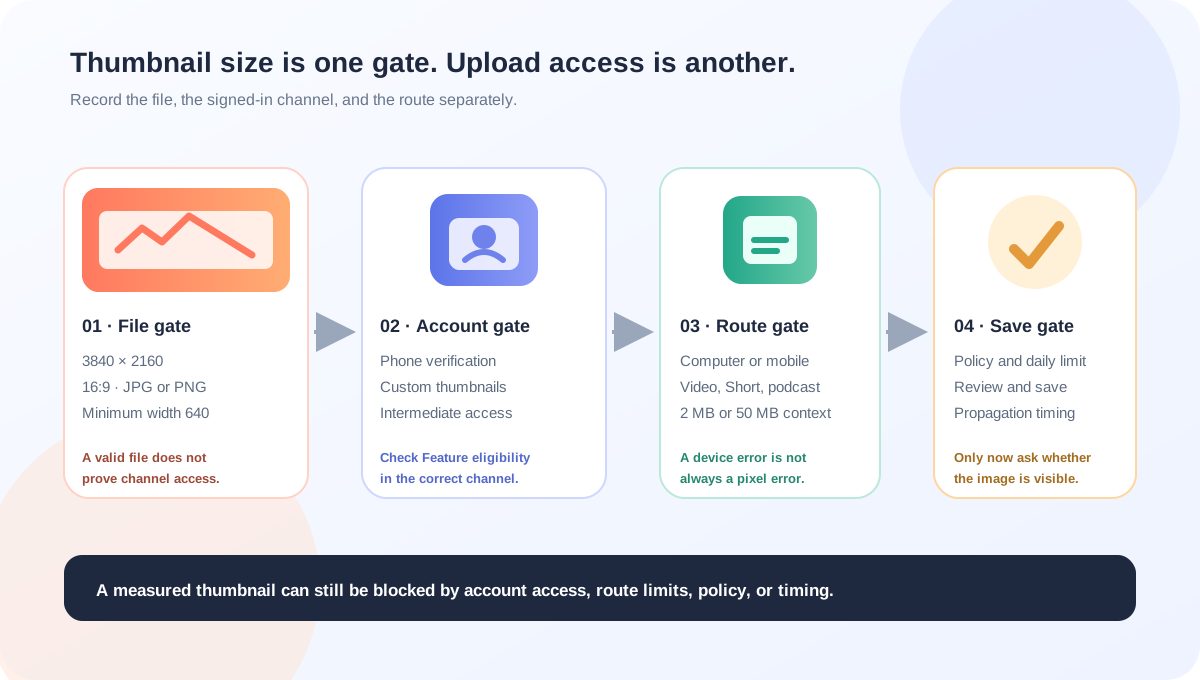
A correct YouTube thumbnail size does not unlock the upload button. YouTube’s current Help pages separate the image gate from the account gate: the public source guidance recommends 3840 × 2160 for videos, a minimum width of 640, JPG or PNG, and 16:9, while phone verification unlocks custom thumbnails as an intermediate feature. Check the file and the channel’s Feature eligibility state as two different things.
Official sources: Add custom thumbnails on YouTube, See & unlock features with phone verification, and Learn about feature access for YouTube Creators, reviewed 2026-10-23.
What is the YouTube thumbnail size before you check feature access?
YouTube’s custom-thumbnail Help page says creators can upload their own image if the account is verified. It then lists the ordinary video-thumbnail source guidance: 3840 × 2160 pixels, minimum width 640 pixels, JPG or PNG formats, and a 16:9 aspect ratio. These are properties of the image, not a promise that every channel sees an Upload file control.
YouTube’s feature-access table places Custom thumbnails under Intermediate features. It says phone-number verification provides access with a limited daily limit, while advanced access through channel history or identity verification can provide a higher daily limit. The exact number of actions is not published in the table.
Measure the file and check the channel separatelyWhy a thumbnail can be the right size and still fail to upload
The official pages describe several different decisions that happen around a thumbnail. A file can satisfy the documented dimensions while the account lacks custom-thumbnail access, the device route exceeds its size limit, the channel has reached a daily limit, or the image triggers a policy restriction. Calling all of those problems “thumbnail size” hides the useful next test.
| Gate | Published evidence | Local question to record |
|---|---|---|
| Pixels | 3840 × 2160 is the current video recommendation; minimum width is 640; JPG or PNG are listed. | What are the final width, height, format, ratio, and file bytes? |
| Access | Custom thumbnails are an intermediate feature made available through phone verification. | Does YouTube Studio show the feature as Enabled for this channel? |
| Device | Mobile video thumbnails have a 2 MB limit; desktop video, Shorts, and podcast thumbnails have a 50 MB limit. | Which device and upload route will carry the file? |
| Policy and limits | Daily limits and Community Guidelines can affect upload access even when the file is valid. | Is the error about access, a daily limit, policy, or the file itself? |
The custom-thumbnail Help page gives different MB limits by upload device: 2 MB for a mobile video thumbnail, 10 MB for a mobile podcast thumbnail, and 50 MB for video, Shorts, and podcast thumbnails on desktop. The page also says daily custom-thumbnail limits can vary by country or region and channel history. Neither limit can be diagnosed from pixel dimensions alone.
How do you check whether custom thumbnails are enabled?
YouTube’s phone-verification Help page directs creators to open YouTube Studio on a computer, choose Settings, open Channel, open Features, and select the features that require phone verification. It says phone verification unlocks Custom thumbnails, Live streaming, videos longer than 15 minutes, and copyright-claim appeals.
The same page distinguishes Brand Account permissions from ordinary channel permissions: a Brand Account owner or manager can phone-verify the channel, while a non-Brand channel requires the channel owner rather than a manager, editor, or viewer. This is an account-role boundary, not a file-format rule.
The feature-access Help page adds a more detailed model. Standard features are available when a channel is created if there are no active Community Guidelines strikes. Intermediate features require phone verification. Advanced features may come from sufficient channel history or identity verification, and access can change when a channel is restricted by Community Guidelines or copyright strikes.
- Prepare the image anyway. Check the final file against 3840 × 2160 / 16:9, the minimum width, the format, and the device-specific MB limit. A file check remains useful even before the account is enabled.
- Open the signed-in Studio account. Use the account that owns or controls the channel. Do not infer access from a different channel or Google account.
- Open Feature eligibility. In YouTube Studio on a computer, go to Settings → Channel → Feature eligibility and look for the enabled state.
- Complete the documented verification route. If Custom thumbnails is under phone verification, follow YouTube’s own verification flow. Do not use someone else’s number or attempt to bypass the account gate.
- Re-check the route. Return to the video’s Thumbnail control and distinguish an Upload file button, a verification prompt, a daily-limit message, and a file-size error.
- Record the result. Note the device, channel role, feature state, file bytes, and exact error text without publishing private account information.
Important boundary: Feed Thumbnail can prepare and measure an image, but it cannot verify a YouTube channel, open Feature eligibility, or complete a phone, ID, or video check on your behalf.
Does the upload device change the YouTube thumbnail size rule?
The recommended video canvas does not become a different pixel rule just because the file was prepared on a phone. The Help page does, however, distinguish the route and the file-size limit. Mobile video thumbnails have a 2 MB ceiling in the published guidance, while desktop video thumbnails have a 50 MB ceiling. A mobile upload can therefore fail because of bytes even when its width and height are correct.
On computer, YouTube Studio’s documented route is Content, select the video, open the Thumbnail control, then choose Upload file and save. The same page says custom Shorts thumbnails are currently available only in YouTube Studio on a computer. This is why a creator may have a valid 9:16 file but still not find a custom Shorts control in a phone app.
On Android, YouTube documents both the YouTube Studio app and the main YouTube app as routes for editing a custom video thumbnail. Both routes require selecting the video, opening Edit thumbnail, choosing a device image, confirming the selection, and saving. The route is a product workflow; it is not evidence that the image should be 1280 × 720 instead of the official source recommendation.
For podcast playlists, YouTube publishes a separate 1:1 thumbnail direction and a 10 MB mobile podcast limit. Do not apply the ordinary 16:9 video rule to a square podcast cover just because both are called thumbnails. The existing podcast guides cover that surface-specific distinction.
A missing control is not proof of a bad canvasCan a local resizer prove that YouTube will accept the file?
The Feed Thumbnail resizer source uses a fixed 1280 × 720 canvas, reads the chosen image locally, and exports a browser-side JPEG. It checks the mobile 2 MB threshold by trying a sequence of local JPEG quality settings, then reports whether the lowest tested export is under or still over that threshold. This is a reproducible preparation check, not a YouTube account check.
The resizer accepts local image types beginning with an image MIME type, shows the browser-reported source dimensions and bytes, and keeps the source on the device. Its 1280 × 720 output is a convenient 16:9 working canvas; it does not claim to produce the official 3840 × 2160 recommendation, and it cannot unlock custom thumbnails.
The downloader accepts watch, Shorts, live, embed, and bare video-ID inputs, requests public i.ytimg.com image variants, and reports naturalWidth and naturalHeight only after a direct image loads. That can document a public image surface after upload, but it cannot establish whether a private channel was verified or whether the uploaded file passed a device-specific route.
Use the thumbnail resizer for a local 16:9 preparation check, the thumbnail downloader for public image variants, and YouTube thumbnail size for the current official source notes.
What do LightX, Snappa, and Reddit add to the access question?
The opened LightX YouTube Thumbnail Resizer page offers a 1280 × 720 preset, custom dimensions, editing, and JPG/PNG download. That is useful for preparing a file, but the page does not verify a YouTube account, inspect Feature eligibility, or confirm a mobile versus desktop upload route.
The opened Snappa size page focuses on the familiar 1280 × 720, 16:9 template workflow. It helps explain why many creators arrive with a correctly shaped file, but it does not establish whether the signed-in channel is allowed to upload custom thumbnails or what daily limit applies to that account.
The opened Reddit thread “Account verified, but still can’t upload custom thumbnails” is a troubleshooting signal about a creator who reports an account-level verification state and a continuing upload problem. The thread is not YouTube authority, and its suggested causes are not treated as facts here.
The opened Reddit thread “Unable to upload custom thumbnails even when I’m...” discusses Feature eligibility, one-time verification, and a possible daily cap. It is useful evidence that creators conflate size, access, and limits, but it does not publish a reliable threshold or a universal fix.
A third opened Reddit discussion about fully custom Shorts thumbnails reports a desktop rollout and surface-specific presentation questions. It is a community observation only; the current YouTube Help page remains the authority for the documented computer-only Shorts route and 9:16 recommendation.
No search volume, traffic, ranking, click-through rate, conversion, or competitor-performance number is inferred from these benchmark pages or discussions.
What should you record when a YouTube thumbnail will not upload?
- Record the asset. Write down width, height, aspect ratio, format, and file size. For a standard video, compare the file with 3840 × 2160 / 16:9 guidance.
- Record the route. Note computer Studio, Android Studio, the main Android app, or a Shorts upload flow. Include whether the content is a video, Short, live stream, or podcast playlist.
- Record the account gate. Check Feature eligibility in the correct channel and note whether Custom thumbnails is enabled, waiting for phone verification, or subject to a restriction.
- Record the error layer. Separate file-too-large, unsupported format, daily limit, verification prompt, policy warning, and “saved but not visible” cases.
- Record the timing. YouTube says thumbnail changes may take time to appear. Do not change a valid file repeatedly and accidentally turn a propagation question into a daily-limit question.
- Protect private data. Do not place phone numbers, identity documents, private Studio screenshots, confidential prompts, or channel credentials in a public evidence log.
This checklist keeps pixel evidence, account access, device route, policy, and propagation as separate fields. It is designed for diagnosis, not for bypassing YouTube’s verification or safety systems.
YouTube thumbnail size and feature access questions
Does 3840 × 2160 unlock custom thumbnails?
No. YouTube publishes 3840 × 2160 as the recommended video-thumbnail resolution, but the feature-access pages say Custom thumbnails are an intermediate feature unlocked through phone verification. File pixels and channel permission are separate gates.
What should I check if the Upload file button is missing?
Open YouTube Studio on a computer, go to Settings → Channel → Feature eligibility, and inspect the channel that owns the video. The official phone-verification page says Custom thumbnails appear among the features unlocked by phone verification. Do not diagnose the missing control from the file dimensions alone.
Is 1280 × 720 wrong?
Not necessarily for a practical 16:9 working canvas. LightX, Snappa, and Feed Thumbnail expose 1280 × 720 preparation paths, but YouTube’s current Help page recommends 3840 × 2160 for a video source. Keep the convenience canvas and the official recommendation clearly labeled.
Can I upload a custom Shorts thumbnail from a phone?
The current YouTube Help page says custom Shorts thumbnails are currently only available to add in YouTube Studio on a computer. It also recommends a 9:16 aspect ratio for uploaded Shorts thumbnails. A mobile app’s frame-selection feature is a different route from the documented custom-file control.
Can Feed Thumbnail verify my channel?
No. Feed Thumbnail can prepare a local image and inspect public image files, but it cannot sign in, phone-verify, inspect Feature eligibility, use identity verification, or save a private YouTube Studio change.
Keep file size, feature access, and upload route separate
YouTube Help: Add custom thumbnails on YouTube is the source for the verified-account requirement, computer and Android routes, Shorts computer-only custom upload note, 3840 × 2160 / 640 minimum / JPG or PNG / aspect-ratio guidance, device-specific MB limits, daily-limit wording, and policy boundaries. Reviewed 2026-10-23.
YouTube Help: See & unlock features with phone verification is the source for the Studio → Settings → Channel → Features path, Brand Account role distinction, and the statement that phone verification unlocks Custom thumbnails. Reviewed 2026-10-23.
YouTube Help: Learn about feature access for YouTube Creators is the source for Standard, Intermediate, and Advanced feature access, the limited versus higher daily-limit wording, Feature eligibility, and restrictions caused by policy or copyright history. Reviewed 2026-10-23.
Feed Thumbnail’s resizer source and downloader source are the first-party sources for the local 1280 × 720 JPEG path, local mobile-size check, browser-only behavior, and public image-variant lookup. No private YouTube account test was run.
LightX’s YouTube thumbnail resizer, Snappa’s YouTube thumbnail notes, and the opened Reddit verification troubleshooting thread, Feature eligibility discussion, and Shorts rollout discussion were used as fixed comparison and question-signal sources only. No benchmark performance was estimated.