YouTube thumbnail size vs end screen size: 16:9 is not the same asset
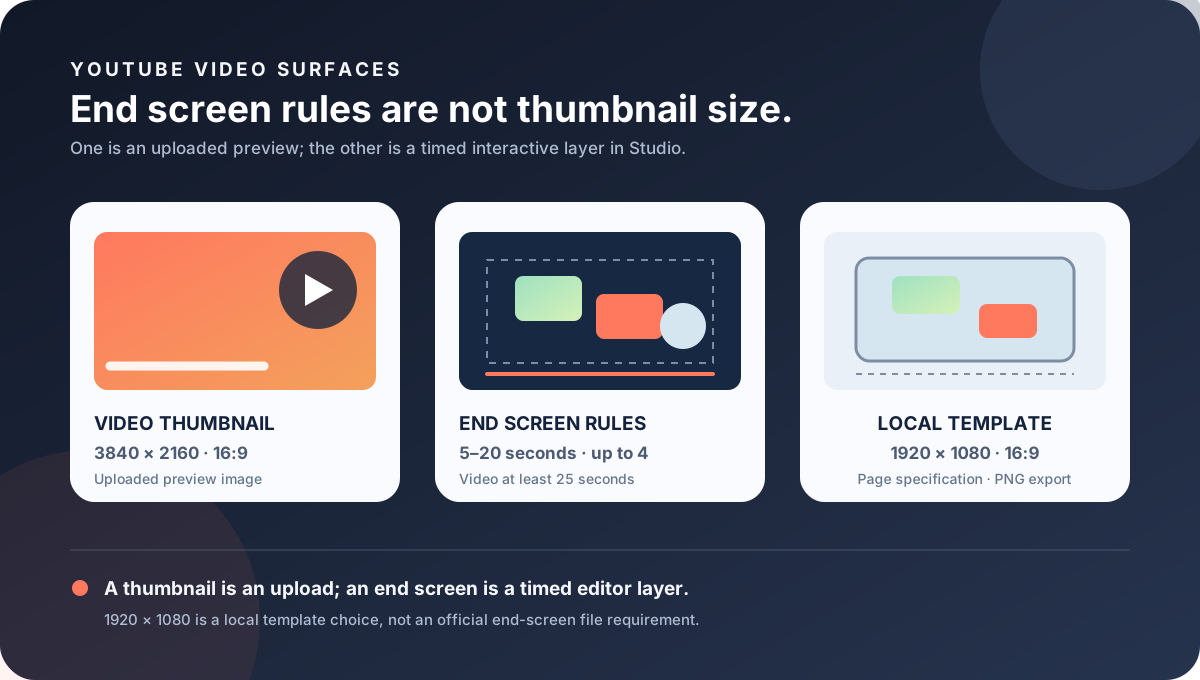
A video thumbnail is an uploaded preview image; an end screen is a timed layer of interactive elements added in YouTube Studio. The current custom-thumbnail guidance recommends 3840 × 2160 for a regular video and 16:9. The end-screen page describes the last 5–20 seconds, up to four elements for a standard 16:9 video, and a minimum video length of 25 seconds. The reviewed Help page does not publish a pixel canvas for an end-screen artwork file.
Official sources: Add end screens to videos, Add custom thumbnails on YouTube, and Manage your channel branding, reviewed 2026-10-30.
What is the YouTube thumbnail size compared with an end screen?
YouTube's custom-thumbnail page recommends a 3840 × 2160 resolution for regular videos, a minimum width of 640 pixels for videos, JPG or PNG formats, and a 16:9 aspect ratio. It describes the custom image as a quick snapshot of the content and says it can be used as the preview image in the embedded player.
YouTube's end-screen page says that end screens can be added to the last 5–20 seconds of a video. It permits up to four elements for videos with a standard 16:9 aspect ratio, notes that other aspect ratios may have a lower limit, and requires the video to be at least 25 seconds long.
The reviewed end-screen page explains timing, element count, eligibility, and the Studio Editor route, but it does not state that creators must upload one end-screen image at a named pixel dimension. A 1920 × 1080 or 1280 × 720 artwork file can be a production canvas, but that is a workflow choice unless a different first-party source says otherwise.
Thumbnail = uploaded preview · End screen = timed interactive layerWhere do you add each surface?
For a regular video thumbnail, YouTube's computer Help page sends the creator to YouTube Studio, then Content, then the selected video, and finally the Thumbnail control. The creator can upload a file or choose a generated suggestion and save it. This changes the preview image for that video.
For an end screen, YouTube sends the creator to Studio, Content, the selected video, and Editor. The creator selects End screen, applies a template or chooses an element, changes timing and placement, previews the result in the player, and saves. The system is editing the video surface rather than receiving a standalone thumbnail-like upload.
The official end-screen element choices include a video, playlist, subscribe prompt, channel, and, when eligible, a link. Those objects are interactive destinations or calls to action. A custom PNG background may sit behind them, but the element controls and timeline remain part of YouTube Studio.
This distinction explains why a search for “YouTube thumbnail size” can produce confusing 16:9 answers. Both a thumbnail and an end-screen composition may be designed against a wide video frame, but the thumbnail is an image file with resolution and byte guidance, while the end screen is an editor state with timing, element, and viewer-surface rules.
What does the end-screen rule actually control?
The end-screen timing window is the final 5–20 seconds. A creator can change when an element begins and ends on the timeline, then preview the result in the player. This is a temporal rule, not a pixel dimension. A still artwork can be 1920 × 1080 in a local editor and still require a separate Studio timeline configuration.
For a standard 16:9 video, YouTube says up to four elements can be added. Other aspect ratios may have a lower limit. The standard 16:9 phrase therefore affects the number of interactive slots, not just the shape of a background image.
The end-screen page says that other interactive elements, including card teasers and video watermarks, are suppressed during the end screen. A creator should not interpret a missing watermark or card as a thumbnail failure. It may be the expected interaction rule while the end screen is active.
Viewers can hide end screens while watching. The Help page also warns that an end screen may not always show or may show differently than designed as YouTube improves the feature based on performance, viewer behavior, device, and context. A local composition proves only the composition; it does not prove every viewer will see the same overlay.
Why might an end screen not appear?
The video must be at least 25 seconds long to have an end screen. This is an eligibility condition for the video surface, not a minimum thumbnail height. A perfectly valid thumbnail can be uploaded to a video that is too short for an end screen.
YouTube says end screens are not available for videos set as made for kids, in the YouTube Music app, in Flash videos, on mobile web, or in 360 videos. These limits describe viewer surfaces and audience settings. They do not mean that the thumbnail file was rejected.
The page also says viewers can hide end screens. If one viewer reports that the overlay is absent while another sees it, record the app, browser, device, audience setting, video duration, and whether the viewer dismissed the overlay. Do not infer a new image-size requirement from a viewer-surface difference.
The end-screen Help page includes an expanded analytics report for end-screen performance. That report is distinct from thumbnail impressions or thumbnail testing. A creator can document an end-screen click or element report without claiming that the end screen changed the thumbnail's click-through rate.
Which YouTube image rule belongs to which surface?
| Surface | First-party size or rule | Where it is configured | Do not infer |
|---|---|---|---|
| Regular video thumbnail | 3840 × 2160 recommended; 16:9; minimum width 640 px for videos. | Studio, Content, selected video, Thumbnail, Upload file, Save. | Do not use the thumbnail source resolution as an end-screen timing or element rule. |
| End screen | Last 5–20 seconds; video at least 25 seconds; up to four elements for standard 16:9; other ratios may allow fewer. | Studio, Content, selected video, Editor, End screen, preview, Save. | Do not claim that the reviewed Help page requires a 1920 × 1080 end-screen upload. |
| Video watermark | Separate square branding asset; watermark is suppressed while an end screen is active. | Channel Profile for the watermark; end screen in the selected video's Editor. | Do not treat a hidden watermark as evidence of a thumbnail or watermark-size failure. |
| Shorts thumbnail | 2160 × 3840 recommended; 9:16 guidance. | Studio on a computer for custom Shorts thumbnails; account verification is required. | Do not rotate the Shorts thumbnail source into an end-screen canvas rule. |
| Local end-screen template | Feed Thumbnail page specification: 1920 × 1080, 16:9, PNG export. | Browser-local canvas; no account, upload, API, or video export. | Do not present the local page canvas as a pixel dimension published by YouTube. |
The table keeps the uploaded thumbnail, Studio end screen, watermark, Shorts thumbnail, and local template in separate rows. This matters because each row has a different evidence type: resolution, timeline, interaction, availability, or local page specification.
The custom-thumbnail page gives device-dependent byte limits for video thumbnails, while the end-screen page gives no corresponding file byte limit for a standalone end-screen artwork upload. Do not invent a file-size gate for the end screen from the thumbnail's mobile or desktop limit.
A local 1920 × 1080 background is a practical way to align with a standard 16:9 video frame, especially when creating a clean visual outro. It remains a production choice. The official end-screen controls that must be verified are the video duration, element count, timing, placement, preview, and viewer surface.
What can Feed Thumbnail check?
Feed Thumbnail's public thumbnail resizer is a browser-local video-thumbnail tool. It reads one PNG, JPG, or WEBP file, targets a fixed 1280 × 720 canvas, offers crop, fit, padding, or stretch treatments, and exports an upload-ready JPG. The page says the file stays on the device and that there is no account, server upload, batch queue, or image API.
The public downloader is also a video-image workflow. It accepts watch, Shorts, live, embed, and bare video-ID inputs, checks direct YouTube image files, keeps files that load, and reports their natural dimensions. It does not open YouTube Studio Editor or verify an end-screen timeline and viewer surface.
The public end-screen template is a separate local tool. It lets the user edit words, colors, and element positions on a 1920 × 1080 16:9 page canvas, export a PNG, and keep the edits in the browser. Its page labels 1920 × 1080 as a page specification and explicitly distinguishes it from a pixel dimension published on the official Help page.
Use the template to compose a visual background and plan a clean next move, then configure the actual video in YouTube Studio. Record the video duration, end-screen timing, element count, placement, audience setting, and viewer surface. Do not turn a local PNG export into evidence that a YouTube end screen was saved or shown to viewers.
What do LightX, Snappa, and Reddit add?
The opened LightX YouTube Thumbnail Resizer is an upload-and-edit workflow centered on a practical 1280 × 720 thumbnail preset. That is useful for the video-preview side of this article, but it does not publish YouTube's end-screen timing, element count, 25-second eligibility, or viewer-surface limitations.
The opened Snappa article recommends 1280 × 720 and 16:9 for common YouTube thumbnails. It helps explain the familiar thumbnail preset that creators may mistakenly transfer to an outro composition. It is not first-party evidence for an end-screen artwork canvas or the Studio Editor rules.
The opened Reddit discussions were used as question signals. One creator-made guide discussion describes overlaying a Studio screenshot to match proportions and leaving blank space at the end; another discussion reports unsupported ultra-wide ratios and disabled end-screen controls; a third discussion reports playlist availability and timing questions. These reports support a reproduction checklist, not official dimensions or performance guarantees.
No search volume, ranking position, click-through rate, traffic, conversion, end-screen lift, or competitor-performance number is inferred from LightX, Snappa, Reddit, or YouTube's Help pages. The comparison is about asset boundaries and evidence quality only.
How should you prepare and verify an end screen?
- Name the surface. Write video thumbnail, end screen, watermark, Shorts thumbnail, or local background before opening an editor.
- Choose the correct evidence. Use 3840 × 2160 and 16:9 for the regular-video thumbnail recommendation; use end-screen timing and element rules for the outro.
- Check video eligibility. Confirm that the video is at least 25 seconds and record the audience setting.
- Choose the element set. Record video, playlist, subscribe, channel, or eligible link elements and stay within the standard 16:9 four-element limit.
- Set the timeline. Keep the active end-screen window between 5 and 20 seconds and preview the result in the player.
- Check the viewer surface. Test computer and supported playback contexts while noting mobile web, Music, Flash, 360, made-for-kids, and hide controls.
- Publish only with authority. A signed-in Studio change requires channel ownership or explicit authorization; a local PNG is not a completed end-screen update.
This checklist separates first-party thumbnail resolution from end-screen timing, elements, eligibility, and viewer-surface rules. It does not promise that every viewer will see the same overlay.
YouTube thumbnail size and end-screen questions
What is the YouTube thumbnail size for an end screen?
An end screen is not a thumbnail file. YouTube recommends 3840 × 2160 and 16:9 for a regular video thumbnail, while the end-screen page gives a 5–20 second window, up to four elements for standard 16:9 videos, and a 25-second minimum video length. The reviewed Help page does not publish a required end-screen artwork pixel canvas.
Can I use a 1920 × 1080 image for a YouTube end screen?
A 1920 × 1080 image can be a practical local 16:9 background canvas, and Feed Thumbnail labels it as a page specification. It is not presented here as a pixel dimension required by the official end-screen Help page. Studio still controls the interactive elements and timing.
How long can a YouTube end screen be?
YouTube says an end screen can be added to the last 5–20 seconds of a video. The creator can change element timing on the Studio Editor timeline.
How many end-screen elements can a standard 16:9 video use?
YouTube says up to four elements can be added for a standard 16:9 video. Other aspect ratios may have a lower limit.
Why is my end screen unavailable?
Check whether the video is at least 25 seconds and whether it is set as made for kids. YouTube also lists the YouTube Music app, Flash videos, mobile web, and 360 videos as unavailable contexts. Viewers can also hide end screens.
Does Feed Thumbnail upload an end screen to YouTube?
No. Its local end-screen template exports a PNG from a 1920 × 1080 page specification, but it does not sign in, upload a video, configure Studio Editor, or verify that viewers see the final overlay.
Keep the thumbnail and end-screen evidence separate
YouTube Help: Add end screens to videos is the source for the 5–20 second timing window, 16:9 element count, 25-second minimum video length, Studio Editor route, element choices, suppressed watermarks and cards, unavailable contexts, viewer hide control, and context-dependent display note. Reviewed 2026-10-30.
YouTube Help: Add custom thumbnails on YouTube is the source for the separate 3840 × 2160 regular-video recommendation, 640 px minimum width, 16:9 guidance, device-dependent thumbnail byte limits, and Shorts and podcast thumbnail rules. Reviewed 2026-10-30.
YouTube Help: Manage your channel branding is the source for the separate video-watermark asset and for the fact that watermarks are suppressed during an active end screen. Reviewed 2026-10-30.
Feed Thumbnail's local end-screen template is the source for the editable 1920 × 1080 page specification, PNG export, local-only behavior, and explicit distinction between the page canvas and an official YouTube pixel requirement. The local thumbnail resizer and thumbnail downloader remain separate video-image tools.
LightX's YouTube thumbnail resizer, Snappa's YouTube thumbnail notes, and the opened end-screen guide discussion, end-screen availability discussion, and unsupported-aspect-ratio discussion were used as fixed comparison and question-signal sources only.