YouTube thumbnail size for embedded videos: source, player, and API image
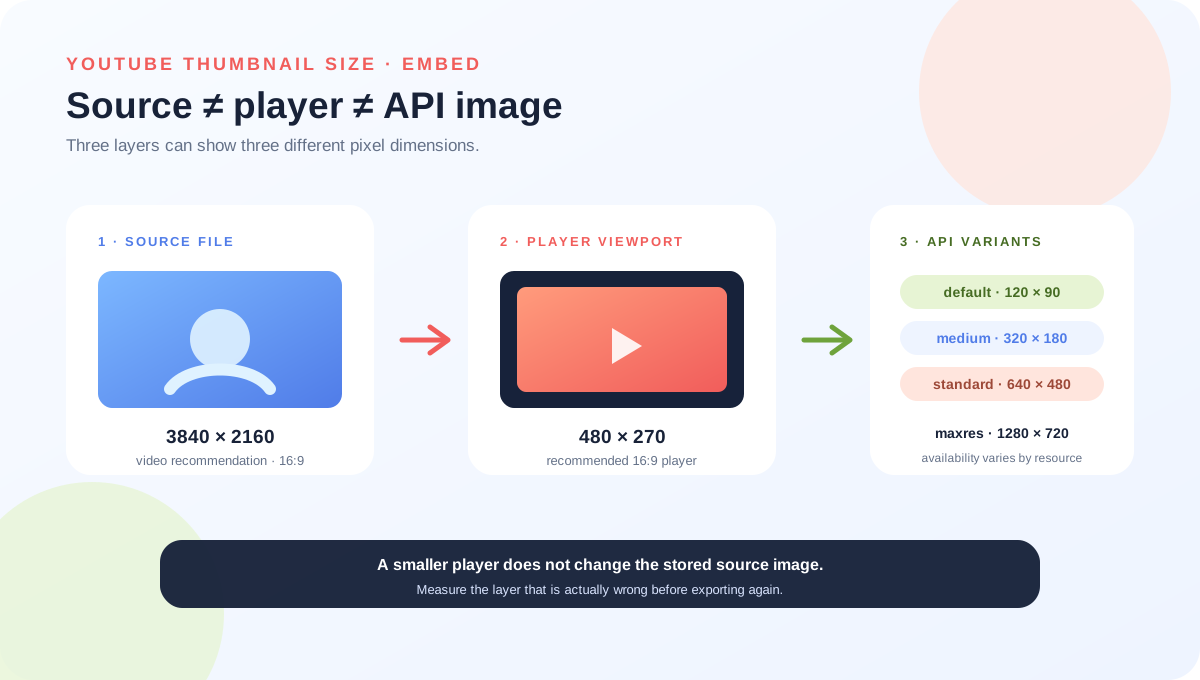
An embedded YouTube player has more than one relevant size. The custom thumbnail is the preview image in the embedded player; YouTube recommends a 3840 × 2160 video thumbnail and a 16:9 ratio. The player itself is a separate viewport: Google’s player documentation recommends a 16:9 player of at least 480 × 270 pixels and requires at least a 200 × 200 viewport. Data API thumbnail variants are a third size system, not new upload requirements.
Official sources: Add customised thumbnails on YouTube, YouTube Embedded Players and Player Parameters, and Thumbnails API reference, reviewed 2026-10-20.
Which YouTube thumbnail size are you actually measuring?
YouTube Help says the custom thumbnail image will be used as the preview image in the embedded player and recommends 3840 × 2160 pixels for videos, with a minimum width of 640 pixels and an aspect ratio of 16:9. That is the source-file guidance. It does not say that every iframe must be 3840 × 2160, or that the player must use the same pixel dimensions as the uploaded file.
The YouTube IFrame Player documentation describes a different object: an embedded player viewport. It requires at least 200 × 200 pixels and recommends a 16:9 player of at least 480 × 270 when controls are shown. Those numbers describe the space occupied by the player on a site, not the custom thumbnail upload canvas.
Source file ≠ iframe viewport ≠ API variantDoes an iframe width change the YouTube thumbnail size?
No. YouTube’s embed Help page tells a creator to open a video or playlist, choose Share, choose Embed, copy the HTML, and paste it into the site. The IFrame documentation then uses the iframe’s width and height to define the player. A 640 × 360 player is an example of a 16:9 viewport; it is not a replacement for the 3840 × 2160 source recommendation.
<iframe width="640" height="360"
  src="https://www.youtube.com/embed/VIDEO_ID"></iframe>
A practical embed can therefore use a high-resolution 16:9 custom thumbnail and display it inside a smaller responsive player. The browser scales the player to its container; changing the iframe attributes changes the player box, not the stored custom image. If the player is made too small for its controls or below the minimum viewport, that is an embed-layout problem rather than a YouTube thumbnail-size failure.
Why do API thumbnail names have different dimensions?
The YouTube Data API describes a thumbnail resource as a set of available image-size objects. It warns that different resource types can support different sizes, that the same name can mean different dimensions for different resources, and that width and height may not be returned for every image. The labels are response variants, not a menu of upload presets.
The API page also says that if an uploaded thumbnail does not match the required dimensions, the image is resized to match without changing its aspect ratio. It says the image is not cropped, but may include black bars so that the size is correct. Keep that statement in its API-documentation scope: it explains the thumbnail resource behavior and does not publish a universal crop map for every YouTube surface or third-party embed.
Variant labels are not upload instructionsIs a missing or stale embedded thumbnail a size problem?
Not automatically. YouTube’s thumbnail Help page says thumbnail changes may take time to appear, without publishing one universal wait period. The embed Help page separately notes that age-restricted videos cannot be watched on most third-party websites, and that missing HTTP Referer context can cause blocked playback and an error screen. Those are product or playback conditions, not evidence that the source image has the wrong YouTube thumbnail size.
The fixed Reddit question about an embedded video describes a creator who thought the uploaded thumbnail was being ignored; the post’s edit attributes the different image to a browser extension. Another Reddit discussion asks how websites keep thumbnail aspect ratios consistent and receives community suggestions about cropping, letterboxing, and `object-fit`. These reports are useful troubleshooting signals, but neither is authority for YouTube’s player or API behavior.
Before exporting another image, identify which object is wrong: the saved custom source, the iframe box, the API response variant, the external page cache, a browser extension, or playback access. A single screenshot from an embedded page cannot distinguish all of those states.
Can the local tools inspect an embedded YouTube thumbnail?
The public Feed Thumbnail resizer source sets a fixed 1280 × 720 canvas and exports JPEG. It can provide a reproducible local 16:9 preparation path, but it does not create an iframe, request the YouTube Data API, or observe an external page’s cache and browser extensions.
The public downloader accepts standard watch, Shorts, live, embed, and bare video-ID inputs in the browser. It requests direct YouTube image files and reports the dimensions of files that actually load. That is useful evidence about an exposed image URL; it is not a guarantee about what a specific embedded player, website cache, or user extension will display.
Open the thumbnail downloader to inspect loaded image variants, the thumbnail resizer for the fixed local canvas, and YouTube thumbnail size for the general source recommendation.
What do LightX, Snappa, and Reddit add?
The opened LightX YouTube Thumbnail Resizer page covers a 1280 × 720 preset, custom dimensions, editing, and JPG/PNG download. It explains source-file preparation, not the relationship between an uploaded thumbnail, an iframe viewport, and an API response variant.
The opened Snappa YouTube thumbnail-size page focuses on the ordinary 1280 × 720, 16:9 workflow and template creation. It does not document the YouTube Player API’s 200 × 200 minimum, 480 × 270 recommendation, or API variant names.
The opened Reddit embedded-video discussion describes a thumbnail that seemed wrong inside an iframe and later attributes the result to a browser extension. The opened web-development discussion asks about consistent thumbnail aspect ratios and compares cropping, letterboxing, and stretching. Both are community signals, not official rules or measured platform behavior.
The useful gap is the handoff between an image editor and a player embed. A generic YouTube thumbnail size answer can be correct for the source file while still being incomplete for the iframe and API layers.
What should you record for an embedded-thumbnail bug?
This checklist is a way to separate source, player, response, and playback evidence. It is not a promise that every third-party page refreshes at the same time.
YouTube thumbnail size and embedded-player questions
What is the YouTube thumbnail size for an embedded video?
For a video source image, YouTube recommends 3840 × 2160 and 16:9. The embedded player is a separate viewport; Google recommends a 16:9 player of at least 480 × 270 and requires at least 200 × 200.
Do I need to upload a 640 × 360 thumbnail for a 640 × 360 iframe?
No. The iframe dimensions describe the player box. YouTube’s source recommendation is a separate 3840 × 2160 video thumbnail.
Will YouTube crop a thumbnail that has the wrong dimensions?
The Data API documentation says a mismatched uploaded thumbnail is resized without changing its aspect ratio and may include black bars; it says the image is not cropped. That statement is scoped to the API thumbnail resource behavior.
Why does an embed show an old or different image?
Check thumbnail propagation, external-page cache, browser extensions, API variant, and playback conditions. A different embedded image is not by itself proof that the source YouTube thumbnail size was wrong.
Can Feed Thumbnail inspect my embedded player?
No. It can inspect local files and loaded direct image variants in the browser. It cannot read a private Studio state, query your API credentials, or observe every external embed’s cache and extension state.
Keep the source, player, and response layers separate
YouTube Help: Add customised thumbnails on YouTube is the source for the custom thumbnail being used as the embedded-player preview, the 3840 × 2160 video recommendation, minimum width, formats, and 16:9 guidance. Reviewed 2026-10-20.
YouTube IFrame Player API: Embedded Players and Player Parameters is the source for the 200 × 200 minimum viewport, the 16:9 player recommendation of at least 480 × 270, and the iframe width/height distinction. Reviewed 2026-10-20.
YouTube Data API: Thumbnails is the source for the named response variants, their documented video dimensions, variable availability, and the resize-without-crop / possible-black-bars wording. Reviewed 2026-10-20.
YouTube Help: Embed videos & playlists is the source for the Share → Embed path, embedding restrictions, age-restricted playback note, and Referer warning.
Feed Thumbnail's resizer source and downloader source are the first-party sources for the local 1280 × 720 JPEG path and browser-side embed-link/image-variant behavior.
LightX's YouTube thumbnail resizer, Snappa's YouTube thumbnail notes, the opened Reddit embedded-video question, and the opened web-development aspect-ratio discussion were used as fixed comparison and question-signal sources only.