YouTube thumbnail size for Community post images: 1:1 and 16 MB
For an image or GIF Community post, YouTube currently suggests a 1:1 aspect ratio and allows a file up to 16 MB. The reviewed Help page lists JPG, PNG, GIF, and WEBP, but it does not publish a fixed pixel canvas. Keep this rule separate from the 3840 × 2160 / 16:9 video-thumbnail recommendation and from a square podcast playlist cover.
Official sources: Create a post, Learn about posts, Add custom thumbnails on YouTube, and Thumbnails policy, reviewed 2026-10-26.
What is the YouTube thumbnail size for a Community post?
The current computer Help page says that an image or GIF Community post can contain up to 10 images, then lists a 16 MB size limit, JPG, PNG, GIF, or WEBP file types, and a suggested 1:1 aspect ratio. It explains the ratio by saying that images are shown in the feed and viewers can see the full image by clicking to expand it.
The Android version reviewed on the same date repeats the 16 MB limit, the JPG, PNG, GIF, or WEBP file types, and the suggested 1:1 ratio. It also describes the mobile flow for adding an image, poll, or quiz and notes that image posts can receive optional music in the app. Neither page provides a mandatory pixel width or height for a Community post image.
1:1 is the official feed suggestion; 16 MB is the official file-size boundaryIs 1080 × 1080 an official YouTube Community post size?
No exact pixel canvas was found in the first-party Community post pages reviewed here. A square file such as 1080 × 1080 can be a convenient production canvas because it expresses the documented 1:1 ratio, but that number should be labeled as a workflow choice rather than a YouTube requirement. The official evidence is the ratio, file-size limit, and accepted formats.
A community discussion about image specifications repeats the official 1:1 and 16 MB wording, while participants also suggest 1080 × 1080 or other square sizes. Those comments are useful for understanding creator expectations, but they do not upgrade a practical 1080 × 1080 suggestion into a first-party minimum or maximum.
The distinction matters when a design tool advertises a preset. A preset can make export predictable, but a preset is not automatically the platform rule. Record the original width, height, format, and bytes, then compare those facts with the official 1:1 and 16 MB boundaries.
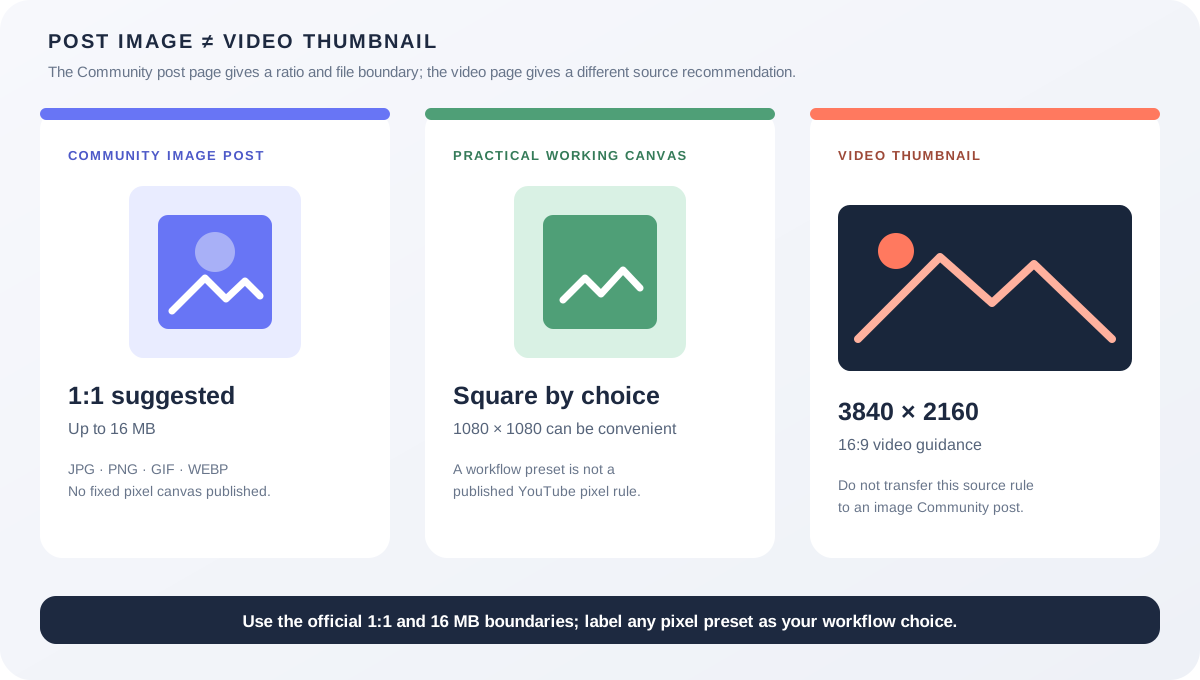
Which YouTube thumbnail size should you prepare?
| Surface | What the official page controls | What not to infer |
|---|---|---|
| Community image or GIF post | Up to 16 MB; JPG, PNG, GIF, or WEBP; suggested 1:1 because of the feed presentation. | Do not claim a fixed 1080, 1200, or other pixel requirement without a first-party source. |
| Regular video thumbnail | 3840 × 2160 recommendation, minimum width 640, JPG or PNG, and 16:9 video guidance. | Do not copy the 3840 × 2160 video rule into a Community post upload form. |
| Short thumbnail | 2160 × 3840 recommendation, minimum height 640, and 9:16 guidance on the custom-thumbnail page. | Do not assume a post that shares a Short needs a portrait image post. |
| Podcast playlist cover | A separate square podcast workflow and recommendation covered by YouTube's podcast documentation. | Do not merge podcast cover evidence with a Community post image rule. |
| Video shared in a post | The post can search for, paste, or select a YouTube video; the video keeps its own thumbnail system. | Do not treat a linked video's thumbnail as the uploaded image of the post. |
The custom-thumbnail Help page says that videos use a 3840 × 2160 recommendation and 16:9, Shorts use 2160 × 3840 and 9:16, and podcast playlists use 1:1 instead of 16:9. Those are separate objects from a Community image post. A post can share a video or playlist URL without changing the source object's thumbnail rules.
The Community post page also distinguishes image posts, video posts, playlist posts, polls, and quizzes. For a video post, the creator can search for a video, paste a URL, or select a channel video. That route is a content reference, not an instruction to upload a video thumbnail as the post's own image.
YouTube's posts overview says that posts can appear on a channel page, in a Posts shelf on the Home tab, on the homepage, in the Subscriptions feed, and that image posts may additionally appear in the Shorts feed. A single square source may therefore travel through several presentation surfaces without receiving a new upload canvas at each one.
Why can a Community post look cropped or blurry?
The official wording says that images are shown in the feed and that viewers can click to expand the full image. It does not promise that every feed card, browser width, app version, or multi-image layout will show identical pixels before expansion. A visible crop is therefore a display observation unless the upload itself fails the documented boundary.
The opened Reddit discussions report cropped or difficult-to-enlarge Community images on desktop and mobile, low-quality images even when creators tried 1080 × 1080 or larger files, and image-upload failures that varied by device. These reports show why a reproduction log should include the app, browser, account, number of images, and viewer action. They do not establish a new YouTube crop formula.
For text-heavy artwork, keep important words away from the edges and test the full-image expansion path. Treat that as a readability practice, not evidence of an undocumented pixel minimum.
Can Feed Thumbnail make a Community post image?
Feed Thumbnail's public resizer is a browser-local video-thumbnail tool. Its source sets a fixed 1280 × 720 canvas and exports a local JPEG, with crop, fit, padding, or stretch treatments. That is useful for a 16:9 video source, but it is not a square Community post export and it does not upload an image to YouTube.
The public downloader accepts watch, Shorts, live, embed, and bare video-ID inputs and reports dimensions for image files that load. It does not accept a Community post URL as a private upload test, inspect the YouTube post composer, or prove how a multi-image post will render in a feed.
Use the tool to measure or prepare a local source only. For a Community post, choose a square working canvas in your own editor, keep the file at or below 16 MB, use one of the documented formats, and record the actual exported dimensions rather than claiming that Feed Thumbnail's 1280 × 720 preset is the post rule.
Does the thumbnail policy apply to Community post images?
YouTube's thumbnails policy says that thumbnails and other images include posts, banners, avatars, and other image features. It warns against misleading, sexually explicit, violent, vulgar, or otherwise prohibited imagery and explains that an image can be removed or lead to a warning or strike depending on the circumstances.
That policy is not a dimension rule. A square image can satisfy the 1:1 suggestion and still violate a content policy; a non-square image may be technically accepted but have a different feed presentation. Keep file type, ratio, bytes, display, and policy as separate checks.
What do LightX, Snappa, and Reddit add?
The opened LightX YouTube Thumbnail Resizer page focuses on upload and editing controls for a practical YouTube thumbnail workflow. Its video-oriented framing is useful for comparison, but it does not publish the official Community post 16 MB boundary or prove how a square image appears in the YouTube feed.
The opened Snappa article recommends 1280 × 720 and 16:9 for common YouTube thumbnails. That is a useful video-source benchmark and a direct contrast with the Community post page's suggested 1:1 ratio. It is not first-party evidence for a Community post pixel canvas.
The opened Reddit threads report Community post crop, zoom, compression, and upload problems across desktop, mobile, accounts, and image counts. They are valuable question signals for a reproducible test matrix, not official size specifications or measured platform guarantees.
No search volume, ranking, click-through rate, traffic, conversion, or competitor-performance number is inferred from these benchmark pages or discussions.
What should you record before publishing an image post?
- Classify the post. Write image, GIF, video, playlist, poll, quiz, or text before choosing the asset.
- Choose the ratio. Start with a square working canvas because YouTube suggests 1:1 for feed image posts.
- Measure the export. Record width, height, format, bytes, and the number of images in the post.
- Check the 16 MB boundary. Confirm that the file you actually select, not an earlier source file, is within the official limit.
- Check the display. Record app or browser, device, account, feed surface, and whether you expanded the full image.
- Check policy separately. Review the image for misleading, violent, sexual, hateful, or otherwise prohibited content before publishing.
This checklist separates first-party file guidance from local export choices and account- or device-specific display evidence. It does not replace a signed-in YouTube post test.
YouTube thumbnail size and Community post questions
What is the YouTube thumbnail size for a Community post image?
YouTube suggests a 1:1 aspect ratio because images are shown in the feed, allows up to 16 MB, and lists JPG, PNG, GIF, and WEBP. The reviewed page does not publish a fixed pixel width or height.
Is 1080 × 1080 required for a Community post?
No requirement at that exact pixel size was found in the reviewed first-party page. It can be a convenient square working canvas, but the evidence-backed rule is 1:1 as a suggestion plus the 16 MB and file-type boundaries.
Can I use a 1280 × 720 video thumbnail in a Community post?
You can choose a file that fits the post composer, but 16:9 is the video-thumbnail workflow and 1:1 is YouTube's suggested ratio for image posts. Do not assume a 16:9 file will occupy the feed the same way as a square image.
Does YouTube accept WEBP Community post images?
Yes. The reviewed computer and Android Help pages list JPG, PNG, GIF, or WEBP for image and GIF posts, with a size limit of up to 16 MB.
Can Feed Thumbnail resize a Community post image?
No. The public resizer currently targets a local 1280 × 720 video-thumbnail JPG. It does not create a square post export, sign in to YouTube, or validate the post composer and feed rendering.
Keep Community posts separate from video thumbnails
YouTube Help: Create a post — Computer is the source for the image/GIF post file types, up-to-16 MB boundary, suggested 1:1 ratio, and multi-image route. Reviewed 2026-10-26.
YouTube Help: Create a post — Android is the source for the mobile image-post route and the same 16 MB, file-type, and 1:1 wording. Reviewed 2026-10-26.
YouTube Help: Learn about posts is the source for Posts shelf, Home, homepage, Subscriptions, Shorts feed, scheduling, and access context. Reviewed 2026-10-26.
YouTube Help: Add custom thumbnails on YouTube is the source for the separate video and Shorts source dimensions and aspect ratios. Reviewed 2026-10-26.
YouTube Help: Thumbnails policy is the source for posts being included among YouTube images covered by policy. Reviewed 2026-10-26.
Feed Thumbnail's resizer source and downloader source are the first-party sources for the local 1280 × 720 JPEG path and browser-side video image behavior. No signed-in Community post test was run.
LightX's YouTube thumbnail resizer, Snappa's YouTube thumbnail notes, and the opened Community post specification discussion, Community post crop discussion, and image upload error discussion were used as fixed comparison and question-signal sources only.