YouTube thumbnail size for channel Home sections: source vs display
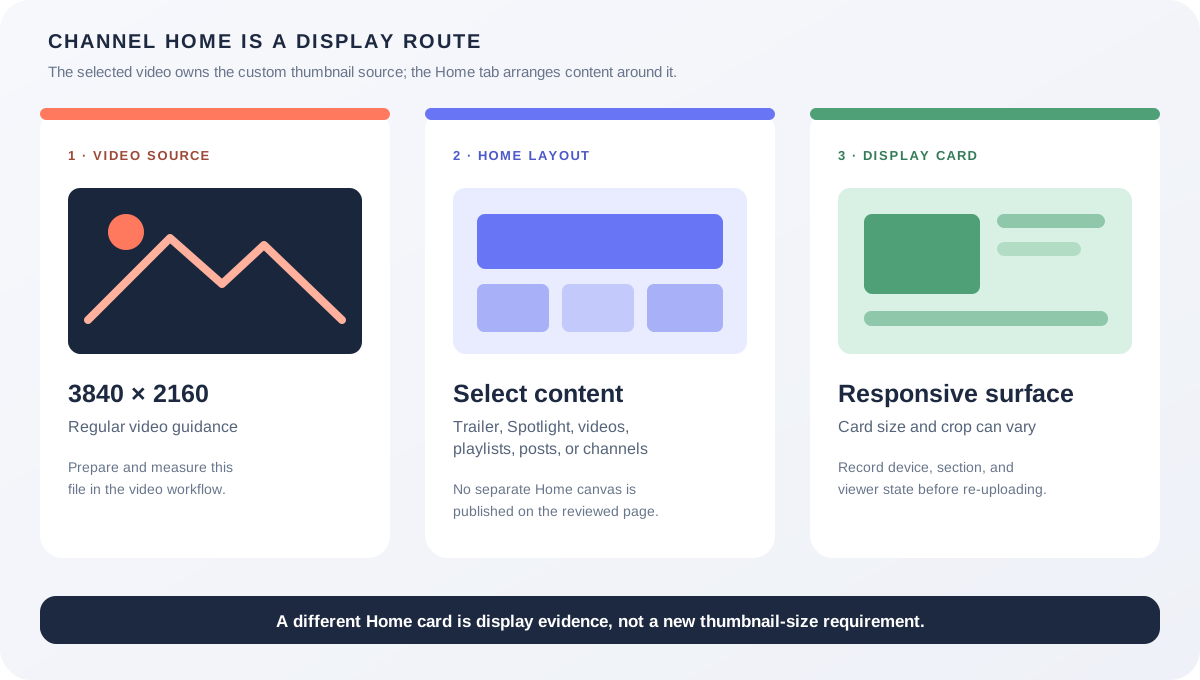
A channel Home tab does not have a separate thumbnail upload canvas in the official layout instructions reviewed here. YouTube tells creators to select a video for a channel trailer or featured video and to choose content for Home-tab sections. Keep the video thumbnail source rule at 3840 × 2160 and 16:9, then treat the channel layout and its responsive cards as separate display layers.
Official sources: Customize your YouTube channel layout, Add custom thumbnails on YouTube, and Thumbnail & title tips, reviewed 2026-10-25.
What is the YouTube thumbnail size for a channel Home tab?
The current YouTube channel-layout Help page says that a channel Home tab can show a trailer, a featured video, and featured sections. It explains how to turn the Home tab on, select a video for a trailer or Spotlight, and add sections such as Videos, Playlists, Channels, Posts, and Top community clips. The page reviewed here does not publish a numeric pixel size for a separate channel-home thumbnail upload.
The custom-thumbnail Help page is the document that publishes image guidance. It says that a custom video thumbnail is used as a preview in the embedded player and recommends 3840 × 2160 pixels for videos, a minimum video width of 640 pixels, JPG or PNG, and an aspect ratio of 16:9. Those numbers describe the video thumbnail source file, not the size of a channel Home card.
Channel layout chooses content; Studio thumbnail upload chooses the source imageWhat does YouTube actually ask you to upload on the Home tab?
For a channel trailer, the layout Help page directs the creator to YouTube Studio, Customization, Home tab, Layout, Add section, and Channel trailer. The final action is to select a video and publish the layout. It is not an instruction to upload a second image file that belongs only to the channel homepage.
For a featured video shown to returning subscribers, the same page directs the creator to add Spotlight, select a video, and publish. The page also states that the featured video will not be shown to that viewer again after it has been watched. This is a content-selection rule and a viewer-state rule, not a new thumbnail-dimension rule.
For featured sections, YouTube lists content types rather than image canvases. The page names Videos, Shorts, live streams, single or multiple playlists, memberships, channels, top community clips, effects, and posts. The creator configures which content is surfaced and in what order; each item keeps the image or thumbnail associated with that content type.
Which YouTube thumbnail size should you prepare?
| Surface | What you control | Evidence-backed size boundary |
|---|---|---|
| Regular video in a Home section | Upload or replace the video's custom thumbnail in Studio. | 3840 × 2160 recommendation, minimum width 640, JPG or PNG, and 16:9 for videos. |
| Short in a Home section | Choose the Short and use the custom Short thumbnail route where available. | 2160 × 3840 recommendation, minimum height 640, and 9:16 guidance for Shorts. |
| Channel trailer or Spotlight | Select the video that the Home tab should feature. | No separate channel-home canvas was published on the reviewed channel-layout page; use the selected video's own thumbnail evidence. |
| Playlist section | Select one or more playlists for the Home tab. | Do not silently reuse the video rule as a playlist-cover rule. See the separate playlist-cover guide and the account-level editor evidence. |
| Banner or profile picture | Edit channel branding assets in the branding/profile workflow. | These are channel identity assets, not video thumbnails. A thumbnail-size answer cannot substitute for their separate specifications. |
The source-file numbers in this table come from YouTube's custom-thumbnail Help page, while the channel Home actions come from the channel-layout Help page. The combination is useful because it prevents a common category error: a channel page may display a video thumbnail, but that does not mean the channel page asks for a second image with its own pixel preset.
Shorts need their own caution. YouTube's thumbnail page describes a 2160 × 3840 recommendation, a minimum height of 640 pixels, and a 9:16 aspect ratio for Shorts. A Short may be placed into a channel Home section, but placement in that section does not turn the Short into a regular 16:9 video or prove how every responsive card will crop it.
A playlist section is also a different object. The Home-tab page says that a creator can highlight playlists, but it does not publish an ordinary playlist-cover canvas in the same paragraph. Do not infer a playlist-cover size from the video-thumbnail recommendation merely because both objects can appear on the same channel page.
Why can a valid thumbnail look different on a channel page?
The Thumbnail & title tips page says that thumbnails show up differently across devices and encourages creators to make the image as large as possible. It also directs creators to compare metrics for Home and Suggested, the Subscriptions Feed, and other discovery surfaces. That advice confirms that presentation varies by surface, but it does not publish one channel-Home pixel rectangle.
A channel layout can therefore place the same video in a featured slot, a Videos section, a Shorts section, or a personalized For you section. The surrounding card, row width, device viewport, and viewer state may change. A crop, letterbox, or different card proportion is display evidence; it is not automatically evidence that the original video thumbnail was uploaded at the wrong size.
If the source image is correct but the channel page looks different, record the content type, channel section, device, viewport, and viewer state before changing the file. The reviewed first-party pages do not justify a universal “channel homepage thumbnail size” number.
What can Feed Thumbnail verify?
Feed Thumbnail's public resizer is a browser-local preparation tool. Its source sets a 1280 × 720 canvas and exports a local JPEG path, which is useful for a practical 16:9 video-thumbnail draft. It does not sign in to YouTube Studio, select a channel Home section, or observe the responsive card rendered for a particular viewer.
The public downloader accepts watch, Shorts, live, embed, and bare video-ID inputs and reports dimensions for image files that actually load in the browser. That makes it useful for inspecting an exposed video image variant, but it cannot prove the private channel-layout state, the selected Home-tab section, or the crop applied by every YouTube client.
Use the local tool to measure the source file, then use YouTube Studio and the channel Home tab to check the actual placement. Keep those observations in separate notes instead of turning a local 1280 × 720 convenience export into an official channel-home requirement.
What do LightX, Snappa, and Reddit add?
The opened LightX YouTube Thumbnail Resizer page presents a 1280 × 720 preset, custom dimensions, editing controls, and JPG/PNG download language. It is a practical source-file workflow. It does not document a separate YouTube channel Home upload canvas or guarantee how the Home tab renders a selected video.
The opened Snappa YouTube thumbnail-size page focuses on 1280 × 720 and 16:9 for YouTube thumbnails, templates, and common player previews. That is useful for preparing the video source file, but it is not first-party evidence for a channel layout card, a playlist cover, or a device-specific crop.
The opened Reddit discussions report a square-looking YouTube homepage, thumbnails missing in Home and subscription tabs, and custom thumbnails appearing on a channel page but not in a channel search result. These are useful questions to reproduce across devices and accounts; they are community observations, not a universal dimension rule.
No search volume, ranking, click-through rate, traffic, conversion, or competitor-performance number is inferred from these benchmark pages or discussions.
What should you record before changing a channel thumbnail?
- Classify the content. Write regular video, Short, live stream, playlist, post, channel, or profile asset before choosing a file.
- Measure the source. Record width, height, format, bytes, and the time the video thumbnail was saved in Studio.
- Record the Home route. Note trailer, Spotlight, Videos, Shorts, Playlists, For you, or another section.
- Record the viewer context. Capture device, app or browser, viewport, signed-in state, and whether the video was already watched.
- Compare the source and display. Ask whether the difference is a crop, a card layout, a missing asset, propagation, or a different content type.
- Keep claims narrow. Cite the video-thumbnail rule for the source, the channel-layout page for selection, and your own screenshot for the display observation.
This checklist preserves the boundary between an official source-file recommendation and an account- or device-specific channel presentation. It does not replace a signed-in YouTube test.
YouTube thumbnail size and channel Home questions
What is the YouTube thumbnail size for a channel homepage?
The reviewed channel-layout Help page does not publish a separate channel-home thumbnail canvas. For a regular video selected for the Home tab, use the video's custom-thumbnail guidance: 3840 × 2160 recommended, minimum width 640, and 16:9.
Does a channel trailer need a different thumbnail size?
The layout workflow selects a video for the trailer. The selected video's custom thumbnail remains the relevant source file; the Home tab placement is a separate presentation layer.
Does a Shorts thumbnail become 16:9 on the channel Home tab?
No such conversion rule is stated on the reviewed pages. YouTube's thumbnail page describes Shorts with 2160 × 3840 and 9:16 guidance, while the channel-layout page describes selecting Shorts as section content.
Can I upload a separate image for a channel section?
The channel-layout page describes selecting a video, playlist, or other content for sections. It does not document a separate generic image upload for a channel Home section. Do not invent a pixel preset from the card's rendered size.
Can Feed Thumbnail test my channel homepage crop?
No. It can measure local files and prepare a 1280 × 720 video-thumbnail export, but it cannot sign in, change channel layout, observe viewer-specific sections, or guarantee a crop across YouTube clients.
Keep the channel layout and video source separate
YouTube Help: Customize your YouTube channel layout is the source for the Home tab, channel trailer, Spotlight, featured sections, selectable content types, and the absence of a numeric channel-home canvas on the reviewed page. Reviewed 2026-10-25.
YouTube Help: Add custom thumbnails on YouTube is the source for the 3840 × 2160 video recommendation, 2160 × 3840 Shorts recommendation, minimum dimensions, formats, file-size limits, and aspect-ratio guidance. Reviewed 2026-10-25.
YouTube Help: Thumbnail & title tips is the source for device variation and the Home, Suggested, and Subscriptions Feed measurement context. Reviewed 2026-10-25.
Feed Thumbnail's resizer source and downloader source are the first-party sources for the local 1280 × 720 JPEG path and browser-side video image-variant behavior. No signed-in channel test was run.
LightX's YouTube thumbnail resizer, Snappa's YouTube thumbnail notes, and the opened homepage aspect-ratio discussion, Home and subscription thumbnail discussion, and channel-page thumbnail discussion were used as fixed comparison and question-signal sources only.