YouTube thumbnail size vs channel banner size: 3840 × 2160 is not 2560 × 1440
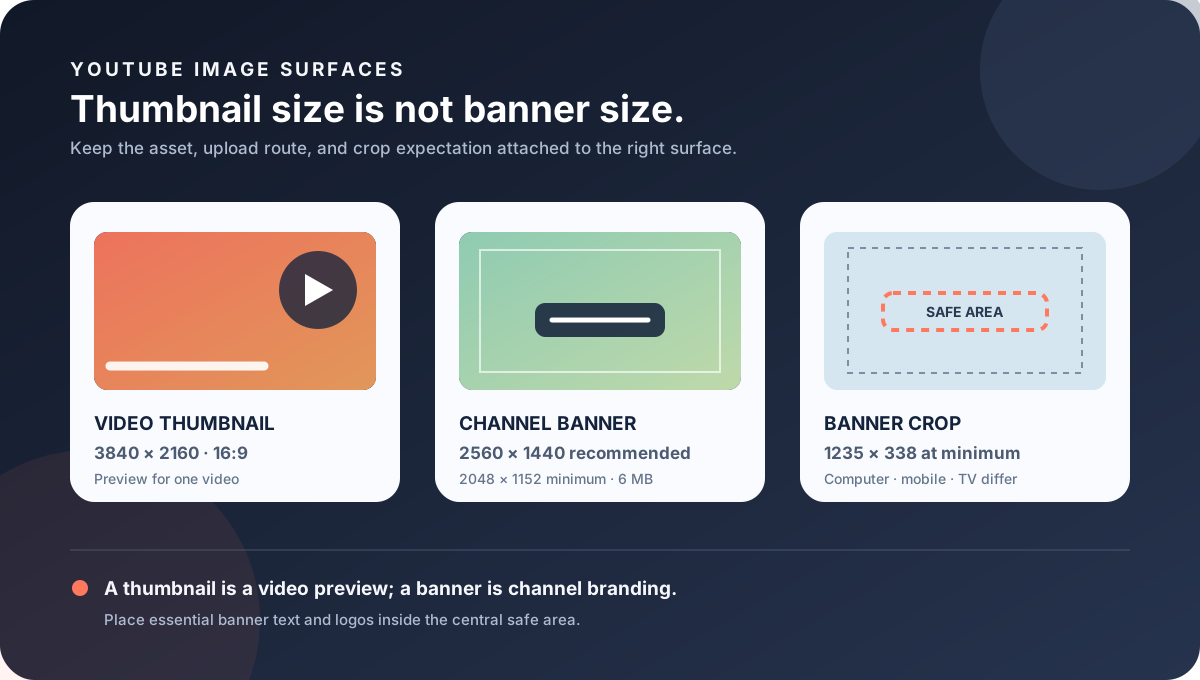
A video thumbnail and a channel banner are different YouTube assets. The current custom-thumbnail guidance recommends 3840 × 2160 for a regular video, while channel branding guidance recommends 2560 × 1440 for a banner, sets 2048 × 1152 as the minimum upload dimension, and defines a much narrower safe area for text and logos. Do not move one asset's preset into the other asset's upload route.
Official sources: Manage your channel branding, Channel banner and profile picture tips, Add custom thumbnails on YouTube, and Channel customization, reviewed 2026-10-27.
What is the YouTube thumbnail size compared with a banner?
YouTube's custom-thumbnail page describes a video thumbnail as a quick snapshot of the content and recommends a 3840 × 2160 resolution for videos. It also recommends JPG or PNG, a minimum width of 640 pixels for videos, and a 16:9 aspect ratio for videos. Those values describe the image attached to a video, not the background image at the top of a channel page.
YouTube's channel-branding page says that a banner image appears as a background at the top of the YouTube page. It recommends a 2048 × 1152 minimum upload at 16:9, gives a 1235 × 338 safe area for text and logos at that minimum, recommends 2560 × 1440 especially for TV, and sets a 6 MB or smaller file-size boundary.
The banner tips page uses a shorter practical recommendation: upload a banner of at least 2560 × 1440 for the best display on all devices. Read that recommendation together with the branding page's minimum and safe-area measurements; do not reduce the banner to a video-thumbnail preset simply because both assets can be described with a wide ratio.
Why does the same keyword lead to different size rules?
A regular video thumbnail is chosen in YouTube Studio from the video's Content workflow. The custom-thumbnail page tells the creator to open the video, select the thumbnail control, upload a file or choose a suggestion, and save. The thumbnail becomes a preview image for that video and can be used by an embedded player.
A channel banner is changed from YouTube Studio's Customization and Profile route. The branding page describes selecting an image, opening a preview, changing the crop, and publishing it. The banner is therefore a channel-level branding object, not a property of one video. A thumbnail edit should not be expected to update the banner, and a banner replacement should not change a video's thumbnail.
The channel-customization page separates the Home tab from Profile. Home organizes a channel trailer, featured video, and sections; Profile updates the profile picture, banner image, video watermark, channel name, handle, description, and links. This separation is useful when a design brief says “YouTube thumbnail size” but actually means a channel header or another Profile asset.
The official pages also use different language for display. A video thumbnail is a preview or snapshot, while a banner is a background that covers a larger channel surface. The thumbnail is expected to communicate one video's subject quickly; the banner has to carry a brand system through several device crops. These are different design constraints even when both working files are landscape.
Which numbers belong to which YouTube image?
The table keeps four image jobs visible at once: video preview, channel background, profile identity, and video watermark. The fact that the branding page lists a 98 × 98 rendered profile picture and a square 150 × 150 watermark is a reminder that “YouTube image size” is not one universal preset. The upload control and display surface decide which measurement matters.
The video page has its own device-dependent byte limits: the reviewed page says 2 MB for video thumbnails on mobile and 50 MB for video, Shorts, and podcast thumbnails on desktop. The banner page gives a different 6 MB or smaller boundary. These limits cannot be compared as if they were interchangeable compression targets because they belong to different upload workflows.
For a banner, plan the full canvas and then design the center first. For a video thumbnail, plan the frame that must read as a small preview and then test it in the watch and embedded-player contexts. A large source file does not remove the need to test the rendered surface.
What does the YouTube banner safe area protect?
At YouTube's minimum banner dimension of 2048 × 1152, the documented safe area for text and logos is 1235 × 338. The safe area is much shorter than the full 16:9 canvas. It exists because the same image is adapted to computer, mobile, and TV displays, where the visible framing is not identical.
The branding page explicitly says that the same banner image is used across computer, mobile, and TV displays, but shows differently depending on the device. It also says that images should accommodate the entire screen for larger devices but will be cropped on certain views and devices. That is a first-party reason to treat edge content as flexible decoration rather than essential information.
The banner tips page reinforces the device problem by recommending at least 2560 × 1440 for the best display on all devices and describing the banner as a larger space for communicating what a channel is about. The recommendation is not a promise that every pixel will remain visible everywhere; it is a working canvas for the channel-branding surface.
Opened Reddit discussions provide useful question signals around this exact gap. One r/NewTubers thread reports that a banner can be cut off on mobile and that important elements should stay in the center safe area. Another discussion reports that a 2560 × 1440 banner can show a full TV view but a narrower desktop or mobile crop. A recent thread reports softness after upload and recommends checking the banner on mobile and desktop after compression. These are creator observations, not replacement specifications.
What can Feed Thumbnail verify today?
Feed Thumbnail's public resizer is deliberately a local video-thumbnail workflow. It reads one PNG, JPG, or WEBP file in the browser, targets a fixed 1280 × 720 canvas, lets the user choose crop, fit, padding, or stretch treatment, and exports an upload-ready JPG. The page states that the image stays on the device and that there is no account, server upload, batch queue, or image API.
The public downloader is also browser-only. It accepts standard watch, Shorts, live, embed, and bare video-ID inputs, checks the direct YouTube image files, keeps files that load, and reports natural pixel dimensions. It is useful for inspecting video thumbnail variants; it does not accept a channel-banner upload, simulate YouTube Studio Customization, or measure a signed-in device crop.
The local boundary is intentional. A 1280 × 720 thumbnail preset is a practical video source and a clear contrast with the official banner recommendation, but it is not a banner maker. For a channel banner, start with a 2560 × 1440 or larger working file, keep the important text and logo inside the safe area, check the 6 MB limit, and use YouTube's preview before publishing.
Use the local tools to inspect the asset you own, not to claim that a public browser check has verified a private YouTube channel. A trustworthy record should say which file was measured, which surface was tested, which device was used, and whether the account had permission to publish the change.
What do LightX, Snappa, and Reddit add?
The opened LightX YouTube Thumbnail Resizer is an upload-and-edit workflow that advertises a 1280 × 720 preset for a YouTube thumbnail. It is a useful practical benchmark for making a video preview, but its page is not the first-party source for the channel banner minimum, safe area, or 6 MB boundary. The workflows should remain labeled separately.
The opened Snappa article recommends 1280 × 720 and 16:9 for common YouTube thumbnails. That aligns with the familiar video-preview production shortcut and helps explain why creators may search for one “YouTube thumbnail size” answer. It does not replace YouTube's channel-branding page, which gives a different 2560 × 1440 recommendation and a 1235 × 338 safe area at minimum dimensions.
The opened Reddit threads were used as question-signal sources. The NewTubers sizing thread describes mobile and desktop crop differences and a center safe-area practice; another thread describes a 2560 × 1440 banner being fully visible on TV but cropped on other views; a recent thread discusses compression and softness after upload. These reports support a test checklist, not an official pixel formula or a performance claim.
No search volume, ranking position, click-through rate, traffic, conversion, or competitor-performance number is inferred from LightX, Snappa, Reddit, or the official Help pages. The comparison is about workflow boundaries and evidence quality only.
How should you prepare a banner without breaking the thumbnail workflow?
This checklist separates official dimensions from local production choices, device display observations, and account permissions. It is a verification routine, not a promise that one export will look identical in every YouTube surface.
YouTube thumbnail size and channel banner questions
What is the YouTube thumbnail size for a regular video?
YouTube's current custom-thumbnail guidance recommends 3840 × 2160 for videos, a minimum width of 640 pixels, JPG or PNG image formats, and a 16:9 aspect ratio for videos. Upload byte limits differ between mobile and desktop.
What is the recommended YouTube banner size?
YouTube's banner tips recommend at least 2560 × 1440 for the best display on all devices. The channel-branding page gives 2048 × 1152 as the minimum upload dimension at 16:9 and lists 1235 × 338 as the safe area at that minimum.
Can I use 3840 × 2160 as a YouTube channel banner?
It is a 16:9 image, but the video-thumbnail recommendation does not automatically make it the documented banner workflow. A banner still needs a safe-area layout, the channel-branding route, a 6 MB or smaller export, and a device-crop check.
Will the whole 2560 × 1440 banner show on mobile?
No guarantee of a full view is given. YouTube says the same banner is used across computer, mobile, and TV but shows differently depending on the device, and that it will be cropped on certain views and devices.
Does Feed Thumbnail make a YouTube banner?
No. Its public resizer currently targets a local 1280 × 720 video-thumbnail JPG, and its downloader inspects video image files. Neither tool signs in to YouTube Studio or validates a channel-banner preview.
What should stay in the banner safe area?
Keep text and logos in the 1235 × 338 safe area at YouTube's minimum 2048 × 1152 banner dimension. Treat the outer artwork as flexible decoration because the visible crop changes across devices.
Keep the video preview and channel brand evidence separate
YouTube Help: Manage your channel branding is the source for the banner background role, 2048 × 1152 minimum, 16:9 ratio, 1235 × 338 safe area at minimum dimensions, 2560 × 1440 recommendation, 6 MB limit, device crop, 98 × 98 profile rendering, and 150 × 150 watermark minimum. Reviewed 2026-10-27.
YouTube Help: Channel banner and profile picture tips is the source for the at-least-2560 × 1440 banner recommendation and the distinction between a profile signature image and a larger banner brand surface. Reviewed 2026-10-27.
YouTube Help: Add custom thumbnails on YouTube is the source for the 3840 × 2160 video recommendation, 640 px minimum width, 16:9 video guidance, device-dependent byte limits, and the separate Shorts and podcast rules. Reviewed 2026-10-27.
YouTube Help: Channel customization is the source for the Home and Profile separation and for the Profile route that updates the banner, profile picture, and watermark. Reviewed 2026-10-27.
Feed Thumbnail's local thumbnail resizer and thumbnail downloader are the first-party sources for the 1280 × 720 browser-local video workflow and direct YouTube image-dimension checks. No signed-in banner upload was run.
LightX's YouTube thumbnail resizer, Snappa's YouTube thumbnail notes, and the opened banner sizing discussion, banner crop discussion, and banner quality discussion were used as fixed comparison and question-signal sources only.