YouTube thumbnail size with Ask Studio: generated suggestion vs upload file
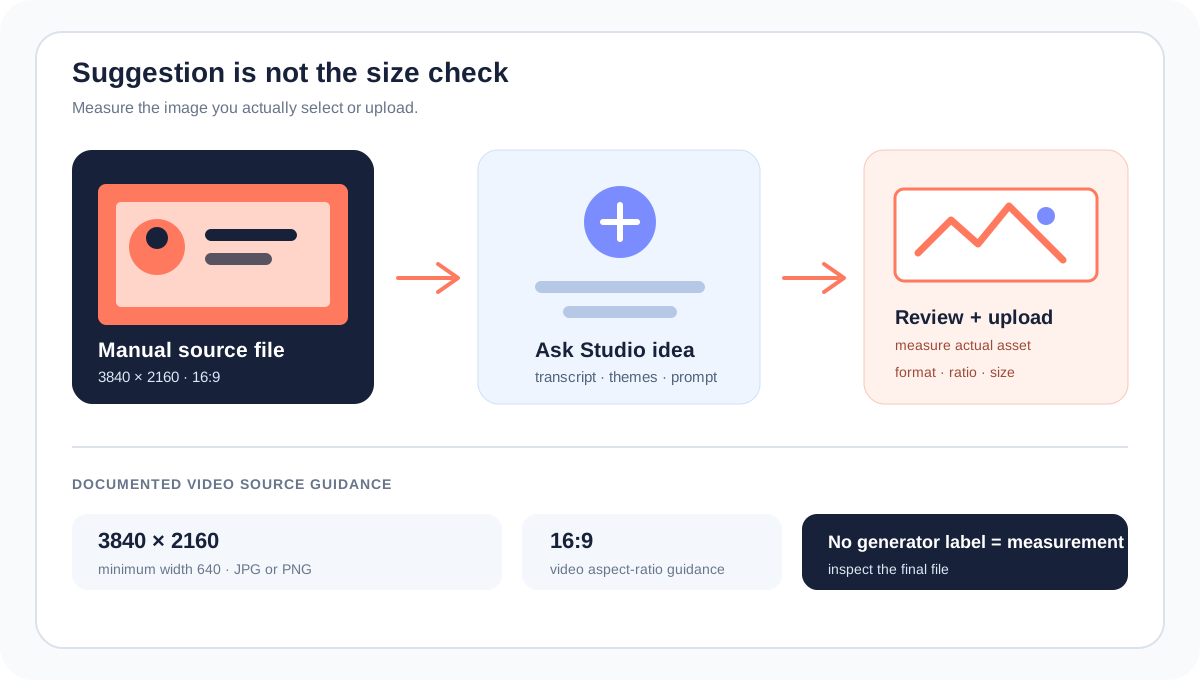
Ask Studio is a suggestion layer, not a published pixel preset. YouTube says Ask Studio can analyze a video’s transcript and themes, suggest a custom thumbnail, and accept follow-up prompts for changes. The same Help page still gives the source-file guidance: 3840 × 2160 for videos, minimum width 640, JPG or PNG, and 16:9. Treat the suggestion as a concept to review; treat the final selected or uploaded image as the file whose YouTube thumbnail size you verify.
Official sources: Add custom thumbnails on YouTube, Learn about Ask Studio in YouTube Studio, and YouTube Blog: Making thumbnails easier, reviewed 2026-10-22.
What is the YouTube thumbnail size when Ask Studio makes a suggestion?
YouTube Help gives two routes under the custom video thumbnail workflow: click Upload file to use an image from your device, or select Get suggestions to generate a thumbnail. It then describes Ask Studio as a way to get custom-thumbnail suggestions based on the video’s transcript and themes, with a prompt, optional video or reference-image attachment, follow-up changes, and a final review of the suggestions.
The same Help page places Image size & resolution after the Ask Studio instructions. It recommends 3840 × 2160 pixels for videos, a minimum width of 640 pixels, image formats such as JPG or PNG, and a 16:9 video ratio. It does not name a separate Ask Studio pixel preset in that list.
Suggestion ≠ source file ≠ upload receiptDoes Ask Studio change the published YouTube thumbnail size?
No separate change is documented in the public pages reviewed here. YouTube’s July 2026 Blog announcement says thumbnail generation was brought directly into Ask Studio for long-form videos, where creators can ask for a thumbnail and adjust elements such as colors and layouts by chatting. The announcement describes the feature and its creative purpose; it does not replace the image-size guidance in YouTube Help.
| Layer | What the official source says | What to verify |
|---|---|---|
| Generation | Transcript and themes can inform a custom-thumbnail suggestion. | Prompt, video context, reference images, and the visual result. |
| Creative revision | Follow-up prompts can request changes such as larger text. | Legibility, faces, claims, and whether the design still matches the video. |
| Image source | 3840 × 2160 and 16:9 remain the documented video-thumbnail guidance. | Actual pixel dimensions, file format, and upload path. |
| Studio action | Review suggestions before using them. | Which image was actually selected or uploaded; do not treat a suggestion as an upload receipt. |
The conclusion that Ask Studio has no separately published output canvas is an evidence-bounded reading of the public documentation, not a claim about every internal generation step. If YouTube exposes a different dimension in your Studio account, record that account-level observation separately from the public Help-page rule.
Why might Ask Studio be missing even when your file is valid?
The Ask Studio Help page says the feature is available to most YouTube creators globally, but only in a web browser on a computer. It lists Official Artist Channels, Made for Kids channels, and creators under 18 as groups without access. If Ask Studio is absent, that is an eligibility or product-surface question, not proof that your YouTube thumbnail size is wrong.
The same page says Ask Studio can use channel and audience context, lets creators attach up to 10 images for visual context, and keeps conversations for up to 30 days. It also warns that human reviewers may process conversations for quality and asks users not to provide confidential information. These are account and privacy boundaries around the suggestion tool, not image-dimension rules.
The custom-thumbnail Help page separately says a creator can upload a custom video thumbnail when the account is verified. Keep that upload eligibility check separate from Ask Studio’s availability: a creator might have one route without having the other route exposed in the same interface.
Missing Ask Studio is not a size errorHow should you check an Ask Studio thumbnail?
- Start with the video context. Ask Studio’s public guidance says it uses the transcript and themes. Check that the suggested image actually represents the video instead of assuming relevance from a prompt alone.
- Review the visual details. Inspect faces, text, logos, numbers, and any generated objects. A visually plausible suggestion is not automatically an accurate or policy-safe thumbnail.
- Keep the size rule visible. For a video source, use the official 3840 × 2160 / 16:9 guidance as the reference. Do not substitute the local 1280 × 720 convenience canvas for what YouTube Help calls the recommended source resolution.
- Measure the final image. If the workflow gives you an actual file or selected image that can be inspected, record its pixel width, height, format, and file size. The generator label is not a measurement.
- Use the Studio route. Review the suggestion in the signed-in publishing workflow and confirm which image is selected or uploaded. This page does not open a private Studio session or claim account-level success.
- Keep the conclusion narrow. Report “suggestion quality,” “source dimensions,” “upload eligibility,” or “feature access” only when the evidence supports that layer.
Why this matters: a generated thumbnail can look correct at a glance while still being the wrong format, the wrong aspect ratio, or the wrong image for the video. Size verification belongs after generation and before the upload decision.
Can Feed Thumbnail verify an Ask Studio output?
The public Feed Thumbnail resizer source uses a fixed 1280 × 720 canvas and exports JPEG in the browser. It is useful for a repeatable 16:9 preparation path, but it does not sign in to YouTube Studio, call Ask Studio, or tell you which generated suggestion your channel selected.
The public downloader accepts standard watch, Shorts, live, embed, and bare video-ID inputs in the browser. It requests direct YouTube image files and reports the dimensions of files that actually load. That can document an exposed image variant after publication; it cannot prove that an Ask Studio suggestion was used or explain the model’s generation process.
Use the thumbnail resizer for a local 16:9 canvas, the thumbnail downloader for loaded public image variants, and YouTube thumbnail size for the general source guidance.
What do LightX, Snappa, and Reddit add?
The opened LightX YouTube Thumbnail Resizer page offers a 1280 × 720 preset, custom dimensions, editing, and JPG/PNG download. It is a source-file preparation reference; it does not document Ask Studio access, transcript-based suggestions, or the final dimensions of an AI-generated result.
The opened Snappa YouTube thumbnail-size page focuses on the ordinary 1280 × 720, 16:9 workflow and template creation. It supports a manual design path, but it is not evidence that Ask Studio emits a 1280 × 720 or 3840 × 2160 file every time.
The opened Reddit discussion about YouTube making AI thumbnails easier quotes the Ask Studio launch announcement and debates whether generated thumbnails will look repetitive or affect viewer trust. The discussion is a community reaction signal, not evidence for click-through rate, ranking, or image dimensions. No performance metric is inferred from it.
The useful gap is the handoff between a generative suggestion and a measurable upload file. A creator can use Ask Studio for ideation while still keeping the source-file check, visual review, account eligibility, and upload confirmation as separate steps.
What should you record before using an Ask Studio thumbnail?
- Record the route. Note whether the image came from a manual file, YouTube’s ordinary suggestion route, or Ask Studio.
- Record the context. Save the video, prompt, reference-image count, and the reason the suggestion was chosen. Avoid storing confidential channel data in public notes.
- Record the final asset. Measure actual pixel dimensions, aspect ratio, format, and file size after the last edit.
- Record access separately. Note whether Ask Studio was available on computer web, whether the channel met its stated eligibility boundaries, and whether the account was verified for custom upload.
- Record the Studio action. Distinguish preview, saved suggestion, selected image, and saved upload. They are not interchangeable states.
- Keep conclusions modest. Do not claim a CTR, ranking, or viewer-trust effect without verified channel data. Do not claim a generator dimension that was not measured.
This checklist separates public documentation, local measurements, account access, and creator judgment. It does not substitute for a signed-in YouTube Studio confirmation.
YouTube thumbnail size and Ask Studio questions
Does Ask Studio have a different YouTube thumbnail size?
The public Help pages reviewed here do not publish a separate Ask Studio pixel preset. YouTube’s video guidance remains 3840 × 2160, minimum width 640, JPG or PNG, and 16:9; measure the final image you actually select or upload.
Can Ask Studio create a thumbnail for my video?
YouTube says Ask Studio can suggest custom thumbnails using a video’s transcript and themes, and that you can use prompts and follow-up changes before reviewing the suggestions. Access requires the signed-in Studio surface and stated eligibility.
Is a 1280 × 720 Ask Studio suggestion automatically correct?
Do not assume it. 1280 × 720 is a common manual workflow and a LightX or Snappa preset, but the public Ask Studio documentation does not make that an output guarantee. Measure the actual file.
Why can’t I see Ask Studio?
YouTube says Ask Studio is available on computer web for most creators globally, with stated exclusions including Official Artist Channels, Made for Kids channels, and creators under 18. A missing feature is an access question, not a thumbnail-size diagnosis.
Can Feed Thumbnail call Ask Studio for me?
No. The local tools can prepare or inspect public image files. They cannot sign in to your channel, access private Studio data, or choose a generated suggestion on your behalf.
Keep Ask Studio suggestions separate from measurable files
YouTube Help: Add custom thumbnails on YouTube is the source for the Upload file / Get suggestions workflow, the Ask Studio transcript-and-themes description, the follow-up prompt steps, the review step, and the 3840 × 2160, minimum-width, format, and 16:9 source guidance. Reviewed 2026-10-22.
YouTube Help: Learn about Ask Studio in YouTube Studio is the source for computer-web availability, stated channel exclusions, image attachments, conversation retention, privacy caution, and the suggestion-quality boundary. Reviewed 2026-10-22.
YouTube Blog: Making thumbnails easier is the source for the July 2026 announcement that thumbnail generation was brought into Ask Studio for long-form videos and that creators can adjust colors and layouts by chatting. Reviewed 2026-10-22.
Feed Thumbnail’s resizer source and downloader source are the first-party sources for the local 1280 × 720 JPEG path and browser-side public-image behavior. No account-level Ask Studio test was run because it requires channel sign-in.
LightX’s YouTube thumbnail resizer, Snappa’s YouTube thumbnail notes, and the opened Reddit Ask Studio discussion were used as fixed comparison and question-signal sources only. No benchmark performance was estimated.