Can you A/B test a YouTube Shorts thumbnail?
No, not under the current official rule. The current YouTube Help page says A/B testing is not available for Shorts. That is a rule about the video being treated as a Short, not a claim that a thumbnail-size checker can predict a test result. Prepare the image locally, but check the video classification before planning a native YouTube experiment.
Official source: Test & compare thumbnails & titles - YouTube Help, reviewed 2026-10-13.
Does YouTube allow A/B testing for Shorts?
The current YouTube Help article has a question specifically about videos that transition into Shorts. Its answer is direct: native A/B testing is not available for Shorts, and a video that becomes a Short cannot use a previously created test or start a new one for that video.
“A/B testing is not available for Shorts.”
— YouTube Help, Test & compare thumbnails & titles
This gives a useful boundary for a YouTube thumbnail size workflow. A correctly prepared image can still be useful for a Short, but the file itself does not unlock the native experiment. The first question is whether the video is in the product path where YouTube makes A/B testing available.
Shorts: native A/B testing unavailableWhat does the official page use to describe a Short?
The same official answer includes a note about video uploads: uploads up to three minutes long that are square or taller are considered Shorts. Those are properties of the video upload and its aspect ratio. They are not a new recommended thumbnail canvas, and they do not turn the usual thumbnail-size preparation step into a Shorts A/B-test control.
That distinction prevents a common workflow error. Someone can resize a cover image, see a clean export, and still be unable to run the native test because the uploaded video is classified as a Short. The image check answers “is this local asset ready to hand off?” The official product rule answers “can this video use the experiment?”
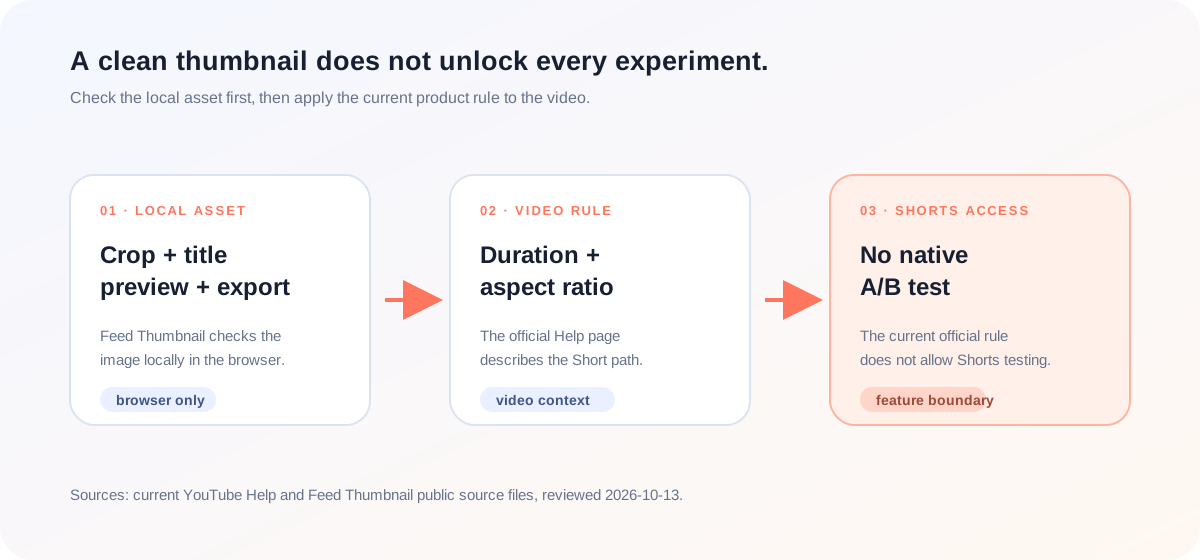
What can a local thumbnail check tell you?
Feed Thumbnail can help with the part that happens before YouTube Studio: choosing a local image, placing a title into a feed-style preview, and checking the result at the tool’s available views. Its homepage source accepts local PNG, JPEG, and WEBP input. The public scripts do not call a YouTube experiment endpoint or report a Shorts classification.
The homepage script creates a PNG download from the browser canvas. The thumbnail resizer script creates a local JPEG output. These are first-party, browser-side observations. They support a file handoff, not a promise that YouTube will expose A/B testing for the uploaded video.
For a creator, the practical value is separation. You can catch a crop or title-placement problem while the asset is still local, then make the product-level decision in YouTube Studio. A clean thumbnail export should not be described as a test result, an eligibility result, or an analytics result.
How should you prepare a thumbnail before checking experiment access?
- Prepare the image locally. Open the thumbnail resizer or the local feed preview, choose the image, and check the crop and readable title placement.
- Keep the asset and video questions separate. The local export tells you what file you made. It does not tell you whether the video is a Short or whether YouTube will offer an experiment.
- Read the current official rule. Use the official A/B-testing Help article, not an old creator comment, to check whether Shorts are eligible for the native feature.
- Check the video conditions. The official note describes up-to-three-minute square-or-taller uploads as Shorts. Treat that as a video-classification clue, not as a thumbnail dimension.
- Plan the next step honestly. If the video is a Short, keep the prepared image for its normal upload workflow and do not promise a native YouTube A/B test for it.
This workflow combines the current official classification wording with reproducible first-party local behavior. It does not simulate YouTube Studio or measure watch time, impressions, or click-through rate.
Why can a Shorts A/B-testing answer look contradictory?
The specific LightX YouTube thumbnail resizer page we opened focuses on image work: upload or drag and drop, a 1280 × 720 preset, editing controls, and JPG or PNG download. The specific Snappa YouTube thumbnail page focuses on templates, editable graphics, dimensions, and download options. Those pages help with asset creation, but neither page establishes current YouTube Shorts experiment eligibility.
The opened Reddit discussion is different: it is a community conversation about YouTube’s Test & Compare feature, timing, CTR, average view duration, and whether Shorts can be tested. It includes a community answer that says Shorts testing works. Because that is an older discussion rather than a current YouTube Help rule, it is useful as a question signal but not as the controlling answer for this guide.
The gap is not another thumbnail maker. It is the handoff between an image tool and a product rule. The official page supplies the current restriction; the local tool supplies a reproducible preparation boundary; the community thread shows why the question keeps coming up. Reading those roles separately is safer than choosing the most confident sentence from a mixed list.
This comparison is limited to the three pages actually opened for this article. It is not a site-wide claim about every page on those domains, and it is not a ranking claim.
YouTube thumbnail size and Shorts A/B-test questions
Can you A/B test a YouTube Shorts thumbnail?
Not with YouTube’s native A/B-testing feature under the current Help-page rule. The page says A/B testing is not available for Shorts.
Does thumbnail size decide whether a video is a Short?
No. The checked official note describes the video upload’s duration and aspect ratio. That is different from preparing a thumbnail image.
Can Feed Thumbnail run a YouTube experiment?
No. It provides local image and feed-preview work. It does not connect to YouTube Studio or report experiment outcomes.
Can I still prepare a Shorts cover image?
Yes. You can prepare and export a local image, but treat that as an asset workflow rather than proof of native A/B-test access.
Why does an older post say Shorts testing works?
Community discussions can describe an earlier product state, a different testing method, or an individual workflow. Use the current official Help page for the present native-feature rule.
Keep the image check and product rule separate
YouTube Help: Test & compare thumbnails & titles is the source for the current Shorts A/B-testing rule and the note about up-to-three-minute square-or-taller video uploads. Reviewed 2026-10-13.
LightX’s YouTube thumbnail resizer page and Snappa’s YouTube thumbnail page were opened for page-specific comparison of image-preparation coverage.
The opened Reddit Test & Compare discussion was treated as an older community question signal, not as an official eligibility source.
Feed Thumbnail’s homepage markup, homepage script, and thumbnail resizer script are the first-party sources for the local input and export boundary. For the broader table, read YouTube thumbnail size.