Can YouTube turn off a custom thumbnail?
Yes, the current YouTube Help page says custom thumbnails may be turned off for certain search results when they are considered inappropriate for viewers. A correct YouTube thumbnail size, file format, or crop does not replace the content-policy check. Prepare the image locally, then review the official thumbnail-policy wording before assuming the upload is safe.
Official source: Add custom thumbnails on YouTube - YouTube Help, reviewed 2026-10-14.
Can YouTube turn off custom thumbnails in search?
The current YouTube Help article has a section titled “Why are my custom thumbnails turned off?” Its answer is narrower than a general claim that every thumbnail will disappear. It says YouTube may turn off custom thumbnails for certain search results when they are considered inappropriate for viewers. The same section says custom thumbnail images must follow the Community Guidelines.
“YouTube may turn off custom thumbnails for certain search results when they're considered inappropriate for viewers.”
— YouTube Help, Add custom thumbnails on YouTube
This is a policy and presentation rule, not a pixel-size rule. The official page does not say that resizing an image, exporting it as a listed format, or using a particular canvas will make policy-sensitive content acceptable. It also does not define every possible search-result decision in that short answer, so this guide does not invent a more detailed enforcement test.
Size check passed ≠ policy check passedWhat content does the official thumbnail-policy section name?
The same Help page says all custom thumbnail images must follow the Community Guidelines. It names examples of prohibited content in the checked section: nudity or sexually provocative content, hate speech, violence, and harmful or dangerous content. The page also states that thumbnails may be rejected and that a strike may be issued when a thumbnail contains those categories.
The page describes stronger consequences for repeat offenses, including removal of custom-thumbnail privileges for a period or account termination. It also says that a creator receives an email and sees an alert in Channel Settings when a strike is issued, and that an appeal may restore a thumbnail if the appeal is approved and the thumbnail has not already been replaced. Those are the official page’s stated boundaries; they are not a substitute for reading the linked Community Guidelines.
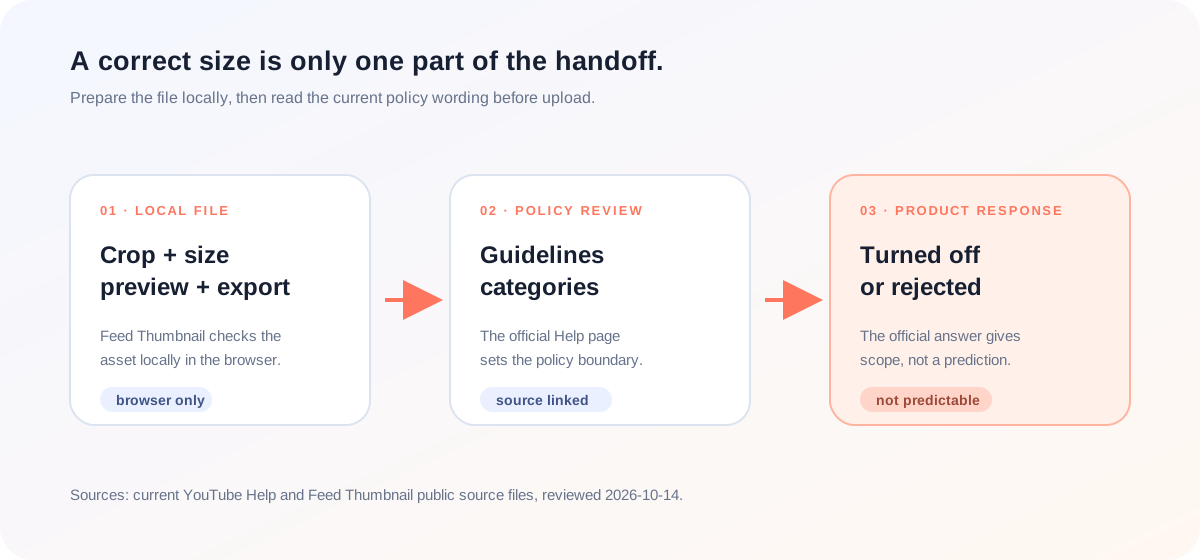
What can a local thumbnail tool check?
Feed Thumbnail handles the preparation side of the workflow: a local image can be placed into a YouTube-style feed preview, checked in the available views, and exported from the browser. Its homepage source accepts local PNG, JPEG, and WEBP input. The public tool does not inspect an image for Community Guidelines compliance, decide whether a search result is appropriate, or submit a thumbnail to YouTube.
The homepage script creates a PNG download from the browser canvas. The thumbnail resizer script creates a local JPEG output. Those are first-party implementation facts. They tell you what the local handoff does, not whether the content is acceptable to YouTube.
That boundary is useful because a polished asset can still need a policy review. A creator can use the YouTube thumbnail size notes and the thumbnail resizer to reduce avoidable layout errors, then make the content decision using the official policy source. The local tool should not be described as a moderation or approval service.
How should you check a thumbnail before upload?
- Check the image locally. Open the thumbnail resizer or the local feed preview, choose the image, and inspect the crop and title placement.
- Record the file facts separately. Note the local input and export path you actually used. A file format or size result is not a policy approval.
- Read the current official policy section. Use the YouTube Help page and its Community Guidelines link instead of assuming that a clean-looking image is automatically acceptable.
- Look for the named risk categories. The checked page names nudity or sexually provocative content, hate speech, violence, and harmful or dangerous content. Do not turn those examples into a complete legal checklist.
- Keep the product response precise. If a thumbnail is rejected, turned off for certain search results, or associated with a strike, follow the current YouTube notice and appeal path. Do not promise restoration or a fixed display result.
This workflow combines the current official Help wording with reproducible first-party local behavior. It does not perform moderation, submit an image to YouTube, or predict a search-result decision.
Why do thumbnail tools rarely answer the policy question?
The specific LightX YouTube thumbnail resizer page we opened focuses on upload, a 1280 × 720 preset, editing, and JPG or PNG download. The specific Snappa YouTube thumbnail page focuses on templates, editable graphics, dimensions, and download options. Those pages cover asset creation, but neither page establishes the current YouTube response to policy-sensitive thumbnail content.
The opened Reddit discussion is about Test & Compare, timing, CTR, average view duration, and creator experience. It is useful context for why creators care about thumbnail changes, but it is not the official source for thumbnail-policy enforcement. The current YouTube Help page supplies the policy wording that the tool pages and community discussion do not.
The gap is therefore not another image editor. It is the handoff between a measurable file check and an unmeasured policy decision. A size guide can prove what its local canvas and exporter did. It cannot prove that a search result will show the custom thumbnail or that a policy reviewer will accept its content.
This comparison is limited to the three pages actually opened for this article. It is not a site-wide claim about every page on those domains, and it is not a ranking claim.
YouTube thumbnail size and policy questions
Can YouTube turn off a custom thumbnail?
Yes. The current Help page says custom thumbnails may be turned off for certain search results when they are considered inappropriate for viewers.
Does the correct YouTube thumbnail size guarantee approval?
No. A size or format check addresses the file-preparation side. The official page separately requires custom thumbnail images to follow the Community Guidelines.
Does Feed Thumbnail check Community Guidelines?
No. It provides local preview and export behavior. It does not moderate content or return a YouTube approval decision.
What policy categories does the checked page name?
It names nudity or sexually provocative content, hate speech, violence, and harmful or dangerous content as examples in its thumbnail-policy section.
What should I do after a thumbnail is rejected?
Read the current notice and the official appeal or policy instructions. This guide does not promise that replacing or appealing an image will produce a particular result.
Keep file preparation and policy review separate
YouTube Help: Add custom thumbnails on YouTube is the source for the current custom-thumbnail policy wording, named content categories, and stated product responses. Reviewed 2026-10-14.
YouTube Community Guidelines is linked by the official Help page. This guide does not reproduce that separate policy document or claim to replace it.
LightX’s YouTube thumbnail resizer page and Snappa’s YouTube thumbnail page were opened for page-specific comparison of image-preparation coverage.
The opened Reddit Test & Compare discussion was treated as community context, not as an official policy source.
Feed Thumbnail’s homepage markup, homepage script, and thumbnail resizer script are the first-party sources for the local input and export boundary.