Does YouTube accept GIF thumbnails?
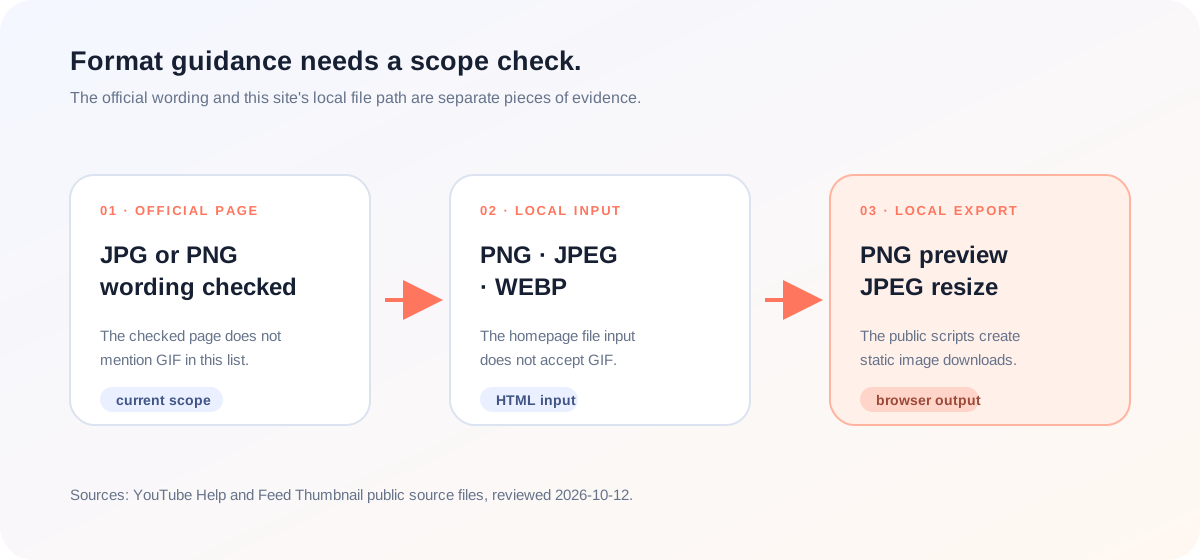
The current YouTube Help page I checked does not confirm GIF uploads. Its custom-thumbnail checklist says images should be uploaded in formats such as JPG or PNG, and the checked format list does not mention GIF. Feed Thumbnail’s own local tools are narrower still: the homepage input accepts PNG, JPEG, and WEBP, while its public exporters create static PNG or JPEG files.
Official source: Add custom thumbnails on YouTube - YouTube Help, reviewed 2026-10-12.
What format does the current YouTube thumbnail page name?
The checked YouTube Help page places file format inside a broader custom-thumbnail checklist. The relevant line says images should be uploaded in formats such as JPG or PNG. In that current section, the page does not mention GIF, and it does not explain whether an animated GIF would be retained as animation, converted to a still image, or rejected.
“Be uploaded in image formats such as JPG or PNG.”
— YouTube Help, Add custom thumbnails on YouTube
That is a deliberately narrow conclusion. The official wording confirms the listed JPG or PNG examples, but the checked sentence is not a complete compatibility matrix. It does not give enough evidence to make a stronger claim about GIF behavior. If GIF support matters for a particular upload, verify the current YouTube Studio upload behavior rather than treating an old third-party list as the official answer.
What formats does Feed Thumbnail accept and export?
Feed Thumbnail’s homepage has a local file input whose accepted types are PNG, JPEG, and WEBP. Its preview exporter renders a static PNG image from the browser canvas. The public source does not advertise a GIF workflow, and the current homepage input does not include GIF in its accepted type list.
The homepage script creates a browser-side PNG download for the visible desktop or phone preview. The separate thumbnail resizer script encodes its checked output as a local JPEG. These are implementation facts from the current source, not a claim about every image format that YouTube may accept.
How should you handle a GIF when preparing a YouTube thumbnail?
- Separate the questions. “Does the official page mention this format?” and “Does my local tool accept this file?” are different checks.
- Read the current official page. The checked sentence names JPG or PNG examples. Record that wording and its review date instead of copying an older format list.
- Check the local input boundary. The Feed Thumbnail homepage accepts PNG, JPEG, and WEBP in its current file control, not GIF.
- Use a static export path. If you need a still image for a thumbnail preview, the homepage PNG export or resizer JPEG export creates a concrete local file. Neither path proves animated-image support.
- Verify uncertain uploads in the owning product. Because the official page does not state GIF behavior in the checked sentence, do not promise acceptance or animation retention without a current Studio observation.
This workflow is a practical separation of the official Help wording and the public first-party Feed Thumbnail implementation. It is not a compatibility guarantee for an unlisted format.
What do the checked pages leave out?
The specific LightX resizer page we read describes upload, a 1280 × 720 preset, editing, and JPG or PNG download. The specific Snappa page describes templates, editable graphics, dimensions, and download. The Reddit discussion we read focuses on thumbnail testing, timing, CTR, average view duration, and creator experience. None of those checked pages establishes how the current YouTube upload flow handles animated GIF thumbnails.
That is the useful gap for a YouTube thumbnail size guide: a format label is not the same as an observed upload result. The official page gives a current, scoped sentence; the local tool gives a reproducible input and output boundary. Keeping those two facts separate avoids turning a stale list or a static export into a promise about YouTube.
This comparison is limited to the three pages actually opened for this article. It is not a site-wide claim about every page on those domains, and it is not a ranking claim.
YouTube thumbnail size and format questions
Does the current official page list GIF?
Not in the checked format sentence. It names image formats such as JPG or PNG and does not mention GIF there.
Does Feed Thumbnail accept GIF on the homepage?
No. The current homepage file input accepts PNG, JPEG, and WEBP. GIF is not in that HTML accept list.
What does Feed Thumbnail export?
The homepage saves the visible preview as a PNG. The separate thumbnail resizer encodes its local checked output as JPEG.
Does a static PNG export prove GIF compatibility?
No. It proves only that the browser-side tool created a PNG from the visible preview. It does not test how YouTube handles an animated GIF upload.
What should I do if I need GIF behavior?
Read the current YouTube Studio upload flow and verify the result there. The checked Help sentence does not provide enough evidence to promise GIF acceptance or animation retention.
Keep official wording and local behavior separate
YouTube Help: Add custom thumbnails on YouTube is the source for the checked JPG-or-PNG wording and the current size-page scope. Reviewed 2026-10-12.
Feed Thumbnail’s homepage markup is the first-party source for the current PNG, JPEG, and WEBP input list. The homepage script is the source for PNG preview export.
Feed Thumbnail’s public resizer script is the source for the local JPEG export path. These implementation facts do not expand YouTube’s official format list.
For the direct tool, open the local YouTube feed preview. For the broader size table, read YouTube thumbnail size.