Can you download a YouTube thumbnail before changing an A/B test?
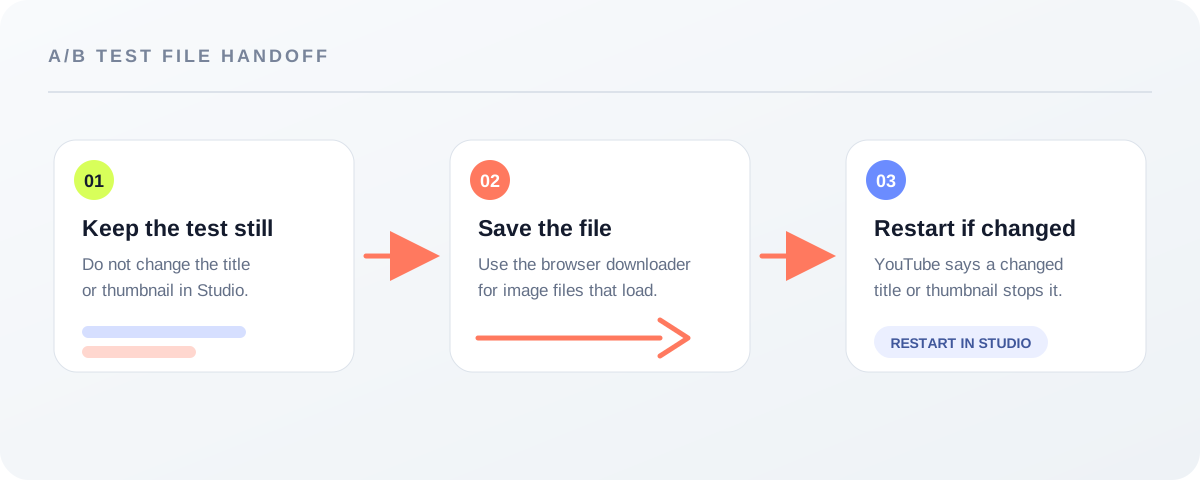
Yes: save the available thumbnail file before changing the video's title or thumbnail in YouTube Studio. YouTube says a title or thumbnail change during an active A/B test stops the test and requires a restart. Feed Thumbnail can save image files that load for a video link, but it does not read the experiment state or report a winning variation.
Official source: A/B test titles & thumbnails - YouTube Help, “Run an A/B test,” reviewed 2026-10-08.
Why save the thumbnail before editing the test?
The official rule is about what happens inside YouTube Studio, not about downloading a file. YouTube’s step five says:
“If a video’s title or thumbnail is changed during the test, the test will automatically stop. Then, you will need to restart the A/B test.”
— YouTube Help, A/B test titles & thumbnails
That makes the file handoff a sensible first step: keep the current Studio test unchanged, save the image you need, and only then decide whether the video needs a new title or thumbnail. The save itself is not an experiment action. It is a local copy of an image file that the downloader can reach.
A YouTube thumbnail downloader is a file check, not a test reader
Feed Thumbnail’s public downloader script parses a YouTube watch link, short link, Shorts link, live link, embed link, or an 11-character video ID in the browser. It then builds direct image URLs from that ID and checks the image files that load. The page does not send the link to a site-side form.
The script declares five candidate filenames: maxresdefault.jpg, sddefault.jpg, hqdefault.jpg, mqdefault.jpg, and default.jpg. A result card remains only when its image fires a successful load event. Each surviving card reports the image’s natural width and height, and gives you a Save image action. That is why the result is best read as “available file checked in this browser,” not as a promise that every possible thumbnail version exists.
Preview in tool is a separate local handoff. The browser fetches the selected direct image, places the resulting data in session storage, and opens the local preview page. The public script does not sign in to YouTube Studio, read an A/B test, inspect watch-time share, or decide which variation won. Those boundaries are observable in the public downloader script, not inferred from a marketing label.
How to use the downloader around a live test
- Leave the test alone first. Do not edit the title or thumbnail in Studio while the A/B test is running if you intend to keep that test active.
- Paste the video link. Open the YouTube thumbnail downloader and paste one video URL or ID. The page checks the input in your browser.
- Read the cards, not the labels alone. The tool removes image cards that fail to load and prints the dimensions read from the loaded image. Save the file you actually need.
- Make any Studio change only after the handoff. If you change the title or thumbnail during the active test, use YouTube’s documented restart path; the page says the test stops automatically.
- Use local preview for composition. If you want to inspect the saved file before a new upload, send it to the local feed preview or the thumbnail resizer. That checks the file and layout; it does not replace YouTube’s experiment report.
The workflow above combines the official Studio rule with the observed behavior of Feed Thumbnail’s browser-only downloader and local preview code. It is a practical separation of responsibilities, not a claim that downloading affects test performance.
What a saved thumbnail does not prove
A saved file does not prove that it was the first A/B variation, the winning variation, or the version currently shown to every viewer. It also does not prove that a missing filename was ever available. In this tool, a missing card means that the direct image request did not produce a loaded image in this run.
Likewise, a local preview is not a YouTube Studio test. Feed Thumbnail can show the image in a simulated feed and export a local PNG, while YouTube’s own A/B test compares concurrent title or thumbnail options and reports results in Studio. Keep those outputs named differently in your workflow: “downloaded file,” “local preview,” and “Studio test result” are not interchangeable.
If the goal is to keep an experiment intact, the official source remains the authority for the experiment state. If the goal is to keep a copy of a public thumbnail before making a change, the downloader is the narrow tool for that file step.
YouTube thumbnail downloader and A/B test questions
Does downloading a thumbnail stop an A/B test?
The cited YouTube Help rule says changing a video’s title or thumbnail during the test stops it. Feed Thumbnail’s downloader only checks image URLs in the browser; it does not edit the Studio video or test.
Can the downloader show the A/B test winner?
No. The tool reports files that load and their natural dimensions. YouTube Studio is the place to review the experiment state and result.
Can a missing file be treated as proof that the variation never existed?
No. The downloader removes a result card when the direct image does not load in that run. That is a file-availability observation, not a historical archive.
Can I preview the saved file before uploading again?
Yes. Use Preview in tool on a result card or open the local feed preview. The preview is for layout checking and does not report YouTube experiment performance.
Where is the A/B rule documented?
Read YouTube Help’s “A/B test titles & thumbnails,” under “Run an A/B test,” step five. The page says a title or thumbnail change during the test stops the test and requires a restart.
Keep the official rule and local tool boundary separate
YouTube Help: A/B test titles & thumbnails is the source for the stop-and-restart rule. The “Run an A/B test” section was reviewed 2026-10-08.
Feed Thumbnail’s downloader page and its public script are the sources for the browser-side URL parsing, loaded-file filtering, natural-dimension display, save action, and local preview handoff.
Feed Thumbnail’s thumbnail resizer is linked as a separate local file check. None of these local tools is a YouTube Studio A/B-test report.