What happens if a YouTube A/B test thumbnail is below 720p?
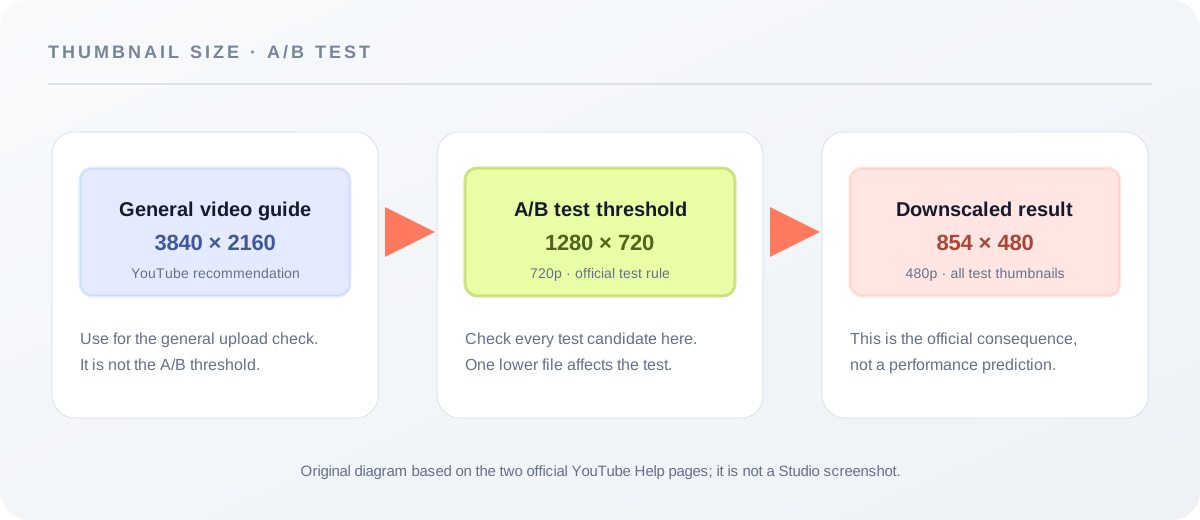
If any thumbnail in a YouTube A/B test is below 720p (1280 × 720), YouTube says all experiment thumbnails are downscaled to 480p (854 × 480). That is a test-specific rule, not the same answer as YouTube’s general video-thumbnail recommendation. Check the source files before you start the experiment.
Official sources: A/B test titles & thumbnails - YouTube Help and Add custom thumbnails on YouTube - YouTube Help, reviewed 2026-10-09.
The YouTube thumbnail size answer changes inside an A/B test
YouTube’s general custom-thumbnail guidance says video thumbnails should be as large as possible, recommends 3840 × 2160 pixels, and names a minimum width of 640 pixels. The separate A/B testing page adds a stricter condition for experiments: if one test thumbnail is lower than 720p, every thumbnail in that experiment is downscaled to 480p.
“If the resolution of any thumbnail is lower than 720p (1280 x 720), all experiment thumbnails will be downscaled to 480p (854 x 480).”
— YouTube Help, A/B test titles & thumbnails
The practical reading is narrow: the rule tells you what YouTube does to the experiment thumbnails when the threshold is missed. It does not say that 480p is the recommended design canvas, and it does not predict a winner, watch time, click-through rate, or reach. Treat 1280 × 720 as the pre-test threshold named by this source, then keep the general YouTube thumbnail-size recommendation in view for the file you actually want to upload.
What Feed Thumbnail can check before you upload?
Feed Thumbnail’s resizer is a local file check, not a YouTube experiment controller. Its public script defines a 1280 × 720 target canvas, reads the selected image’s natural width, natural height, and file size, then draws the image with crop, fit, or stretch behavior. The input file is handled through a browser object URL; no account or site-side upload is part of that code path.
When you export, the script encodes a local JPEG and checks the selected blob against the mobile upload limit used by the tool. The output filename carries the local target dimensions, but that filename is not a new YouTube recommendation. It is a trace of what this browser tool rendered. The useful question is therefore: “Did my local source and export reach the A/B threshold?” not “Did Feed Thumbnail run my test?”
Those facts are reproducible in the public resizer script. They also define the tool’s boundary: the script does not sign in to YouTube Studio, start an experiment, inspect the test result, or know whether a channel’s upload was accepted. Use the official Studio page for the experiment and the local tool for the file preparation step.
How to check thumbnail size before an A/B test
- Keep the candidate files separate. Name the images by their experiment role so you can tell which source file passed the local check.
- Read the source dimensions first. Load each image in the thumbnail resizer and read the dimensions shown by the browser. This is a file observation, not a Studio result.
- Reach the named threshold. If a test candidate is below 1280 × 720, the official A/B page says all experiment thumbnails will be downscaled to 854 × 480.
- Keep the general guidance separate. The official thumbnail-size page recommends a larger 3840 × 2160 video canvas and a 16:9 ratio. Do not replace that general guidance with the downscaled 480p outcome.
- Upload and manage the experiment in Studio. The local page can prepare a file, but it cannot start the test or report the winner. Keep the source URL and the official rule beside your own file notes.
This sequence is a practical interpretation of the two official Help pages plus the public first-party resizer code. It is not a promise about a particular channel’s experiment outcome.
The missing detail is the experiment consequence
The specific LightX page we read focuses on upload, a 1280 × 720 preset, custom units, editing, and JPG/PNG download. The specific Snappa page focuses on templates, editable graphics, dimensions, and download. The Reddit discussion we read focuses on whether a new thumbnail test is useful early in a video’s life and on community test-timing notes. None of those page texts states the exact official rule that one below-720p test thumbnail causes all experiment thumbnails to be downscaled.
That is the useful gap for a size guide: a canvas preset tells you what to make, while the A/B rule tells you what the experiment will do when one candidate misses the threshold. The difference matters because a file can look ready in a generic editor and still enter the experiment under a different resolution condition than you intended.
This comparison is limited to the three pages actually opened for this article. It is not a site-wide claim about every page on those domains, and it is not a ranking claim.
YouTube thumbnail size and A/B test questions
What size should an A/B test thumbnail reach?
The cited A/B testing page names 720p, written as 1280 × 720, as the threshold. It says that if any test thumbnail is lower than that, all experiment thumbnails are downscaled to 854 × 480.
Is 854 × 480 the recommended YouTube thumbnail size?
No. It is the downscaled experiment result described by the A/B test page, not the general video-thumbnail recommendation.
Does the local resizer run an A/B test?
No. It reads a local image, draws a 1280 × 720 canvas, exports a local JPEG, and reports file information. YouTube Studio manages the experiment.
What does the general YouTube thumbnail page recommend?
The checked official page recommends 3840 × 2160 for video thumbnails, a minimum width of 640 pixels, and a 16:9 aspect ratio for videos.
Does passing the size check guarantee a winning thumbnail?
No. The size rule describes resolution handling. It does not predict watch time, click-through rate, or which option will win.
Separate size facts from experiment results
YouTube Help: A/B test titles & thumbnails is the source for the 720p threshold and 480p downscale rule. The “Tips for A/B testing” section was reviewed 2026-10-09.
YouTube Help: Add custom thumbnails on YouTube is the source for the general 3840 × 2160 recommendation, minimum width, listed formats, and 16:9 video ratio. The page was reviewed 2026-10-09.
Feed Thumbnail’s public resizer script is the source for the local 1280 × 720 canvas, local image metadata read, and local JPEG export. It is implementation evidence, not a YouTube Studio test.
For the direct tool, open the YouTube thumbnail downloader. For the broader official size table, read YouTube thumbnail size.