Why can’t I A/B test a YouTube thumbnail?
A correct YouTube thumbnail size is not enough to make an A/B test available. The current YouTube Help page lists separate eligibility requirements: the feature is available through YouTube Studio on a computer, advanced features must be enabled, and some video types and content settings are excluded. Prepare the image locally, but diagnose access at the channel and video level.
Official source: Test & compare thumbnails & titles - YouTube Help, reviewed 2026-10-15.
What does YouTube require before an A/B test can run?
The current official A/B-testing page does not reduce eligibility to an image dimension. It says the feature is currently available on computers through YouTube Studio, requires advanced features to be enabled, and excludes Shorts, Scheduled Lives, and Premiere videos at this time. It separately says that Live Archives can be tested and that a Premiere becomes eligible only after it ends and converts to a long-form video.
“This feature is currently only available on computers through YouTube Studio.”
— YouTube Help, Test & compare thumbnails & titles
The page also lists content restrictions. Videos made for kids, mature audiences, or private videos cannot use the feature. Its age-restriction note adds a specific warning about losing feature access when age-restricted content is uploaded without the corresponding setting. These are account and video-state checks, not thumbnail-canvas checks.
Thumbnail file ready ≠ A/B-test accessWhich eligibility check is failing?
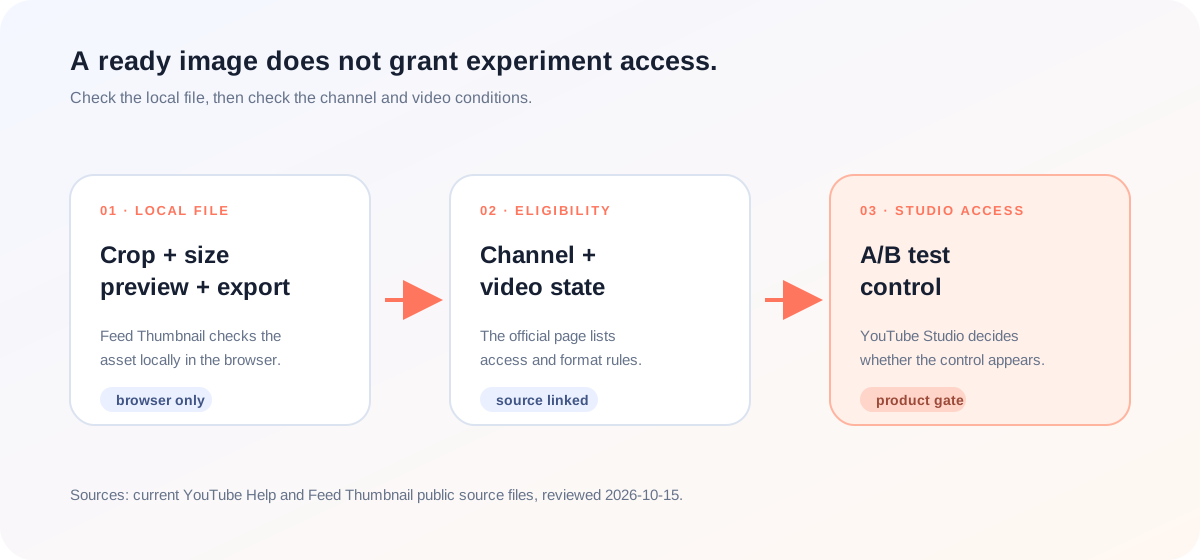
When the testing control is missing, the fastest useful diagnosis is to separate the levels. A local tool can show what happened to an image. YouTube Studio decides whether the channel and video can use the feature. The official Help page is the source for that product-level decision.
A missing control therefore does not prove that the image is too small. Conversely, a clean local export does not prove that the control should appear. Use the product’s eligibility list first, then investigate the image-specific requirements separately.
What can a thumbnail-size tool actually rule out?
Feed Thumbnail handles the preparation side of the workflow: a local image can be placed into a YouTube-style feed preview, checked in the available views, and exported from the browser. Its homepage source accepts local PNG, JPEG, and WEBP input. That makes it useful for image handoff, but it cannot enable advanced features or read a video’s YouTube Studio eligibility state.
The homepage script creates a PNG download from the browser canvas. The thumbnail resizer script creates a local JPEG output. These are first-party implementation facts. They do not connect to YouTube Studio, inspect channel settings, or return a native A/B-test control.
That boundary makes the workflow easier to explain. A creator can use the YouTube thumbnail size notes and the thumbnail resizer to prepare a file, then use the official A/B-testing eligibility list to diagnose access. The tool should not imply that a size result is an account feature check.
How should you troubleshoot a missing A/B-test control?
- Prepare the image separately. Open the thumbnail resizer or the local feed preview, choose the image, and inspect the crop and title placement.
- Use a computer for the product check. The official page says the feature is currently available through YouTube Studio on a computer. Do not treat a mobile-only view as proof that the feature is unavailable everywhere.
- Check advanced features. The official eligibility list says advanced features must be enabled. Follow YouTube’s own access instructions rather than guessing from the thumbnail file.
- Check the video type. Exclude Shorts, Scheduled Lives, and active Premiere videos under the current rule. A Live Archive is treated differently on the official page.
- Check the video settings. Made-for-kids, mature-audience, and private videos are listed as ineligible. Resolve the actual setting shown in YouTube Studio before changing the image.
This workflow combines the current official eligibility list with reproducible first-party local behavior. It does not access YouTube Studio, change settings, or promise that a creator will receive the feature.
Why do thumbnail tools make eligibility look simpler?
The specific LightX YouTube thumbnail resizer page we opened focuses on upload, a 1280 × 720 preset, editing, and JPG or PNG download. The specific Snappa YouTube thumbnail page focuses on templates, editable graphics, dimensions, and download options. Those pages explain asset creation, but neither page establishes whether a creator’s YouTube channel or video can access native A/B testing.
The opened Reddit discussion focuses on Test & Compare, timing, CTR, average view duration, and creator experience. It is useful context for the question, but it does not replace the current official eligibility list. The official page is the source that distinguishes desktop access, advanced features, video types, and content settings.
The useful gap is the handoff between image readiness and product access. A size guide can show what its local canvas and exporter did. It cannot enable a channel feature, convert a video format, or inspect a privacy setting. Keeping those claims separate gives the creator a shorter path to the real blocker.
This comparison is limited to the three pages actually opened for this article. It is not a site-wide claim about every page on those domains, and it is not a ranking claim.
YouTube thumbnail size and A/B-test eligibility questions
Does YouTube thumbnail size make an A/B test available?
No. Thumbnail preparation and A/B-test eligibility are separate checks. The current official page lists channel, device, video-type, and content-setting requirements.
Can I run the A/B test from a phone?
The checked official page says the feature is currently available on computers through YouTube Studio.
Do I need advanced features enabled?
Yes. The current eligibility list says advanced features must be enabled to be eligible.
Which video types are excluded?
The checked page says Shorts, Scheduled Lives, and Premiere videos cannot be A/B tested at this time. It treats Live Archives separately.
Can Feed Thumbnail check my A/B-test access?
No. It handles local image preview and export. It does not read channel settings, privacy, audience labels, or YouTube Studio eligibility.
Keep file preparation and feature eligibility separate
YouTube Help: Test & compare thumbnails & titles is the source for the current desktop, advanced-feature, video-format, and content-setting eligibility requirements. Reviewed 2026-10-15.
YouTube Help: different YouTube Tools and features and how to unlock access to advanced features are linked from the official eligibility list; this guide does not infer a creator’s account state.
LightX’s YouTube thumbnail resizer page and Snappa’s YouTube thumbnail page were opened for page-specific comparison of image-preparation coverage.
The opened Reddit Test & Compare discussion was treated as community context, not as the official eligibility source.
Feed Thumbnail’s homepage markup, homepage script, and thumbnail resizer script are the first-party sources for the local input and export boundary.