Fit a square image to YouTube thumbnail size
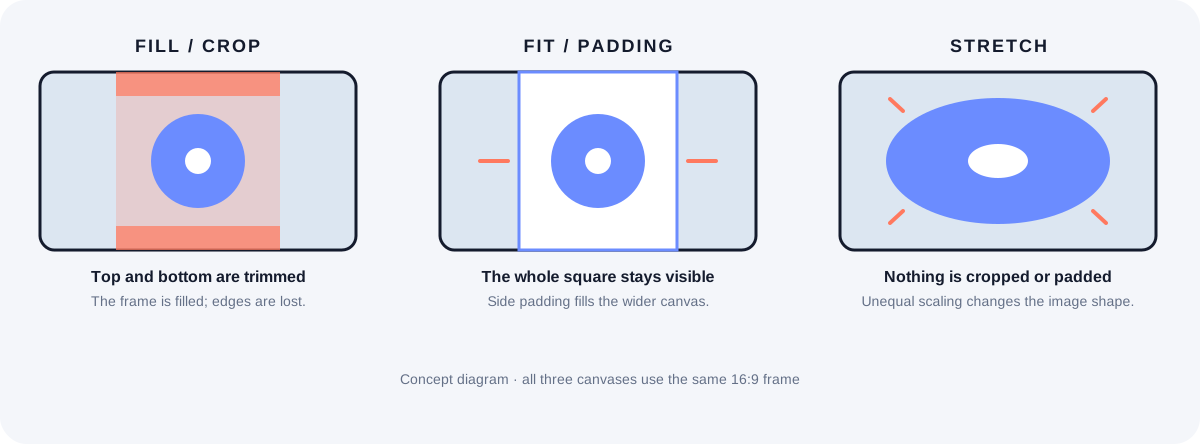
A square image cannot fill a 16:9 video thumbnail frame without either cropping its edges, adding side padding, or distorting its shape. Choose the trade-off before export: crop to fill, fit to preserve every edge, or stretch only when shape distortion is acceptable.
YouTube recommends a 16:9 aspect ratio for video thumbnails. Source: Add custom thumbnails on YouTube - Computer - YouTube Help, “Image size & resolution”; reviewed 2026-09-29.
What changes in one square-to-wide example?
Let S be the width and height of a square source, then compare it with YouTube Help’s recommended video canvas of 3840 × 2160 pixels. S is a variable, not a recommended upload size; the equations use the official canvas and apply to any square source. They describe framing geometry, not how another app will display an uploaded image.
| Choice | Calculation for square side S | Trade-off |
|---|---|---|
| Fill / crop | Retained source height = S × (9 ÷ 16). A centered crop removes (S − 9S ÷ 16) ÷ 2 = 7S ÷ 32 from each vertical edge. | Fills the frame without bars, but loses the top and bottom of the square. |
| Fit / padding | Scale = min(3840 ÷ S, 2160 ÷ S) = 2160 ÷ S. The square draws at 2160 × 2160 px, leaving (3840 − 2160) ÷ 2 = 840 px of side padding. | Keeps every source edge; the side areas become part of the exported image. |
| Stretch | Horizontal scale = 3840 ÷ S; vertical scale = 2160 ÷ S. The horizontal scale is 16 ÷ 9 times the vertical scale. | Keeps all pixels and fills the frame, but circles and faces change shape. |
How to read the result: use Fill when the subject can survive a centered top-and-bottom crop; use Fit when the whole square must remain visible and side padding is acceptable. Stretch is the only option here with no crop and no padding, and it changes the source proportions.
Which framing choice should you check?
Why do black bars appear beside a square image?
In a fit operation, a square is narrower than a 16:9 canvas after it is scaled to the canvas height. The unused side regions are padding. In our resizer, that padding is painted into the local JPG; this does not diagnose framing added by an unrelated embed or platform.
Does cropping keep the whole square visible?
No. A center crop trims the top and bottom in this square-to-16:9 case. Check that captions, logos, and the subject remain inside the retained region before saving.
Can stretching avoid both padding and cropping?
It avoids both, but the horizontal scale is 16/9 times the vertical scale for a square source and a 16:9 canvas. Use a stretch only if that visible shape change is acceptable for the artwork.
What this example can and cannot establish
The 16:9 video ratio and 3840 × 2160 recommendation come from YouTube Help. The crop, fit, and scale values are algebra derived from that official canvas; S remains a variable rather than an assumed source size.
A Reddit post asks about black bars in off-platform video embeds. That report is a real user question, not proof that every bar has the same cause: “Can I get rid of black bars in my thumbnails?”
The existing browser-based thumbnail resizer demonstrates crop, fit, and stretch locally, but its current export preset is 1280 × 720. It is not an export at YouTube’s current 3840 × 2160 recommendation. See the thumbnail size source notes for the official figures.